> ## Documentation Index
> Fetch the complete documentation index at: https://agent-observability-docs.splunk.com/llms.txt
> Use this file to discover all available pages before exploring further.
# Custom evaluators
> Define an evaluator with a custom LLM-as-judge prompt inside the run creation flow.
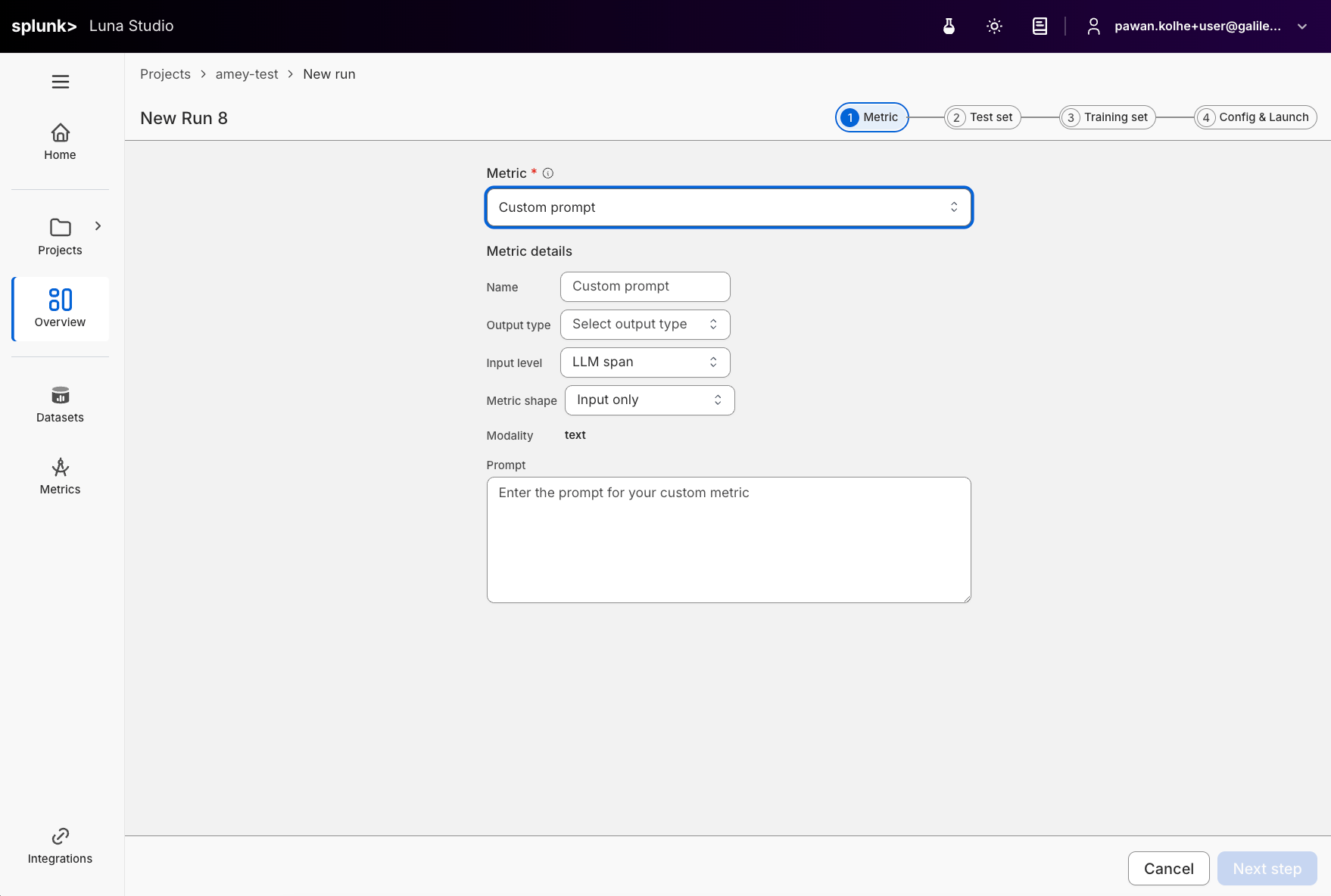
Most evaluators in Luna Studio come from Splunk Agent Observability presets or custom Splunk Agent Observability evaluators. When you need an evaluator that does not fit an existing option, define a custom LLM-as-judge prompt in [Step 1 of the run creation flow](/luna-studio/ui/runs/new-run/step-1-evaluator#write-a-custom-prompt).
 ## Open custom prompt mode
From Step 1 of the run creation flow, open the evaluator dropdown and click **Use custom prompt**.
## Fields
| Field | Required | Notes |
| -------------- | -------- | --------------------------------------------------------------------------------------- |
| Evaluator name | No | Optional display name. If blank, Luna Studio derives one from the run context. |
| Output type | Yes | The trainable return shape: Boolean or Categorical. |
| Step | Yes | The trace step the evaluator runs against: LLM span, Retriever, Agent span, Trace. |
| Input step | Yes | Training input shape: Single message, Input / output pair, Full trace, or Full session. |
| Modality | — | Read-only. Fixed to **Text** today. |
| Prompt | Yes | The LLM-as-judge prompt. Required. |
## Output types in detail
| Output type | When to use |
| ----------- | ----------------------------------------------------------------------- |
| Boolean | Yes/no questions ("Is this toxic?", "Does the answer cite a source?"). |
| Categorical | Picking one of a fixed list (e.g. `positive` / `neutral` / `negative`). |
Other Splunk Agent Observability output types are not trainable in Luna Studio yet. The output type also constrains what label values your test set can use during validation. See [Test sets](/luna-studio/ui/datasets/test-sets#required-schema).
## Steps in detail
| Step | Where it fires |
| ---------- | -------------------------------------------------------------- |
| LLM span | A single LLM call inside a trace. The default and most common. |
| Retriever | A retrieval step (e.g. evaluating chunk relevance). |
| Agent span | A single agent step inside a trace. |
| Trace | The full trace — input, intermediate steps, and final output. |
The right step depends on what your evaluator needs to see. For "is the final answer toxic?" → LLM span or Trace. For "are retrieved chunks relevant?" → Retriever.
## Input steps
| Input step | When to use |
| ------------------- | ----------------------------------------------------------- |
| Single message | One text input per row. |
| Input / output pair | Rows that include both the prompt/input and model output. |
| Full trace | Trace-level evaluators that need the full request flow. |
| Full session | Session-level evaluators that need multiple related traces. |
Full trace and full session inputs require user-supplied training data; synthetic generation is disabled for those shapes.
## Prompt-writing tips
* **Be specific.** Define exactly what counts as a positive vs negative result.
* **Give examples.** One or two short examples per outcome class is plenty.
* **Constrain the output.** End the prompt with something like "Respond with only `true` or `false`." for Boolean evaluators.
* **Avoid open scales.** "Score 1–10" is harder for an LLM-judge to keep consistent than a binary or 3-class categorical.
## Submit
Continue through the run creation flow. Luna Studio saves the evaluator definition with the run and fine-tunes it once you launch.
## Designing outside Luna Studio
Use the standalone Splunk Agent Observability evaluators workflow when you want to design and test an evaluator outside of Luna Studio before bringing it into a run.
## Where to go next
Define a custom evaluator inside a new run.
Schema rules and best practices for evaluation data.
Publish a fine-tuned evaluator to Splunk Agent Observability.
## Open custom prompt mode
From Step 1 of the run creation flow, open the evaluator dropdown and click **Use custom prompt**.
## Fields
| Field | Required | Notes |
| -------------- | -------- | --------------------------------------------------------------------------------------- |
| Evaluator name | No | Optional display name. If blank, Luna Studio derives one from the run context. |
| Output type | Yes | The trainable return shape: Boolean or Categorical. |
| Step | Yes | The trace step the evaluator runs against: LLM span, Retriever, Agent span, Trace. |
| Input step | Yes | Training input shape: Single message, Input / output pair, Full trace, or Full session. |
| Modality | — | Read-only. Fixed to **Text** today. |
| Prompt | Yes | The LLM-as-judge prompt. Required. |
## Output types in detail
| Output type | When to use |
| ----------- | ----------------------------------------------------------------------- |
| Boolean | Yes/no questions ("Is this toxic?", "Does the answer cite a source?"). |
| Categorical | Picking one of a fixed list (e.g. `positive` / `neutral` / `negative`). |
Other Splunk Agent Observability output types are not trainable in Luna Studio yet. The output type also constrains what label values your test set can use during validation. See [Test sets](/luna-studio/ui/datasets/test-sets#required-schema).
## Steps in detail
| Step | Where it fires |
| ---------- | -------------------------------------------------------------- |
| LLM span | A single LLM call inside a trace. The default and most common. |
| Retriever | A retrieval step (e.g. evaluating chunk relevance). |
| Agent span | A single agent step inside a trace. |
| Trace | The full trace — input, intermediate steps, and final output. |
The right step depends on what your evaluator needs to see. For "is the final answer toxic?" → LLM span or Trace. For "are retrieved chunks relevant?" → Retriever.
## Input steps
| Input step | When to use |
| ------------------- | ----------------------------------------------------------- |
| Single message | One text input per row. |
| Input / output pair | Rows that include both the prompt/input and model output. |
| Full trace | Trace-level evaluators that need the full request flow. |
| Full session | Session-level evaluators that need multiple related traces. |
Full trace and full session inputs require user-supplied training data; synthetic generation is disabled for those shapes.
## Prompt-writing tips
* **Be specific.** Define exactly what counts as a positive vs negative result.
* **Give examples.** One or two short examples per outcome class is plenty.
* **Constrain the output.** End the prompt with something like "Respond with only `true` or `false`." for Boolean evaluators.
* **Avoid open scales.** "Score 1–10" is harder for an LLM-judge to keep consistent than a binary or 3-class categorical.
## Submit
Continue through the run creation flow. Luna Studio saves the evaluator definition with the run and fine-tunes it once you launch.
## Designing outside Luna Studio
Use the standalone Splunk Agent Observability evaluators workflow when you want to design and test an evaluator outside of Luna Studio before bringing it into a run.
## Where to go next
Define a custom evaluator inside a new run.
Schema rules and best practices for evaluation data.
Publish a fine-tuned evaluator to Splunk Agent Observability.