> ## Documentation Index
> Fetch the complete documentation index at: https://agent-observability-docs.splunk.com/llms.txt
> Use this file to discover all available pages before exploring further.
# Projects overview
> Top-level containers for training runs tied to a GenAI use case.
A **project** is the top-level container in Luna Studio. It groups training runs that share a goal — typically improving a single GenAI application or use case within a given domain.
The **Projects** page is the home of the app at `/{org}` (and the Luna Studio logo always returns you here).
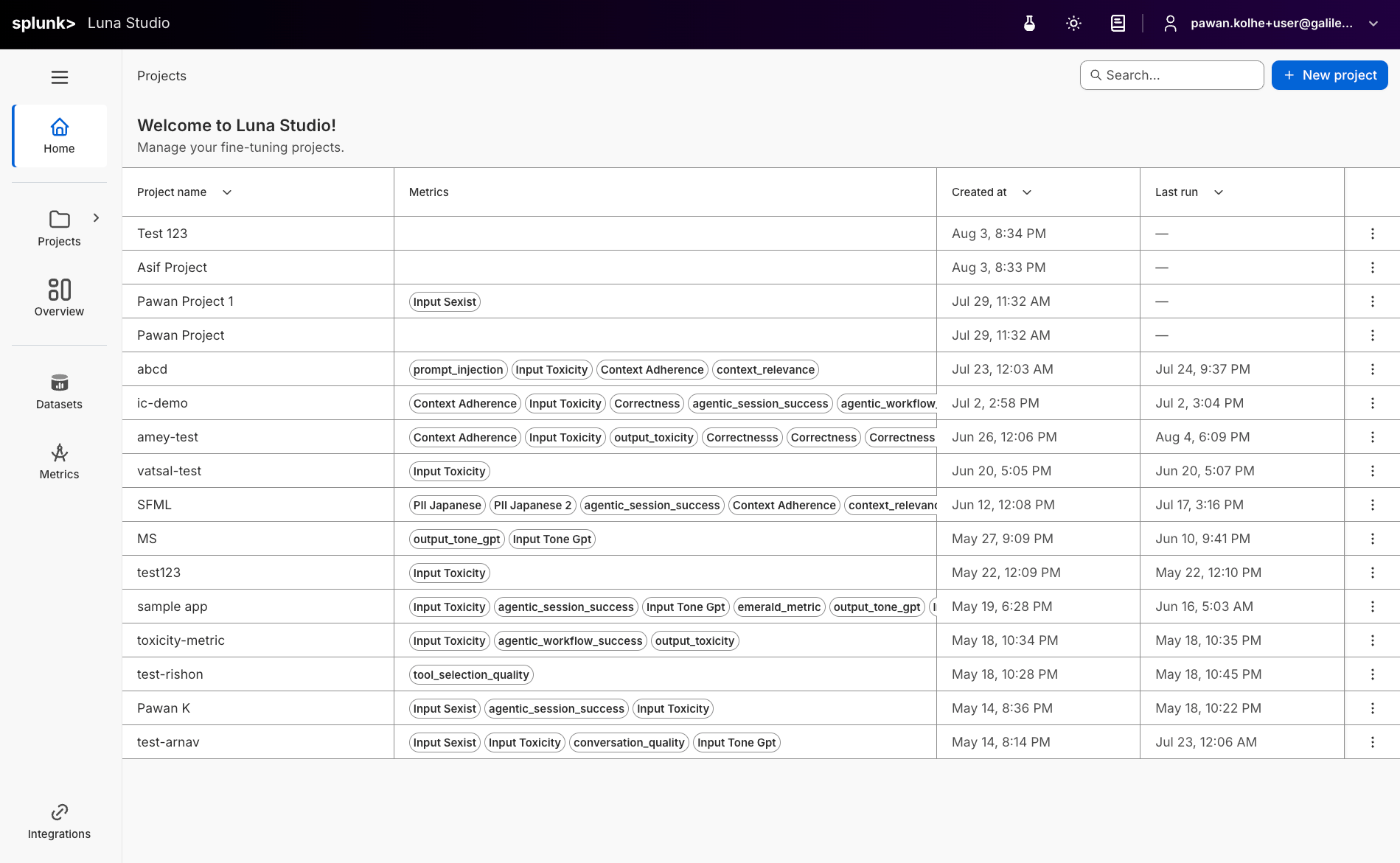 ## Projects table
The projects table shows every project in your organization, with these columns:
| Column | What it shows |
| ------------ | ------------------------------------------------------------------------------------ |
| Project name | The name you gave the project. |
| Evaluators | Outline-style chips listing the evaluators produced by this project's training runs. |
| Created at | When the project was first created. |
| Last run | When the most recent run was launched. |
| Actions | A `…` menu with **Delete project**. |
Click any row to open the project's [Training runs](/luna-studio/ui/projects/training-runs-home) page.
## Top-bar actions
* **Search** — the input on the right of the page header filters projects by name.
* **New project** — primary button on the right. Opens the create project modal.
## Naming projects
There's no strict format, but a few patterns work well:
* **GenAI use case** — `customer-support-copilot`, `enterprise-search-assistant`.
* **Team or domain + use case** — `sales-engineering-assistant`, `hr-policy-assistant`.
* **Versioned** — `customer-support-copilot-v2`, `enterprise-search-assistant-v3` for iterating on the same use case.
Avoid spaces (use hyphens or underscores) and keep names short — they appear in breadcrumbs throughout the app.
## Delete a project
Open the `…` action menu on a project row and click **Delete project**. The action is destructive — Luna Studio will prompt you to confirm before deleting.
Deleting a project removes all of its training runs from Luna Studio. **Registered evaluators** are not affected — they remain in the [Splunk Agent Observability evaluators store](/concepts/evaluators/overview) until you delete them there.
## How projects relate to other concepts
```mermaid theme={null}
flowchart LR
Organization["Organization"] --> ProjectA["Project A"]
Organization --> ProjectB["Project B"]
ProjectA --> RunA1["Run 1"]
ProjectA --> RunA2["Run 2"]
ProjectA --> RunA3["Run 3"]
RunA1 --> Evaluator1["Evaluator (fine-tuned)"]
RunA2 --> Evaluator2["Evaluator (registered)"]
```
* Datasets are organization-wide and can be reused across projects. LLM provider integrations can come from a personal override or an administrator-managed workspace default.
* Runs and evaluators are **project-scoped** — they live inside one project.
## Where to go next
The main project workspace: stats, filters, and the runs table.
The four-step flow for launching a training run.
## Projects table
The projects table shows every project in your organization, with these columns:
| Column | What it shows |
| ------------ | ------------------------------------------------------------------------------------ |
| Project name | The name you gave the project. |
| Evaluators | Outline-style chips listing the evaluators produced by this project's training runs. |
| Created at | When the project was first created. |
| Last run | When the most recent run was launched. |
| Actions | A `…` menu with **Delete project**. |
Click any row to open the project's [Training runs](/luna-studio/ui/projects/training-runs-home) page.
## Top-bar actions
* **Search** — the input on the right of the page header filters projects by name.
* **New project** — primary button on the right. Opens the create project modal.
## Naming projects
There's no strict format, but a few patterns work well:
* **GenAI use case** — `customer-support-copilot`, `enterprise-search-assistant`.
* **Team or domain + use case** — `sales-engineering-assistant`, `hr-policy-assistant`.
* **Versioned** — `customer-support-copilot-v2`, `enterprise-search-assistant-v3` for iterating on the same use case.
Avoid spaces (use hyphens or underscores) and keep names short — they appear in breadcrumbs throughout the app.
## Delete a project
Open the `…` action menu on a project row and click **Delete project**. The action is destructive — Luna Studio will prompt you to confirm before deleting.
Deleting a project removes all of its training runs from Luna Studio. **Registered evaluators** are not affected — they remain in the [Splunk Agent Observability evaluators store](/concepts/evaluators/overview) until you delete them there.
## How projects relate to other concepts
```mermaid theme={null}
flowchart LR
Organization["Organization"] --> ProjectA["Project A"]
Organization --> ProjectB["Project B"]
ProjectA --> RunA1["Run 1"]
ProjectA --> RunA2["Run 2"]
ProjectA --> RunA3["Run 3"]
RunA1 --> Evaluator1["Evaluator (fine-tuned)"]
RunA2 --> Evaluator2["Evaluator (registered)"]
```
* Datasets are organization-wide and can be reused across projects. LLM provider integrations can come from a personal override or an administrator-managed workspace default.
* Runs and evaluators are **project-scoped** — they live inside one project.
## Where to go next
The main project workspace: stats, filters, and the runs table.
The four-step flow for launching a training run.