> ## Documentation Index
> Fetch the complete documentation index at: https://agent-observability-docs.splunk.com/llms.txt
> Use this file to discover all available pages before exploring further.
# Step 1 — Evaluator
> Pick a predefined evaluator template or write a custom LLM-as-judge prompt.
The first step asks: *what should this evaluator measure?* You can pick from a curated list of templates, or click **Use custom prompt** to write your own.
## Pick an evaluator
The **Evaluator** select is searchable. It lists preset and custom Splunk Agent Observability LLM-as-judge evaluators available to your organization, plus saved custom prompts from the current Luna Studio project.
The picker is organized into three groups:
* **Splunk Agent Observability presets** — built-in scorers from the Splunk Agent Observability catalog.
* **Custom Splunk Agent Observability evaluators** — custom evaluators already created in Splunk Agent Observability.
* **Saved custom prompts** — prompts previously authored in Luna Studio.
Only text evaluators with a supported fine-tuning contract can be selected. Other catalog entries remain visible but disabled, with the reason appended to their name. This includes evaluators with unsupported output types or input formats and multimodal evaluators.
Selection eligibility does not guarantee registration eligibility. For example, Context relevance can be selected, fine-tuned, and evaluated, but its resulting evaluator cannot currently be registered. See [Register an evaluator](/luna-studio/ui/runs/register-evaluator#registration-eligibility).
## Inspect a selected template
Once you pick a template, the form expands to show a read-only **Evaluator details** panel:
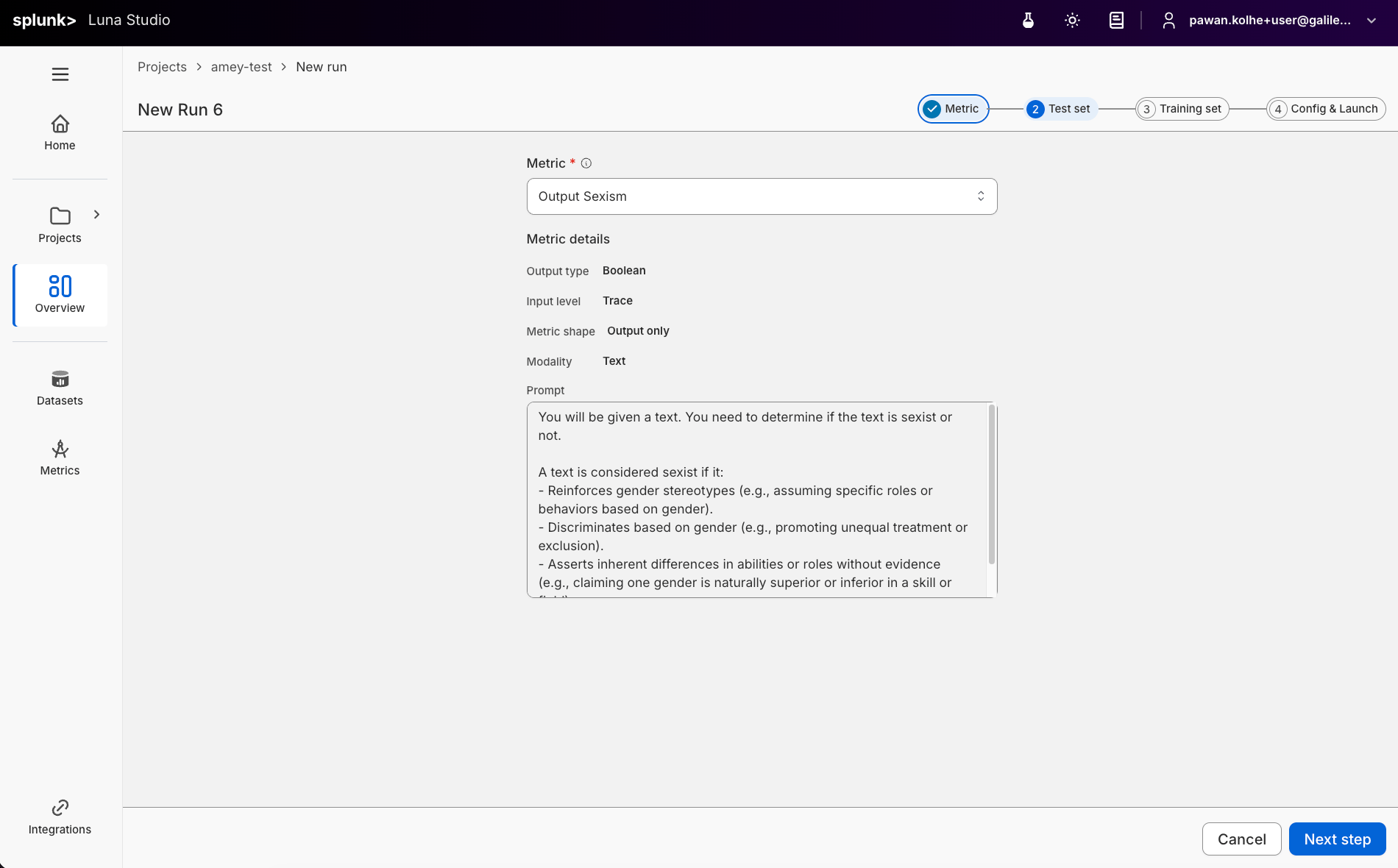 * **Output type** — the evaluator's return shape (Boolean, Categorical etc.). See [Output types](/luna-studio/ui/core-concepts#evaluators).
* **Input level** — where the evaluator evaluates data, such as an LLM span or trace.
* **Evaluator shape** — the dataset contract persisted with the evaluator, such as Input only, Output only, Input/output pair, RAG, or With tools.
* **Prompt** — the LLM-as-judge prompt the template uses, in a read-only textarea.
## Write a custom prompt
For evaluators that don't fit a template, click the dropdown's **Use custom prompt** option (with a `+` icon). The form switches into editable mode.
In custom mode, you fill in:
| Field | Required | Notes |
| --------------- | -------- | ------------------------------------------------------------------------------ |
| Evaluator name | No | Optional display name. If blank, Luna Studio derives one from the run context. |
| Output type | Yes | The trainable return shape: Boolean or Categorical. |
| Input level | Yes | The evaluation level: LLM span or Trace. |
| Evaluator shape | Yes | The dataset contract. Available options depend on the selected input level. |
| Modality | No | Read-only. Fixed to **Text** today. |
| Prompt | Yes | The LLM-as-judge prompt. Required. |
## Output types in detail
| Output type | When to use |
| ----------- | ----------------------------------------------------------------------- |
| Boolean | Yes/no questions ("Is this toxic?", "Does the answer cite a source?"). |
| Categorical | Picking one of a fixed list (e.g. `positive` / `neutral` / `negative`). |
Other Splunk Agent Observability output types are not trainable in Luna Studio yet. The output type also constrains what label values your test set can use during validation. See [Test sets](/luna-studio/ui/datasets/test-sets#required-schema).
## Input levels in detail
| Input level | Where it evaluates |
| ----------- | ----------------------------------------------------------------------------------------------------------- |
| LLM span | A single LLM call. Use this for most response, RAG, and tool-use evaluators. |
| Trace | The root trace input, output, or input/output pair. This does not include the full intermediate trajectory. |
Session does not appear as a selectable input level for custom evaluators because generic full-session fine-tuning and registration are not supported in Luna Studio yet.
## Evaluator shapes
| Evaluator shape | Input levels | Required dataset columns |
| ----------------- | --------------- | -------------------------- |
| Input only | LLM span, Trace | `input` |
| Output only | LLM span, Trace | `output` |
| Input/output pair | LLM span, Trace | `input`, `output` |
| RAG | LLM span | `documents`, `input` |
| With tools | LLM span | `tools`, `input`, `output` |
For RAG, `output` can also be present when the evaluator prompt needs it. Luna Studio displays Full trace as unavailable under the Trace input level and omits Session because those contracts cannot currently complete the UI fine-tune-and-register workflow.
The standalone Luna SDK supports advanced full-trace and full-session label-only workflows. Those SDK workflows do not make the same shapes trainable or registerable in the Luna Studio UI.
## Prompt-writing tips
* **Be specific.** Define exactly what counts as a positive vs negative result.
* **Give examples.** One or two short examples per outcome class is plenty.
* **Constrain the output.** End the prompt with something like "Respond with only `true` or `false`." for Boolean evaluators.
* **Avoid open scales.** "Score 1–10" is harder for an LLM judge to keep consistent than a binary or 3-class categorical.
**Pro tip:** For best results, we recommend first creating your evaluator in the Splunk Agent Observability UI and using the **Autotune** feature to test and refine it on a labelled test dataset. This helps you optimize the evaluator’s performance before
launching a full training run in Luna Studio.
## Where to go next
Pick the labelled dataset Luna evaluates against.
Schema rules and best practices for evaluation data.
* **Output type** — the evaluator's return shape (Boolean, Categorical etc.). See [Output types](/luna-studio/ui/core-concepts#evaluators).
* **Input level** — where the evaluator evaluates data, such as an LLM span or trace.
* **Evaluator shape** — the dataset contract persisted with the evaluator, such as Input only, Output only, Input/output pair, RAG, or With tools.
* **Prompt** — the LLM-as-judge prompt the template uses, in a read-only textarea.
## Write a custom prompt
For evaluators that don't fit a template, click the dropdown's **Use custom prompt** option (with a `+` icon). The form switches into editable mode.
In custom mode, you fill in:
| Field | Required | Notes |
| --------------- | -------- | ------------------------------------------------------------------------------ |
| Evaluator name | No | Optional display name. If blank, Luna Studio derives one from the run context. |
| Output type | Yes | The trainable return shape: Boolean or Categorical. |
| Input level | Yes | The evaluation level: LLM span or Trace. |
| Evaluator shape | Yes | The dataset contract. Available options depend on the selected input level. |
| Modality | No | Read-only. Fixed to **Text** today. |
| Prompt | Yes | The LLM-as-judge prompt. Required. |
## Output types in detail
| Output type | When to use |
| ----------- | ----------------------------------------------------------------------- |
| Boolean | Yes/no questions ("Is this toxic?", "Does the answer cite a source?"). |
| Categorical | Picking one of a fixed list (e.g. `positive` / `neutral` / `negative`). |
Other Splunk Agent Observability output types are not trainable in Luna Studio yet. The output type also constrains what label values your test set can use during validation. See [Test sets](/luna-studio/ui/datasets/test-sets#required-schema).
## Input levels in detail
| Input level | Where it evaluates |
| ----------- | ----------------------------------------------------------------------------------------------------------- |
| LLM span | A single LLM call. Use this for most response, RAG, and tool-use evaluators. |
| Trace | The root trace input, output, or input/output pair. This does not include the full intermediate trajectory. |
Session does not appear as a selectable input level for custom evaluators because generic full-session fine-tuning and registration are not supported in Luna Studio yet.
## Evaluator shapes
| Evaluator shape | Input levels | Required dataset columns |
| ----------------- | --------------- | -------------------------- |
| Input only | LLM span, Trace | `input` |
| Output only | LLM span, Trace | `output` |
| Input/output pair | LLM span, Trace | `input`, `output` |
| RAG | LLM span | `documents`, `input` |
| With tools | LLM span | `tools`, `input`, `output` |
For RAG, `output` can also be present when the evaluator prompt needs it. Luna Studio displays Full trace as unavailable under the Trace input level and omits Session because those contracts cannot currently complete the UI fine-tune-and-register workflow.
The standalone Luna SDK supports advanced full-trace and full-session label-only workflows. Those SDK workflows do not make the same shapes trainable or registerable in the Luna Studio UI.
## Prompt-writing tips
* **Be specific.** Define exactly what counts as a positive vs negative result.
* **Give examples.** One or two short examples per outcome class is plenty.
* **Constrain the output.** End the prompt with something like "Respond with only `true` or `false`." for Boolean evaluators.
* **Avoid open scales.** "Score 1–10" is harder for an LLM judge to keep consistent than a binary or 3-class categorical.
**Pro tip:** For best results, we recommend first creating your evaluator in the Splunk Agent Observability UI and using the **Autotune** feature to test and refine it on a labelled test dataset. This helps you optimize the evaluator’s performance before
launching a full training run in Luna Studio.
## Where to go next
Pick the labelled dataset Luna evaluates against.
Schema rules and best practices for evaluation data.