> ## Documentation Index
> Fetch the complete documentation index at: https://agent-observability-docs.splunk.com/llms.txt
> Use this file to discover all available pages before exploring further.
# Register an evaluator
> Publish a fine-tuned evaluator to the Splunk Agent Observability evaluators store.
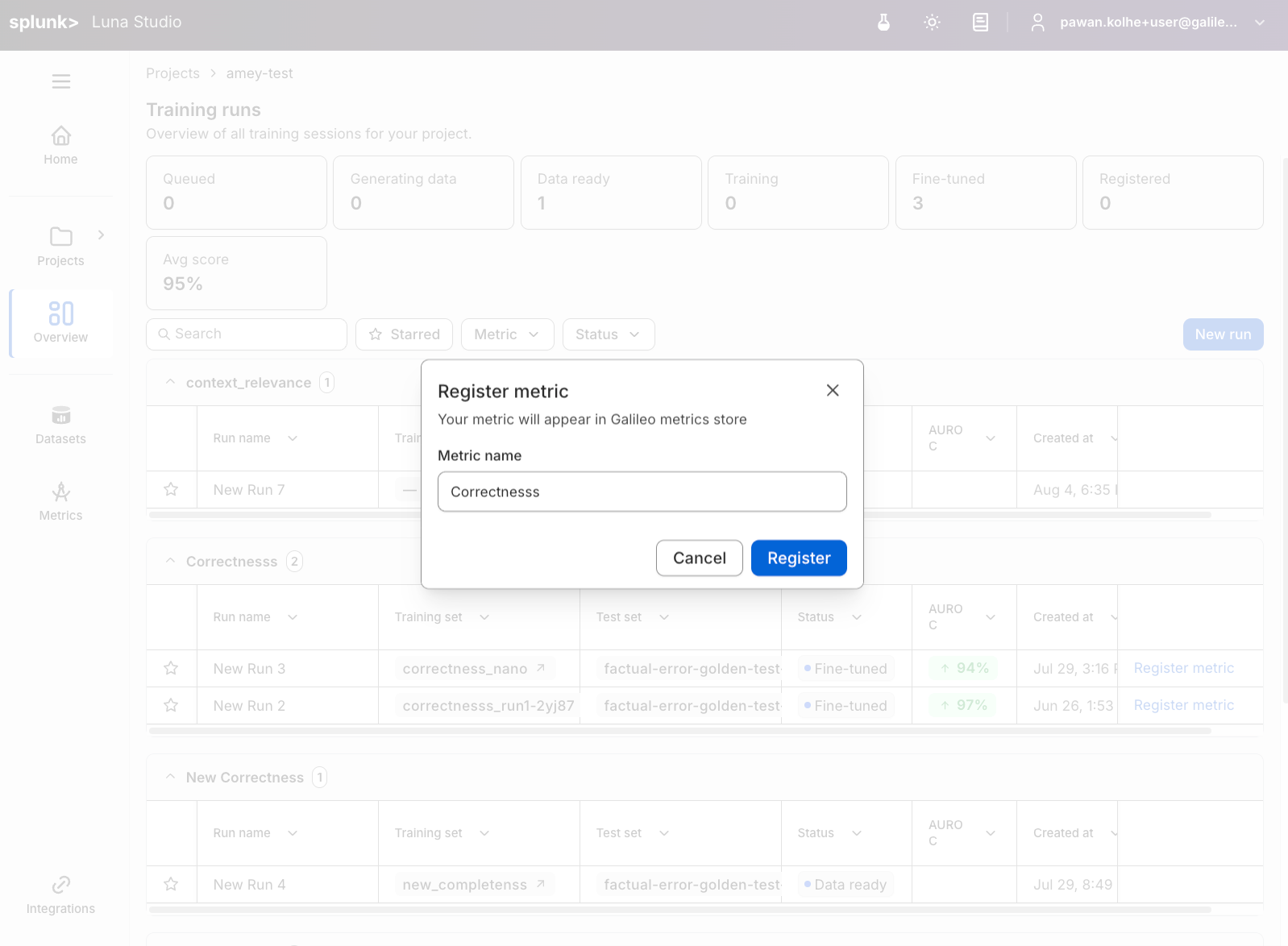
Once an eligible run reaches **Fine-tuned**, you can register the resulting evaluator. Registration publishes the evaluator to the [Splunk Agent Observability evaluators store](/concepts/evaluators/overview), where it becomes available across the Splunk Agent Observability platform — for evaluation in experiments, Agent Streams, and runtime guardrails using Protect / Agent Control.
A run can finish fine-tuning successfully and still be ineligible to register. How Luna Studio surfaces that eligibility depends on where you start registration: the run details page checks before enabling its footer action, while the Training runs table and Evaluators page validate when you submit the modal.
 ## Prerequisites
* The run must be in the **Fine-tuned** status. See [Run lifecycle](/luna-studio/ui/runs/lifecycle).
* The Luna Studio deployment must have an active [Splunk Agent Observability API connection](/luna-studio/ui/integrations/splunk-ao).
* The evaluator must have a supported registration runtime contract.
## Registration eligibility
Full-trace, full-session, and other evaluator contracts without a supported Splunk Agent Observability runtime are blocked from registration.
Context relevance is a separate, registration-only exception keyed to the built-in scorer's identity. Its prompt depends on retrieved documents, but generic fine-tuned scorer registration would remove that dependency and change what the evaluator evaluates. Context relevance can therefore be trained and evaluated in Luna Studio, but not registered today. This restriction does not make the RAG evaluator shape generally ineligible for registration.
## Where you can register from
The **Register evaluator** action appears in three places:
* **Run details page** — primary footer button on Fine-tuned runs.
* **Training runs table** — an action link on each Fine-tuned row. See [Training runs home](/luna-studio/ui/projects/training-runs-home#runs-table).
* **Evaluators page** — an action link on each Fine-tuned evaluator. See [Evaluators overview](/luna-studio/ui/evaluators/overview).
All three open the same **Register evaluator** flow. On the run details page, Luna Studio runs a preflight first and disables the footer button with a blocker tooltip when registration is unavailable. The Training runs table and Evaluators page do not run that preflight before opening the modal; the backend checks eligibility when you submit and the modal shows any resulting error.
## Steps
From the run details footer, the runs table row, or the evaluators page row.
Use a name that's clear in the Splunk Agent Observability evaluators store, where it'll sit alongside built-in evaluators. Examples: `support-tone-strict`, `pii-detector-en`.
The modal closes. After registration succeeds, the run's status flips to **Registered** and the **Register evaluator** affordance disappears for that run.
## If registration is blocked
On the run details page, read the blocker shown with the disabled footer action. From the Training runs table or Evaluators page, read the error that remains in the modal after an unsuccessful submission. Common cases are:
* **No Splunk Agent Observability connection** — ask your deployment operator to configure the Splunk Agent Observability API URL and key.
* **Unsupported evaluator contract** — the fine-tuned artifact remains available in Luna Studio, but that evaluator cannot be published to the Splunk Agent Observability evaluators store.
## Naming guidance
* Use lowercase with hyphens: `customer-tone-classifier`, not `Customer Tone Classifier`.
* Include the language or domain if relevant: `pii-detector-en`, `legal-toxicity`.
* Add version suffixes (`-v1`, `-v2`) if you are registering multiple variants.
Evaluator names should be unique within your Splunk Agent Observability workspace. If an evaluator with the same name already exists, registration fails with a duplicate-name error. Pick a different name and try again.
## Where to go next
Use registered evaluators in Agent Control workflows.
Configure the Splunk Agent Observability Logger and Agent Control SDK.
Understand how Luna-based evaluators power evaluation and protection.
## Prerequisites
* The run must be in the **Fine-tuned** status. See [Run lifecycle](/luna-studio/ui/runs/lifecycle).
* The Luna Studio deployment must have an active [Splunk Agent Observability API connection](/luna-studio/ui/integrations/splunk-ao).
* The evaluator must have a supported registration runtime contract.
## Registration eligibility
Full-trace, full-session, and other evaluator contracts without a supported Splunk Agent Observability runtime are blocked from registration.
Context relevance is a separate, registration-only exception keyed to the built-in scorer's identity. Its prompt depends on retrieved documents, but generic fine-tuned scorer registration would remove that dependency and change what the evaluator evaluates. Context relevance can therefore be trained and evaluated in Luna Studio, but not registered today. This restriction does not make the RAG evaluator shape generally ineligible for registration.
## Where you can register from
The **Register evaluator** action appears in three places:
* **Run details page** — primary footer button on Fine-tuned runs.
* **Training runs table** — an action link on each Fine-tuned row. See [Training runs home](/luna-studio/ui/projects/training-runs-home#runs-table).
* **Evaluators page** — an action link on each Fine-tuned evaluator. See [Evaluators overview](/luna-studio/ui/evaluators/overview).
All three open the same **Register evaluator** flow. On the run details page, Luna Studio runs a preflight first and disables the footer button with a blocker tooltip when registration is unavailable. The Training runs table and Evaluators page do not run that preflight before opening the modal; the backend checks eligibility when you submit and the modal shows any resulting error.
## Steps
From the run details footer, the runs table row, or the evaluators page row.
Use a name that's clear in the Splunk Agent Observability evaluators store, where it'll sit alongside built-in evaluators. Examples: `support-tone-strict`, `pii-detector-en`.
The modal closes. After registration succeeds, the run's status flips to **Registered** and the **Register evaluator** affordance disappears for that run.
## If registration is blocked
On the run details page, read the blocker shown with the disabled footer action. From the Training runs table or Evaluators page, read the error that remains in the modal after an unsuccessful submission. Common cases are:
* **No Splunk Agent Observability connection** — ask your deployment operator to configure the Splunk Agent Observability API URL and key.
* **Unsupported evaluator contract** — the fine-tuned artifact remains available in Luna Studio, but that evaluator cannot be published to the Splunk Agent Observability evaluators store.
## Naming guidance
* Use lowercase with hyphens: `customer-tone-classifier`, not `Customer Tone Classifier`.
* Include the language or domain if relevant: `pii-detector-en`, `legal-toxicity`.
* Add version suffixes (`-v1`, `-v2`) if you are registering multiple variants.
Evaluator names should be unique within your Splunk Agent Observability workspace. If an evaluator with the same name already exists, registration fails with a duplicate-name error. Pick a different name and try again.
## Where to go next
Use registered evaluators in Agent Control workflows.
Configure the Splunk Agent Observability Logger and Agent Control SDK.
Understand how Luna-based evaluators power evaluation and protection.