> ## Documentation Index
> Fetch the complete documentation index at: https://agent-observability-docs.splunk.com/llms.txt
> Use this file to discover all available pages before exploring further.
# Find Your Organization Keys
These instructions are for users with on-premises, standalone, and custom deployments.
Environment variables help connect your application to Splunk Agent Observability.
| Environment Variable | | Required | |
| ----------------------------------------------------------------------------------- | ------------------------ | :------: | -------------------------------------------------------------- |
| [Splunk Agent Observability API Key](#splunk-ao-api-key) | `SPLUNK_AO_API_KEY` | Yes | Only used for on-premises, standalone, and custom deployments. |
| [Splunk Agent Observability Console URL](#splunk-ao-console-url) | `SPLUNK_AO_CONSOLE_URL` | Yes | Only used for on-premises, standalone, and custom deployments. |
| [Splunk Agent Observability API URL](#splunk-ao-api-url) | `SPLUNK_AO_API_URL` | No | Only used for on-premises, standalone, and custom deployments. |
| [Splunk Agent Observability Project](#splunk-agent-observability-project) | `SPLUNK_AO_PROJECT` | No | |
| [Splunk Agent Observability Agent Stream](#splunk-agent-observability-agent-stream) | `SPLUNK_AO_AGENT_STREAM` | No | |
Let's break down what each variable does and where to find them within the UI.
It's possible to create an API key by using [this API endpoint](/api-reference/api_keys/create-api-key).
## Splunk AO API key
You need your Splunk Agent Observability API key to send traces to an Agent Stream from your applications or run experiments in code.
Select your user profile in the upper-right corner.
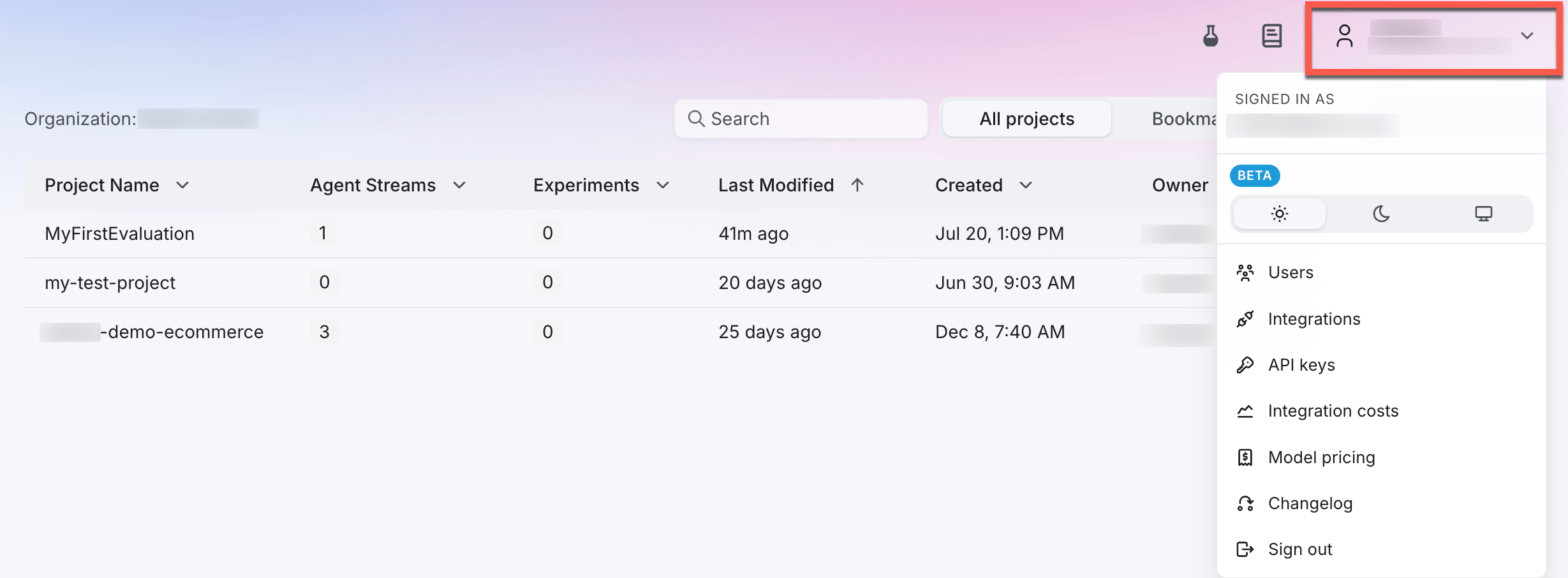 Select **API keys** from the user menu.
Select the **+Create new key** button to create a new API key.
Give your API key a name and optionally set an expiration date. By default, API keys expire after a year.
Copy your API key and store it somewhere safe. You will not be able to see this key again.
## Splunk AO Console URL
`SPLUNK_AO_CONSOLE_URL` is the URL for your on-premises, standalone, or custom deployment.
It appears in the browser window when you log into the Splunk Agent Observability homepage.
Example `SPLUNK_AO_CONSOLE_URL`: `https://console.subdomain.yourcompany.com`
## Splunk AO API URL
`SPLUNK_AO_API_URL` is an optional custom API URL for connecting to the [Agent Observability REST API](/api/getting-started).
Most users will not need to set up this environment variable, because it will be automatically found from the Console URL:
* If your Console URL is `https://console.subdomain.yourcompany.com`, your API URL will automatically be set to `https://api.subdomain.yourcompany.com`
* If your Console URL is `https://subdomain.yourcompany.com`, your API URL will automatically be set to `https://api.subdomain.yourcompany.com`
If your company has set up a custom API URL, you may wish to verify the URL using [these instructions](/api/getting-started#verify-the-base-api-url).
## Splunk Agent Observability Project
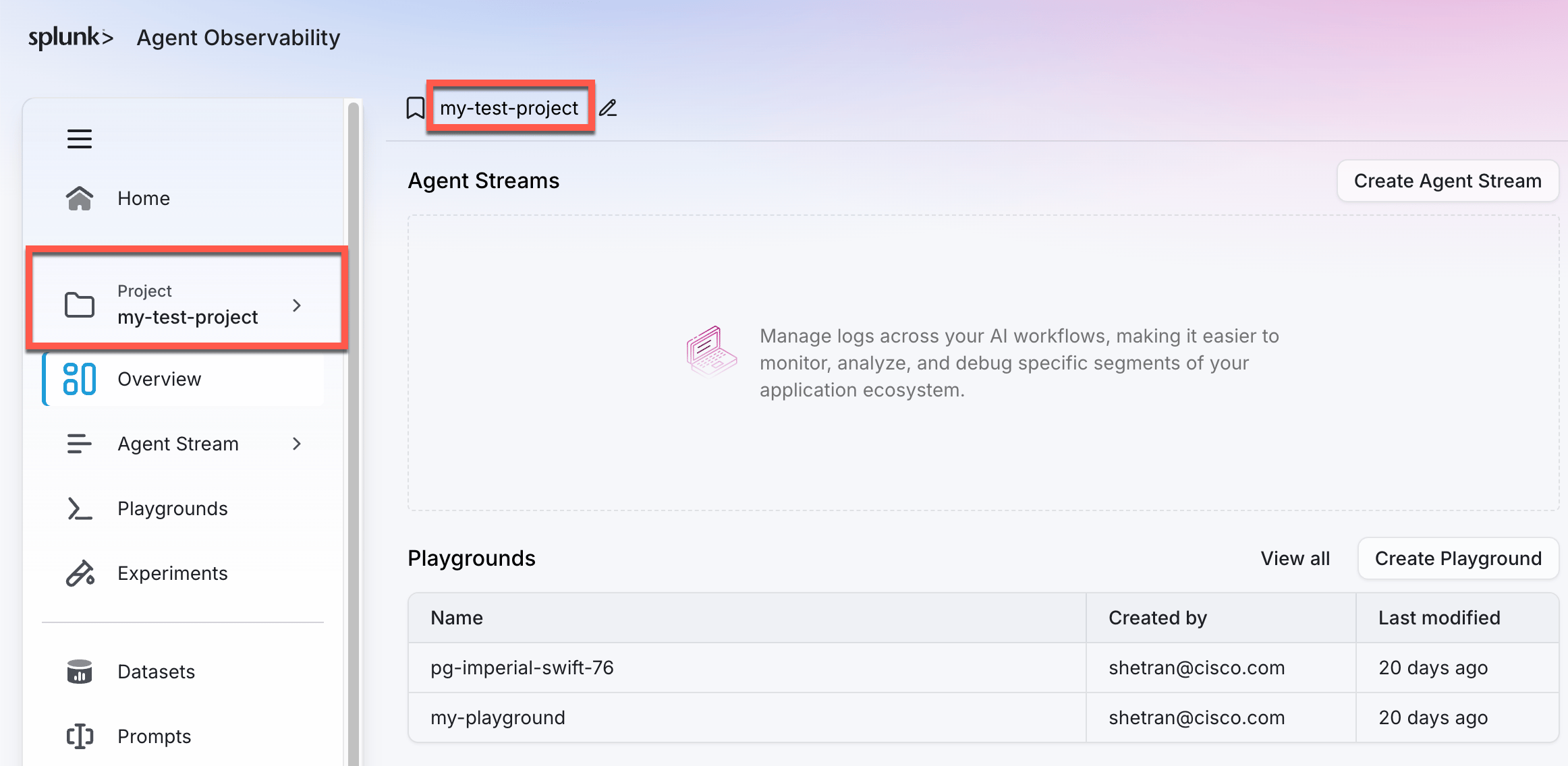
Your Splunk Agent Observability Project is the name of the project you create.
Select **API keys** from the user menu.
Select the **+Create new key** button to create a new API key.
Give your API key a name and optionally set an expiration date. By default, API keys expire after a year.
Copy your API key and store it somewhere safe. You will not be able to see this key again.
## Splunk AO Console URL
`SPLUNK_AO_CONSOLE_URL` is the URL for your on-premises, standalone, or custom deployment.
It appears in the browser window when you log into the Splunk Agent Observability homepage.
Example `SPLUNK_AO_CONSOLE_URL`: `https://console.subdomain.yourcompany.com`
## Splunk AO API URL
`SPLUNK_AO_API_URL` is an optional custom API URL for connecting to the [Agent Observability REST API](/api/getting-started).
Most users will not need to set up this environment variable, because it will be automatically found from the Console URL:
* If your Console URL is `https://console.subdomain.yourcompany.com`, your API URL will automatically be set to `https://api.subdomain.yourcompany.com`
* If your Console URL is `https://subdomain.yourcompany.com`, your API URL will automatically be set to `https://api.subdomain.yourcompany.com`
If your company has set up a custom API URL, you may wish to verify the URL using [these instructions](/api/getting-started#verify-the-base-api-url).
## Splunk Agent Observability Project
Your Splunk Agent Observability Project is the name of the project you create.
 ## Splunk Agent Observability Agent Stream
The Splunk Agent Observability Agent Stream is the name of the specific Agent Stream that you want to record your traces into.
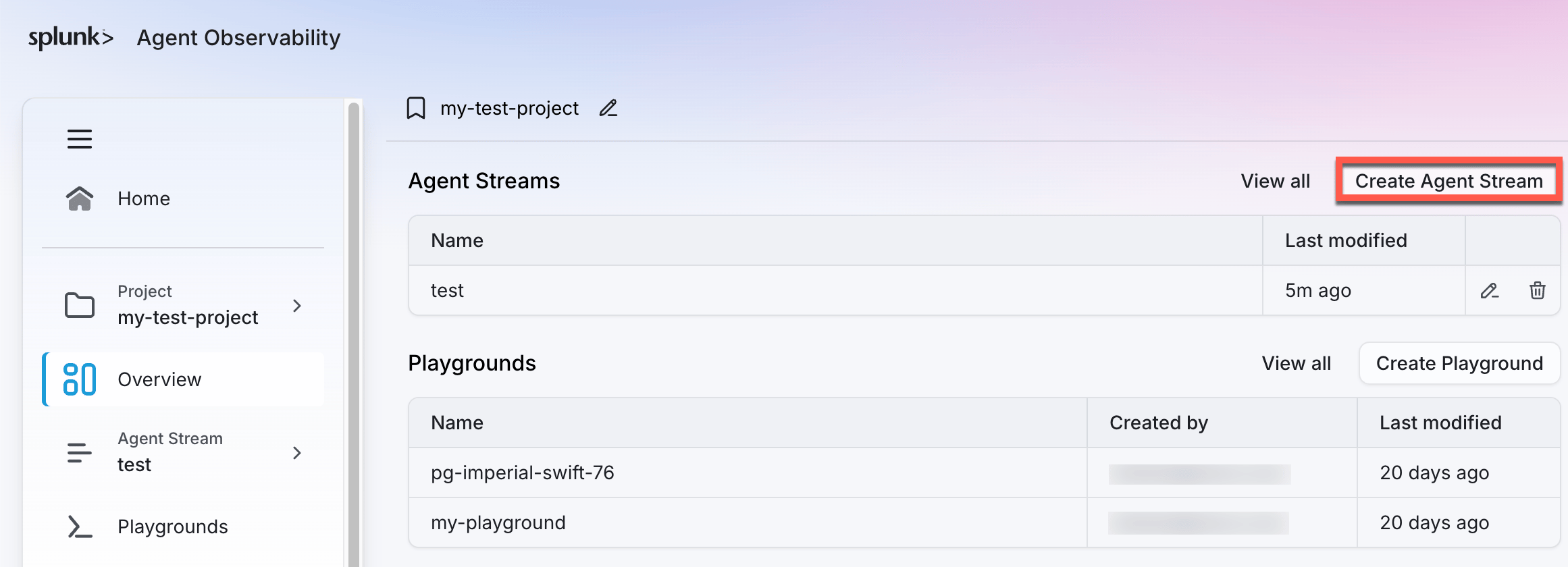
To find or create an Agent Stream, first select the project you'd want to create an Agent Stream from. On the project home screen, the existing Agent Streams are displayed in a table. Select **Create Agent Stream** to create a new one.
## Splunk Agent Observability Agent Stream
The Splunk Agent Observability Agent Stream is the name of the specific Agent Stream that you want to record your traces into.
To find or create an Agent Stream, first select the project you'd want to create an Agent Stream from. On the project home screen, the existing Agent Streams are displayed in a table. Select **Create Agent Stream** to create a new one.
 The Agent Stream name is case-sensitive. If you change the name of the Agent Stream, you will also have to change how it is referenced within your application as well.
## Best practices and tips
* Keep your API keys secure and never share them publicly
* Create separate keys for different applications or environments
* Set expiration dates for temporary access
* Regularly rotate keys for enhanced security
* Use descriptive names to track key usage
The Agent Stream name is case-sensitive. If you change the name of the Agent Stream, you will also have to change how it is referenced within your application as well.
## Best practices and tips
* Keep your API keys secure and never share them publicly
* Create separate keys for different applications or environments
* Set expiration dates for temporary access
* Regularly rotate keys for enhanced security
* Use descriptive names to track key usage