> ## Documentation Index
> Fetch the complete documentation index at: https://agent-observability-docs.splunk.com/llms.txt
> Use this file to discover all available pages before exploring further.
# Experiment Groups
> Organize related experiment runs in the Splunk Agent Observability UI and with the SDK
Experiment groups allow you to organize experiments within a project. Previously, all experiments in a project were shown in one list. With experiment groups, you can compare and rank experiments based on groups that you define.
## Experiment groups in the Splunk Agent Observability UI
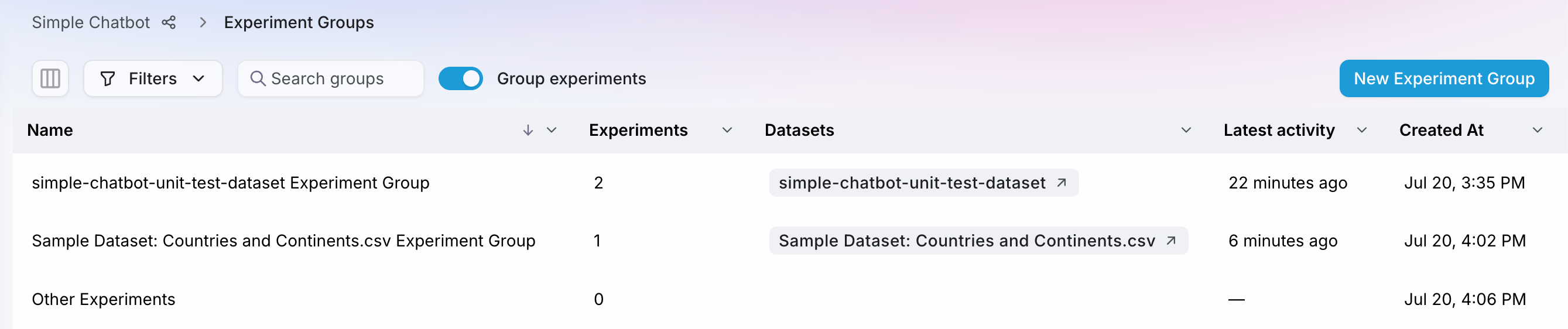
To ease the transition to experiment groups, your experiments have been organized into dataset groups. By default, an "Other Experiments" group contains experiments that do not have associated datasets.
 ### Move experiments to another group
You can move existing experiments to other groups, including to new experiment groups that you define.
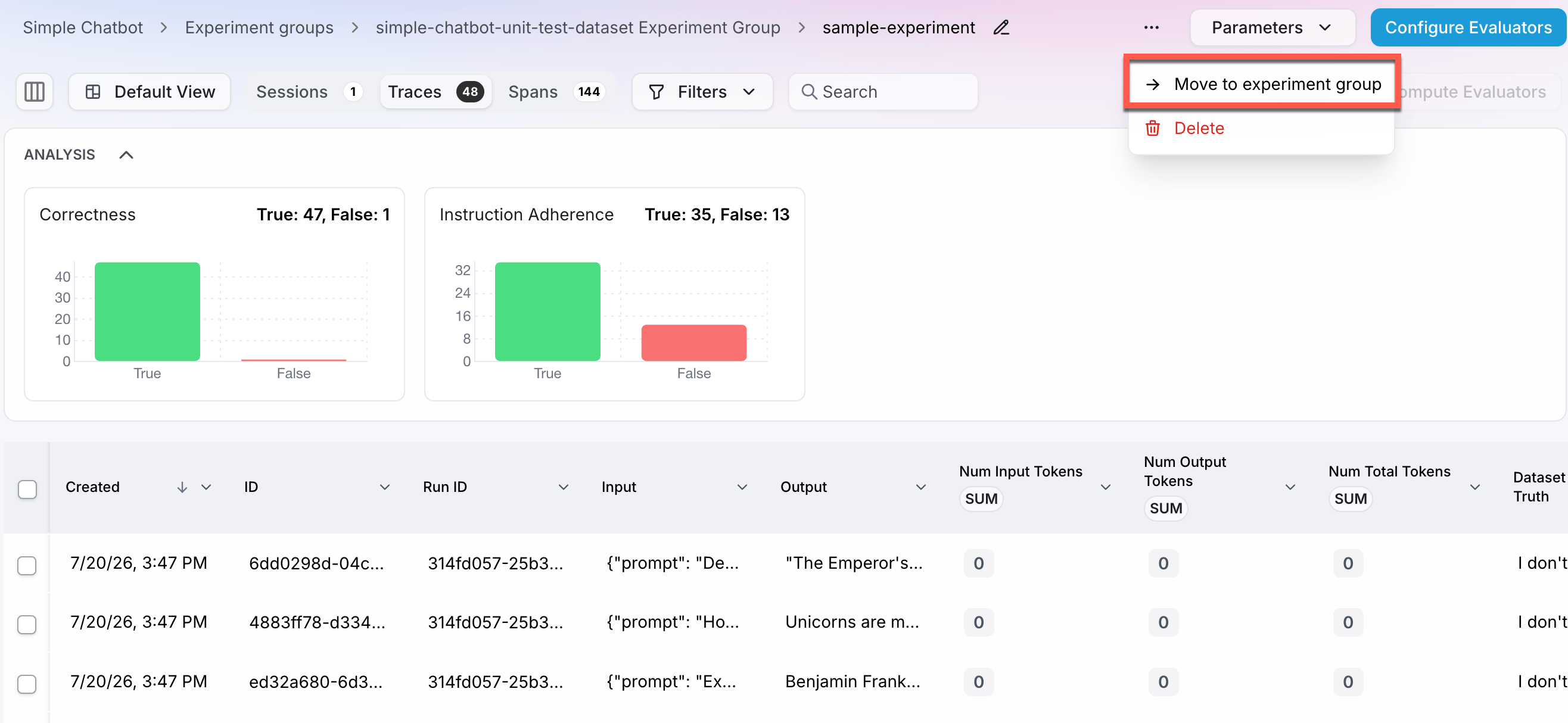
To move an individual experiment: Go to the experiment page, open the context menu in the top right, and click on the menu option to "Move to experiment group".
### Move experiments to another group
You can move existing experiments to other groups, including to new experiment groups that you define.
To move an individual experiment: Go to the experiment page, open the context menu in the top right, and click on the menu option to "Move to experiment group".
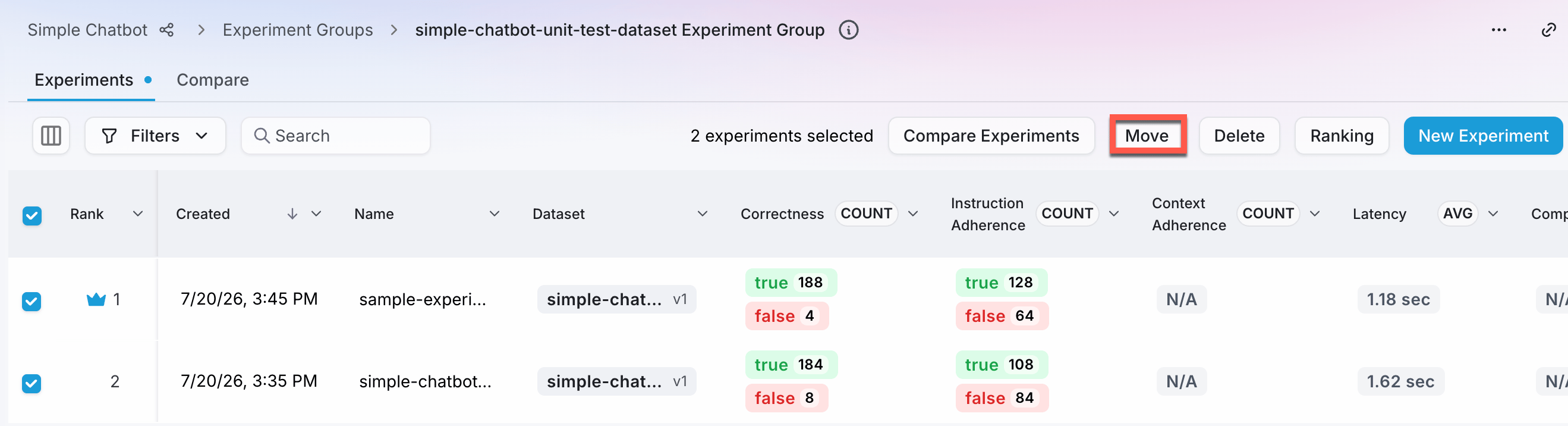
 To move multiple experiments at a time: Select all or some experiments in a group, then click on the **Move** button.
 ### Rank experiments in a group
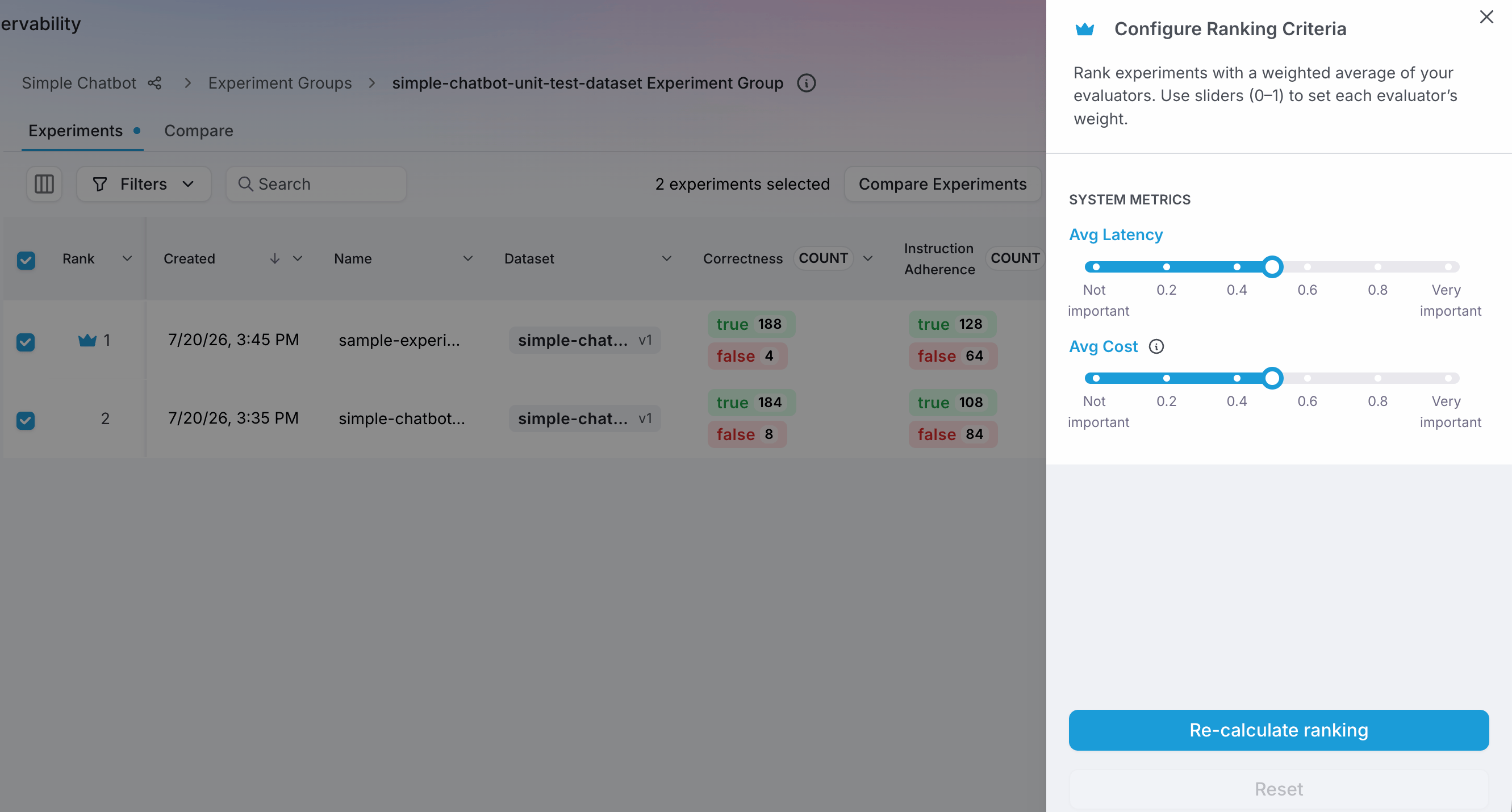
Use the **Ranking** button in an experiment group to customize a leaderboard for that group. The ranking criteria is configurable based on a weighted average of evaluators. With experiment groups, each group can now have its own leaderboard and ranking criteria.
### Rank experiments in a group
Use the **Ranking** button in an experiment group to customize a leaderboard for that group. The ranking criteria is configurable based on a weighted average of evaluators. With experiment groups, each group can now have its own leaderboard and ranking criteria.
 ## Experiment groups in the Splunk Agent Observability SDK
Python SDK support for Experiment Groups is in [Splunk Agent Observability](https://pypi.org/project/splunk-ao) **≥ 2.2.0**
**Your existing experiment code keeps working.** The optional **`experiment_group`** parameter does not change behavior when omitted. Your current [`run_experiment`](/sdk-api/python/reference/experiments#run_experiment), [`create_experiment`](/sdk-api/python/reference/experiments#create_experiment), and [`get_experiments`](/sdk-api/python/reference/experiments#get_experiments) calls stay valid.
For experiments you specify [in code](/sdk-api/experiments/running-experiments), you can choose to pass an experiment group name (the optional **`experiment_group`** parameter) to organize your experiments.
### Place an experiment into an experiment group
```python theme={null}
from splunk_ao import SplunkAOEvaluators
from splunk_ao.experiments import run_experiment
run_experiment(
experiment_name="rag-baseline",
dataset=my_dataset,
function=my_app,
metrics=[SplunkAOEvaluators.correctness],
experiment_group="RAG Benchmark",
)
```
### List experiment groups and their experiments
```python theme={null}
from splunk_ao.experiments import list_experiment_groups, get_experiments
experiment_groups = list_experiment_groups(project_name="my-project")
experiments = get_experiments(
project_name="my-project",
experiment_group="RAG Benchmark",
)
```
You can also use **`create_experiment(..., experiment_group="…")`** when you need an experiment shell (for example tagging or setup) before data rows are processed. For full parameters, see the [Experiments SDK reference](/sdk-api/python/reference/experiments).
## How an experiment gets into a group
Splunk Agent Observability applies rules in this order (first match wins):
1. **Experiment group name** — If you pass **`experiment_group`** (or choose a group in the UI), the experiments uses or creates that named group.
2. **Dataset** — Else if the experiment includes a dataset, the experiment can land in that dataset's group.
3. **Other Experiments** — Else the experiment goes to the built-in default group.
```mermaid theme={null}
flowchart TD
A[New experiment] --> B{"Group name set
## Experiment groups in the Splunk Agent Observability SDK
Python SDK support for Experiment Groups is in [Splunk Agent Observability](https://pypi.org/project/splunk-ao) **≥ 2.2.0**
**Your existing experiment code keeps working.** The optional **`experiment_group`** parameter does not change behavior when omitted. Your current [`run_experiment`](/sdk-api/python/reference/experiments#run_experiment), [`create_experiment`](/sdk-api/python/reference/experiments#create_experiment), and [`get_experiments`](/sdk-api/python/reference/experiments#get_experiments) calls stay valid.
For experiments you specify [in code](/sdk-api/experiments/running-experiments), you can choose to pass an experiment group name (the optional **`experiment_group`** parameter) to organize your experiments.
### Place an experiment into an experiment group
```python theme={null}
from splunk_ao import SplunkAOEvaluators
from splunk_ao.experiments import run_experiment
run_experiment(
experiment_name="rag-baseline",
dataset=my_dataset,
function=my_app,
metrics=[SplunkAOEvaluators.correctness],
experiment_group="RAG Benchmark",
)
```
### List experiment groups and their experiments
```python theme={null}
from splunk_ao.experiments import list_experiment_groups, get_experiments
experiment_groups = list_experiment_groups(project_name="my-project")
experiments = get_experiments(
project_name="my-project",
experiment_group="RAG Benchmark",
)
```
You can also use **`create_experiment(..., experiment_group="…")`** when you need an experiment shell (for example tagging or setup) before data rows are processed. For full parameters, see the [Experiments SDK reference](/sdk-api/python/reference/experiments).
## How an experiment gets into a group
Splunk Agent Observability applies rules in this order (first match wins):
1. **Experiment group name** — If you pass **`experiment_group`** (or choose a group in the UI), the experiments uses or creates that named group.
2. **Dataset** — Else if the experiment includes a dataset, the experiment can land in that dataset's group.
3. **Other Experiments** — Else the experiment goes to the built-in default group.
```mermaid theme={null}
flowchart TD
A[New experiment] --> B{"Group name set
in UI or SDK?"}
B -->|Yes| G2[Experiment uses or creates group by name]
B -->|No| D{"Dataset
attached?"}
D -->|Yes| G3["Experiment in dataset's named group"]
D -->|No| G4["Experiment in default group
('Other Experiments')"]
```
## Related resources
Use the UI for playgrounds, datasets, and experiment workflows.
Evaluators, datasets, and how experiments fit together.
Prompt templates, generated output, and custom functions.
Run experiments inside tests and pipelines.