> ## Documentation Index
> Fetch the complete documentation index at: https://agent-observability-docs.splunk.com/llms.txt
> Use this file to discover all available pages before exploring further.
# Prompts
> Learn how to create and use prompt templates in experiments
Prompts in Splunk Agent Observability allow you to create, store, and reuse LLM prompts across your experiments. They provide a structured way to manage your LLM interactions.
## Prompts in the Splunk Agent Observability UI
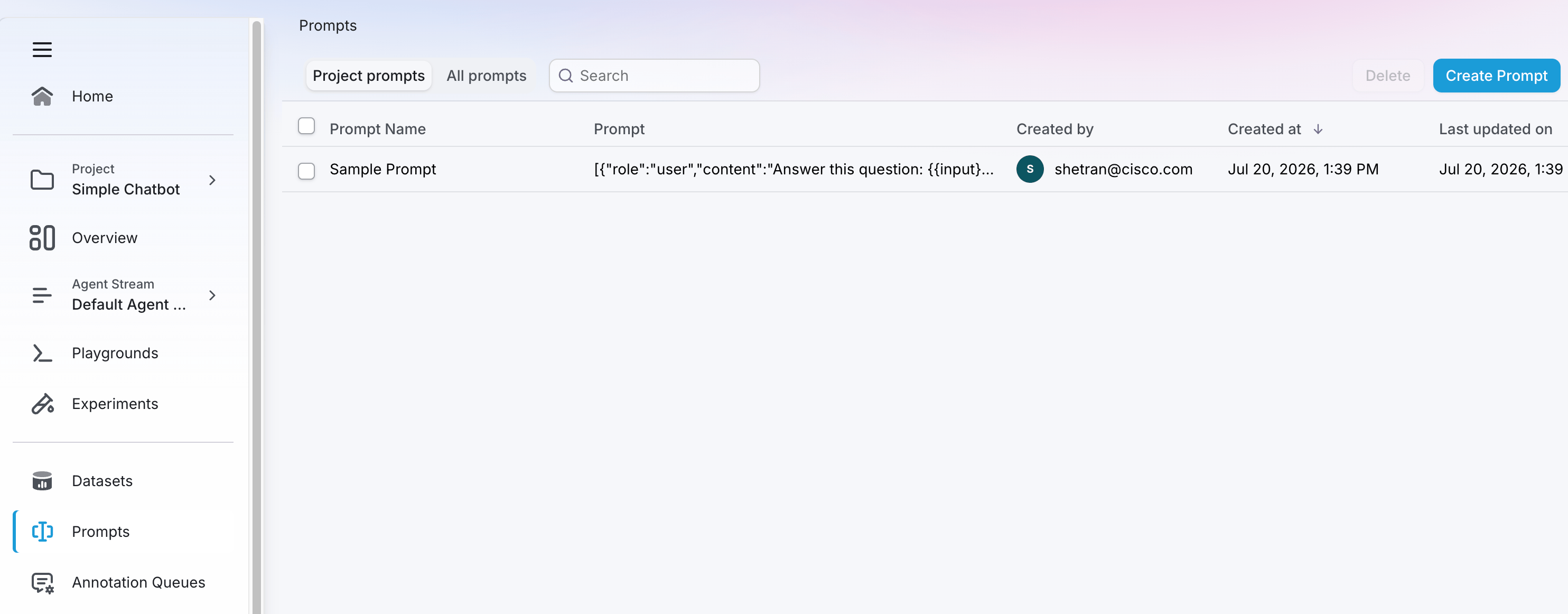 The **Prompts** page of the Splunk Agent Observability UI shows you the existing prompts associated with your selected project. Click on **All prompts** to view all prompts in your organization. Click the **Create Prompt** button to create a new prompt.
## Prompts in code
### Create prompts
```python Python theme={null}
from splunk_ao import Message, MessageRole
from splunk_ao.prompts import create_prompt
# Create a prompt with system and user messages
prompt = create_prompt(
name="storyteller-prompt",
template=[
Message(role=MessageRole.system,
content="You are a great storyteller."),
Message(role=MessageRole.user,
content="""
Please write a short story about
the following topic: {{topic}}
""")
]
)
```
```python Python (Beta) theme={null}
from splunk_ao import Message, MessageRole, Prompt
# Create a prompt with system and user messages
prompt = Prompt(
name="storyteller-prompt",
messages=[
Message(role=MessageRole.system,
content="You are a great storyteller."),
Message(role=MessageRole.user,
content="""
Please write a short story about
the following topic: {{topic}}
""")
],
)
prompt.create()
```
#### Connect prompt templates to dataset inputs
When you use datasets in Splunk Agent Observability, the attributes stored in the input in your dataset are made available to your prompt templates using mustache templating. This allows you to create dynamic prompts that adapt to the data in each row.
Suppose you have the following dataset:
```python Python theme={null}
test_data = [
{ "input": { "city": "Rome, Italy", "days": "5" } },
{ "input": { "city": "Paris, France", "days": "3" } },
]
```
To reference fields from your dataset in your prompt, use double curly braces:
```python Python theme={null}
from splunk_ao import Message, MessageRole
message = Message(role=MessageRole.user,
content="""
Plan a {{ days }}-day travel itinerary
for a trip to {{ city }}.
""")
```
* `{{ city }}` will be replaced with the value of the `city` field inside the `input` dictionary.
* `{{ days }}` will be replaced with the value of the `days` field inside the `input` dictionary.
### Get prompts
Once prompts have been created in Splunk Agent Observability, they can be retrieved by name. For project level prompts, pass in either the project name or Id.
```python Python theme={null}
from splunk_ao.prompts import get_prompt
# Get an existing prompt
prompt = get_prompt(
name="storyteller-prompt"
)
```
```python Python (Beta) theme={null}
from splunk_ao import Prompt
# Get an existing prompt
prompt = Prompt.get(name="storyteller-prompt")
```
### List prompts
To list all prompt templates in a project or organization:
```python Python theme={null}
from splunk_ao.prompts import get_prompts
# List all prompt templates in a project
templates = get_prompts()
# Print template names
for template in templates:
print(f"Template: {template.name}")
```
```python Python (Beta) theme={null}
from splunk_ao import Prompt
# List all prompt templates
templates = Prompt.list()
# Print template names
for template in templates:
print(f"Template: {template.name}")
```
### Delete prompts
To delete a prompt:
```python Python theme={null}
from splunk_ao.prompts import delete_prompt
# Delete a prompt
delete_prompt(
name="storyteller-prompt"
)
```
```python Python (Beta) theme={null}
from splunk_ao import Prompt
# Get and delete a prompt
prompt = Prompt.get(name="storyteller-prompt")
if prompt is None:
raise ValueError("Prompt 'storyteller-prompt' not found")
prompt.delete()
```
### Use prompts in experiments
Prompts can be used in experiments to evaluate different prompt templates:
```python Python theme={null}
from splunk_ao.datasets import get_dataset
from splunk_ao.experiments import run_experiment
from splunk_ao.prompts import get_prompt
from splunk_ao import SplunkAOEvaluators
# Get an existing dataset
dataset = get_dataset(
name="countries"
)
# Get an existing prompt
prompt = get_prompt(
name="geography-prompt"
)
# Run an experiment with the dataset and prompt
results = run_experiment(
"geography-experiment",
dataset=dataset,
prompt_template=prompt,
metrics=[SplunkAOEvaluators.completeness],
project="my-project",
)
```
```python Python (Beta) theme={null}
from splunk_ao import Dataset, Experiment, Evaluator, Prompt
# Get an existing dataset
dataset = Dataset.get(name="countries")
if dataset is None:
raise ValueError("Dataset 'countries' not found")
# Get an existing prompt
prompt = Prompt.get(name="geography-prompt")
if prompt is None:
raise ValueError("Prompt 'geography-prompt' not found")
# Create and run the experiment in one step
# (create() triggers the run automatically)
experiment = Experiment(
name="geography-experiment",
dataset=dataset,
prompt=prompt,
metrics=[Evaluator.metrics.completeness],
project_name="my-project",
)
experiment.create()
```
### Best practices
When working with prompts:
1. Use descriptive names that reflect the prompt's purpose
2. Include clear system messages to set context
3. Document any required input variables
4. Version your prompt templates appropriately
5. Test prompt templates with various inputs before using in production
## Related resources
Learn about more datasets, the data driving your experiments.
Learn how to use datasets and experiments to improve your application.
The **Prompts** page of the Splunk Agent Observability UI shows you the existing prompts associated with your selected project. Click on **All prompts** to view all prompts in your organization. Click the **Create Prompt** button to create a new prompt.
## Prompts in code
### Create prompts
```python Python theme={null}
from splunk_ao import Message, MessageRole
from splunk_ao.prompts import create_prompt
# Create a prompt with system and user messages
prompt = create_prompt(
name="storyteller-prompt",
template=[
Message(role=MessageRole.system,
content="You are a great storyteller."),
Message(role=MessageRole.user,
content="""
Please write a short story about
the following topic: {{topic}}
""")
]
)
```
```python Python (Beta) theme={null}
from splunk_ao import Message, MessageRole, Prompt
# Create a prompt with system and user messages
prompt = Prompt(
name="storyteller-prompt",
messages=[
Message(role=MessageRole.system,
content="You are a great storyteller."),
Message(role=MessageRole.user,
content="""
Please write a short story about
the following topic: {{topic}}
""")
],
)
prompt.create()
```
#### Connect prompt templates to dataset inputs
When you use datasets in Splunk Agent Observability, the attributes stored in the input in your dataset are made available to your prompt templates using mustache templating. This allows you to create dynamic prompts that adapt to the data in each row.
Suppose you have the following dataset:
```python Python theme={null}
test_data = [
{ "input": { "city": "Rome, Italy", "days": "5" } },
{ "input": { "city": "Paris, France", "days": "3" } },
]
```
To reference fields from your dataset in your prompt, use double curly braces:
```python Python theme={null}
from splunk_ao import Message, MessageRole
message = Message(role=MessageRole.user,
content="""
Plan a {{ days }}-day travel itinerary
for a trip to {{ city }}.
""")
```
* `{{ city }}` will be replaced with the value of the `city` field inside the `input` dictionary.
* `{{ days }}` will be replaced with the value of the `days` field inside the `input` dictionary.
### Get prompts
Once prompts have been created in Splunk Agent Observability, they can be retrieved by name. For project level prompts, pass in either the project name or Id.
```python Python theme={null}
from splunk_ao.prompts import get_prompt
# Get an existing prompt
prompt = get_prompt(
name="storyteller-prompt"
)
```
```python Python (Beta) theme={null}
from splunk_ao import Prompt
# Get an existing prompt
prompt = Prompt.get(name="storyteller-prompt")
```
### List prompts
To list all prompt templates in a project or organization:
```python Python theme={null}
from splunk_ao.prompts import get_prompts
# List all prompt templates in a project
templates = get_prompts()
# Print template names
for template in templates:
print(f"Template: {template.name}")
```
```python Python (Beta) theme={null}
from splunk_ao import Prompt
# List all prompt templates
templates = Prompt.list()
# Print template names
for template in templates:
print(f"Template: {template.name}")
```
### Delete prompts
To delete a prompt:
```python Python theme={null}
from splunk_ao.prompts import delete_prompt
# Delete a prompt
delete_prompt(
name="storyteller-prompt"
)
```
```python Python (Beta) theme={null}
from splunk_ao import Prompt
# Get and delete a prompt
prompt = Prompt.get(name="storyteller-prompt")
if prompt is None:
raise ValueError("Prompt 'storyteller-prompt' not found")
prompt.delete()
```
### Use prompts in experiments
Prompts can be used in experiments to evaluate different prompt templates:
```python Python theme={null}
from splunk_ao.datasets import get_dataset
from splunk_ao.experiments import run_experiment
from splunk_ao.prompts import get_prompt
from splunk_ao import SplunkAOEvaluators
# Get an existing dataset
dataset = get_dataset(
name="countries"
)
# Get an existing prompt
prompt = get_prompt(
name="geography-prompt"
)
# Run an experiment with the dataset and prompt
results = run_experiment(
"geography-experiment",
dataset=dataset,
prompt_template=prompt,
metrics=[SplunkAOEvaluators.completeness],
project="my-project",
)
```
```python Python (Beta) theme={null}
from splunk_ao import Dataset, Experiment, Evaluator, Prompt
# Get an existing dataset
dataset = Dataset.get(name="countries")
if dataset is None:
raise ValueError("Dataset 'countries' not found")
# Get an existing prompt
prompt = Prompt.get(name="geography-prompt")
if prompt is None:
raise ValueError("Prompt 'geography-prompt' not found")
# Create and run the experiment in one step
# (create() triggers the run automatically)
experiment = Experiment(
name="geography-experiment",
dataset=dataset,
prompt=prompt,
metrics=[Evaluator.metrics.completeness],
project_name="my-project",
)
experiment.create()
```
### Best practices
When working with prompts:
1. Use descriptive names that reflect the prompt's purpose
2. Include clear system messages to set context
3. Document any required input variables
4. Version your prompt templates appropriately
5. Test prompt templates with various inputs before using in production
## Related resources
Learn about more datasets, the data driving your experiments.
Learn how to use datasets and experiments to improve your application.