> ## Documentation Index
> Fetch the complete documentation index at: https://agent-observability-docs.splunk.com/llms.txt
> Use this file to discover all available pages before exploring further.
# Distributed Tracing with OpenTelemetry
> Stitch traces across two agents in different processes using OTel and the SplunkAOSpanProcessor.
Distributed Tracing in the new [Splunk Agent Observability Python SDK](/sdk-api/overview) is under construction. Please expect code details to change until Distributed Tracing is generally available.
When two agents run in separate processes and call each other over HTTP, OpenTelemetry's W3C `traceparent` header carries the trace context across the wire. Splunk Agent Observability joins all spans that share a trace ID into a single trace.
If both services are Python and use the Splunk Agent Observability SDK directly, [Distributed Tracing (Beta)](/sdk-api/logging/distributed-tracing) is simpler. Use the OTel approach when your services use different agent frameworks (Microsoft Agent Framework, Google ADK, LangChain, etc.) or different languages.
## What you'll see in Splunk Agent Observability
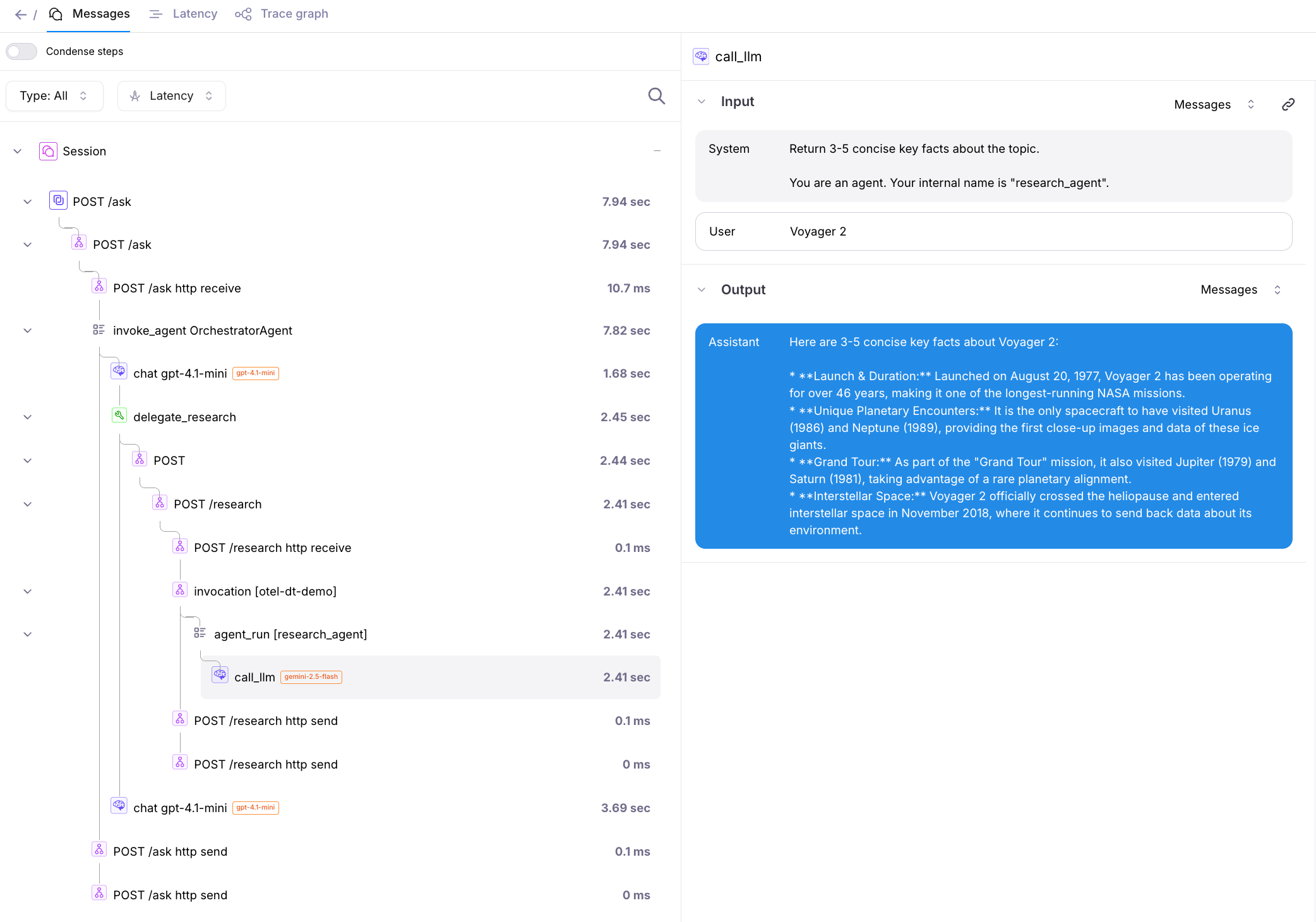
A single user request to **Agent A** that delegates to **Agent B** produces one trace:
```text theme={null}
POST /ask ← Agent A: FastAPI server span (workflow)
invoke_agent OrchestratorAgent ← Agent A: MAF agent span
HTTP POST /research ← Agent A: requests client span (workflow)
POST /research ← Agent B: FastAPI server span (workflow)
invoke_agent research_agent ← Agent B: ADK agent span
gemini.generate_content ← Agent B: LLM span
```
## Setup
```ini .env theme={null}
OPENAI_API_KEY=sk-... # find your key at https://platform.openai.com/api-keys
GOOGLE_API_KEY=... # find your key at https://aistudio.google.com
SPLUNK_AO_API_KEY=... # Only required for on-premises, standalone, or custom deployments
SPLUNK_AO_PROJECT=otel-distributed-tracing
SPLUNK_AO_AGENT_STREAM=default
AGENT_B_URL=http://localhost:8001
```
```text requirements.txt theme={null}
fastapi
uvicorn[standard]
requests
python-dotenv
splunk-ao[otel]
opentelemetry-instrumentation-fastapi
opentelemetry-instrumentation-requests
agent-framework
agent-framework-openai
google-adk
openinference-instrumentation-google-adk
```
`SplunkAOSpanProcessor` reads `SPLUNK_AO_API_KEY`, `SPLUNK_AO_PROJECT`, and `SPLUNK_AO_AGENT_STREAM` from the environment and exports OTLP directly to Splunk Agent Observability's OTel endpoint. No collector required.
## Agent A: Microsoft Agent Framework, calls Agent B
```python agent_a.py theme={null}
import os
import requests
from dotenv import load_dotenv
from fastapi import FastAPI
from pydantic import BaseModel
from splunk_ao.otel import SplunkAOSpanProcessor, add_splunk_ao_span_processor
from opentelemetry import trace
from opentelemetry.sdk.trace import TracerProvider
from opentelemetry.instrumentation.fastapi import FastAPIInstrumentor
from opentelemetry.instrumentation.requests import RequestsInstrumentor
from agent_framework import openai, tool
from agent_framework.observability import enable_instrumentation
load_dotenv()
# Set the global tracer provider before any instrumentor runs.
tracer_provider = TracerProvider()
add_splunk_ao_span_processor(tracer_provider, SplunkAOSpanProcessor())
trace.set_tracer_provider(tracer_provider)
# injects traceparent on outbound HTTP
RequestsInstrumentor().instrument()
# MAF built-in OTel
enable_instrumentation(enable_sensitive_data=True)
AGENT_B_URL = os.environ["AGENT_B_URL"]
@tool(approval_mode="never_require")
def delegate_research(topic: str) -> str:
"""Ask the research agent for facts about a topic."""
r = requests.post(f"{AGENT_B_URL}/research", json={"topic": topic}, timeout=60)
r.raise_for_status()
return r.json()["findings"]
orchestrator = openai.OpenAIChatClient(model="gpt-4.1-mini").as_agent(
name="OrchestratorAgent",
instructions="Use delegate_research to gather facts, then answer the user clearly.",
tools=[delegate_research],
)
app = FastAPI()
FastAPIInstrumentor.instrument_app(app)
class AskRequest(BaseModel):
question: str
@app.post("/ask")
async def ask(req: AskRequest):
return {"answer": str(await orchestrator.run(req.question))}
```
## Agent B: Google ADK research agent
```python agent_b.py theme={null}
from dotenv import load_dotenv
from fastapi import FastAPI
from pydantic import BaseModel
from splunk_ao.otel import SplunkAOSpanProcessor, add_splunk_ao_span_processor
from opentelemetry import trace
from opentelemetry.sdk.trace import TracerProvider
from opentelemetry.instrumentation.fastapi import FastAPIInstrumentor
from openinference.instrumentation.google_adk import GoogleADKInstrumentor
from google.adk.agents.llm_agent import Agent
from google.adk.runners import InMemoryRunner
from google.genai.types import Content, Part
load_dotenv()
tracer_provider = TracerProvider()
add_splunk_ao_span_processor(tracer_provider, SplunkAOSpanProcessor())
trace.set_tracer_provider(tracer_provider)
GoogleADKInstrumentor().instrument(tracer_provider=tracer_provider)
agent = Agent(
model="gemini-2.5-flash",
name="research_agent",
instruction="Return 3-5 concise key facts about the topic.",
)
runner = InMemoryRunner(agent=agent, app_name="otel-dt-demo")
app = FastAPI()
FastAPIInstrumentor.instrument_app(app)
class ResearchRequest(BaseModel):
topic: str
@app.post("/research")
async def research(req: ResearchRequest):
session = await runner.session_service.create_session(
app_name="otel-dt-demo", user_id="user"
)
findings = ""
# Drain the full async generator. Returning early closes it from a
# different asyncio context and breaks OTel context-token cleanup.
async for event in runner.run_async(
user_id="user",
session_id=session.id,
new_message=Content(role="user", parts=[Part(text=req.topic)]),
):
if event.is_final_response() and event.content and event.content.parts:
findings = event.content.parts[0].text
return {"findings": findings}
```
## Run it
```bash theme={null}
pip install -r requirements.txt
# Terminal 1
uvicorn agent_b:app --port 8001
# Terminal 2
uvicorn agent_a:app --port 8000
# Terminal 3
curl -s -X POST http://localhost:8000/ask \
-H "Content-Type: application/json" \
-d '{"question": "Tell me about Voyager 1."}' | jq
```
Open the `otel-distributed-tracing` project in Splunk Agent Observability, Agent Stream `default`. You'll see one trace covering both agents:
 ## Self-hosted Splunk Agent Observability
The OTel endpoint is different from Splunk Agent Observability's regular API endpoint and is specifically designed to receive telemetry data in the OTLP format.
If you are using:
* A cloud deployment, then you don't need to provide a custom OTel endpoint.
The default endpoint `/otel/traces` will be used automatically.
* A **self-hosted deployment**, replace the `/otel/traces` endpoint with your deployment URL. The format of this URL is based on your console URL, appending `/otel/traces`.
Set `SPLUNK_AO_API_ENDPOINT` in `.env`; `SplunkAOSpanProcessor` picks it up automatically.
## Related
* [Distributed Tracing (Beta)](/sdk-api/logging/distributed-tracing): Splunk Agent Observability's native Python SDK distributed mode.
* [Microsoft Agent Framework integration](/sdk-api/third-party-integrations/opentelemetry-and-openinference/microsoft-agent-framework)
* [Google ADK (OpenTelemetry) integration](/sdk-api/third-party-integrations/opentelemetry-and-openinference/google-adk)
* [Java + Python OTel distributed tracing example](https://github.com/splunk/splunk-ao-python/tree/main/examples/logging-samples/distributed-tracing-otel-python-java): End-to-end runnable example with a Java Spring Boot gateway and a Python FastAPI + LangGraph RAG service.
## Self-hosted Splunk Agent Observability
The OTel endpoint is different from Splunk Agent Observability's regular API endpoint and is specifically designed to receive telemetry data in the OTLP format.
If you are using:
* A cloud deployment, then you don't need to provide a custom OTel endpoint.
The default endpoint `/otel/traces` will be used automatically.
* A **self-hosted deployment**, replace the `/otel/traces` endpoint with your deployment URL. The format of this URL is based on your console URL, appending `/otel/traces`.
Set `SPLUNK_AO_API_ENDPOINT` in `.env`; `SplunkAOSpanProcessor` picks it up automatically.
## Related
* [Distributed Tracing (Beta)](/sdk-api/logging/distributed-tracing): Splunk Agent Observability's native Python SDK distributed mode.
* [Microsoft Agent Framework integration](/sdk-api/third-party-integrations/opentelemetry-and-openinference/microsoft-agent-framework)
* [Google ADK (OpenTelemetry) integration](/sdk-api/third-party-integrations/opentelemetry-and-openinference/google-adk)
* [Java + Python OTel distributed tracing example](https://github.com/splunk/splunk-ao-python/tree/main/examples/logging-samples/distributed-tracing-otel-python-java): End-to-end runnable example with a Java Spring Boot gateway and a Python FastAPI + LangGraph RAG service.