

Create a Splunk Agent Observability Account
First, navigate to your Splunk Agent Observability homepage and create an account.Add your first trace with the Python SDK
This guide works with Python, using OpenAI, Anthropic, Gemini Enterprise, Azure OpenAI, and AWS Bedrock LLMs.- OpenAI
- Anthropic
- Gemini Enterprise
- Azure OpenAI
- AWS Bedrock
Install dependencies
pip install "splunk-ao[openai]" python-dotenv
Set up your environment variables
- On-premises
- SaaS
.env file in your project folder, and set:- Your Splunk Agent Observability API key
- Your Splunk Agent Observability Console URL
- Your OpenAI API Key
SPLUNK_AO_API_KEY="your-splunk-ao-api-key"
SPLUNK_AO_CONSOLE_URL="your-splunk-ao-console-url"
OPENAI_API_KEY="your-openai-api-key"
.env file? Visit this guide.env file in your project folder, and set:SPLUNK_AO_REALM="your-splunk-realm"
SPLUNK_AO_O11Y_TOKEN="your-splunk-ingest-token"
OPENAI_API_KEY="your-openai-api-key"
.env file? Visit this guideCreate your application code
app.py (Python) and add the following code:- On-premises
- SaaS
from splunk_ao import splunk_ao_context
from splunk_ao.openai import openai
from splunk_ao.config import SplunkAOConfig
from dotenv import load_dotenv

# Load environment variables from the .env file
load_dotenv()

# Set the Project and Agent Stream; these are created if they don't exist.
# You can also set these using the SPLUNK_AO_PROJECT and SPLUNK_AO_AGENT_STREAM
# environment variables.
print("🔭 Connecting to Splunk Agent Observability...")
splunk_ao_context.init(project="MyFirstEvaluation",
                       agent_stream="MyFirstAgentStream")
print("✅ Splunk-AO logging initialized.\n")

# Initialize the Splunk Agent Observability OpenAI client wrapper
client = openai.OpenAI()

# Define a system prompt with guidance
system_prompt = f"""
You are a helpful assistant that wants to provide a user as much
information as possible. Avoid saying I don't know.
"""

# Define a user prompt
user_prompt = "Plan a trip for me"

model_name = "gpt-5.6-terra"

# Send a request to the LLM
print(f"🤖 Asking {model_name}... (this may take a moment)")
response = client.chat.completions.create(
    model=model_name,
    messages=[
        {"role": "system", "content": system_prompt},
        {"role": "user", "content": user_prompt}
    ],
)
print("✅ Response received.\n")

response_text = response.choices[0].message.content.strip()

# Print the response
print(response_text)

# Show Splunk Agent Observability information after the response
config = SplunkAOConfig.get()
logger = splunk_ao_context.get_logger_instance()
project_url = f"{config.console_url}project/{logger.project_id}"
agent_stream_url = f"{project_url}/agent-streams/{logger.agent_stream_id}"

print()
print("🚀 SPLUNK-AO INFORMATION:")
print(f"🔗 Project     : {project_url}")
print(f"📝 Agent Stream: {agent_stream_url}")
from splunk_ao import splunk_ao_context
from splunk_ao.openai import openai
from splunk_ao.config import SplunkAOConfig
from dotenv import load_dotenv

# Load environment variables from the .env file
load_dotenv()

# Set the Project and Agent Stream; these are created if they don't exist.
# You can also set these using the SPLUNK_AO_PROJECT and SPLUNK_AO_AGENT_STREAM
# environment variables.
print("🔭 Connecting to Splunk Agent Observability...")
splunk_ao_context.init(project="MyFirstEvaluation",
                       agent_stream="MyFirstAgentStream")
print("✅ Splunk-AO logging initialized.\n")

# Initialize the Splunk Agent Observability OpenAI client wrapper
client = openai.OpenAI()

# Define a system prompt with guidance
system_prompt = f"""
You are a helpful assistant that wants to provide a user as much
information as possible. Avoid saying I don't know.
"""

# Define a user prompt
user_prompt = "Plan a trip for me"

model_name = "gpt-5.6-terra"

# Send a request to the LLM
print(f"🤖 Asking {model_name}... (this may take a moment)")
response = client.chat.completions.create(
    model=model_name,
    messages=[
        {"role": "system", "content": system_prompt},
        {"role": "user", "content": user_prompt}
    ],
)
print("✅ Response received.\n")

response_text = response.choices[0].message.content.strip()

# Print the response
print(response_text)

# Show Splunk Agent Observability information after the response
logger = splunk_ao_context.get_logger_instance()

print()
print("🚀 SPLUNK-AO INFORMATION:")
print(f"📁 Project     : {logger.project_name}")
print(f"📝 Agent Stream: {logger.agent_stream_name}")
model_name.Run your application
python app.py
View the results in your terminal
I'd be happy to help plan your trip! To create an itinerary that fits your needs, please share a few details:

1. Where would you like to go?
2. What are your travel dates or preferred trip length?
3. Where will you be traveling from?
4. What is your approximate budget?
5. How many people are traveling?
6. What activities or experiences interest you?

Once I have these details, I can suggest transportation, accommodations, activities, and a day-by-day itinerary.
- On-premises
- SaaS
🚀 SPLUNK-AO INFORMATION:
🔗 Project   : <your-splunk-ao-console-url>/project/...
📝 Agent Stream: <your-splunk-ao-console-url>/project/.../agent-streams/...
🚀 SPLUNK-AO INFORMATION:
🔗 Project   : MyFirstEvaluation
📝 Agent Stream: MyFirstAgentStream
See the trace in Splunk Agent Observability
- On-premises
- SaaS

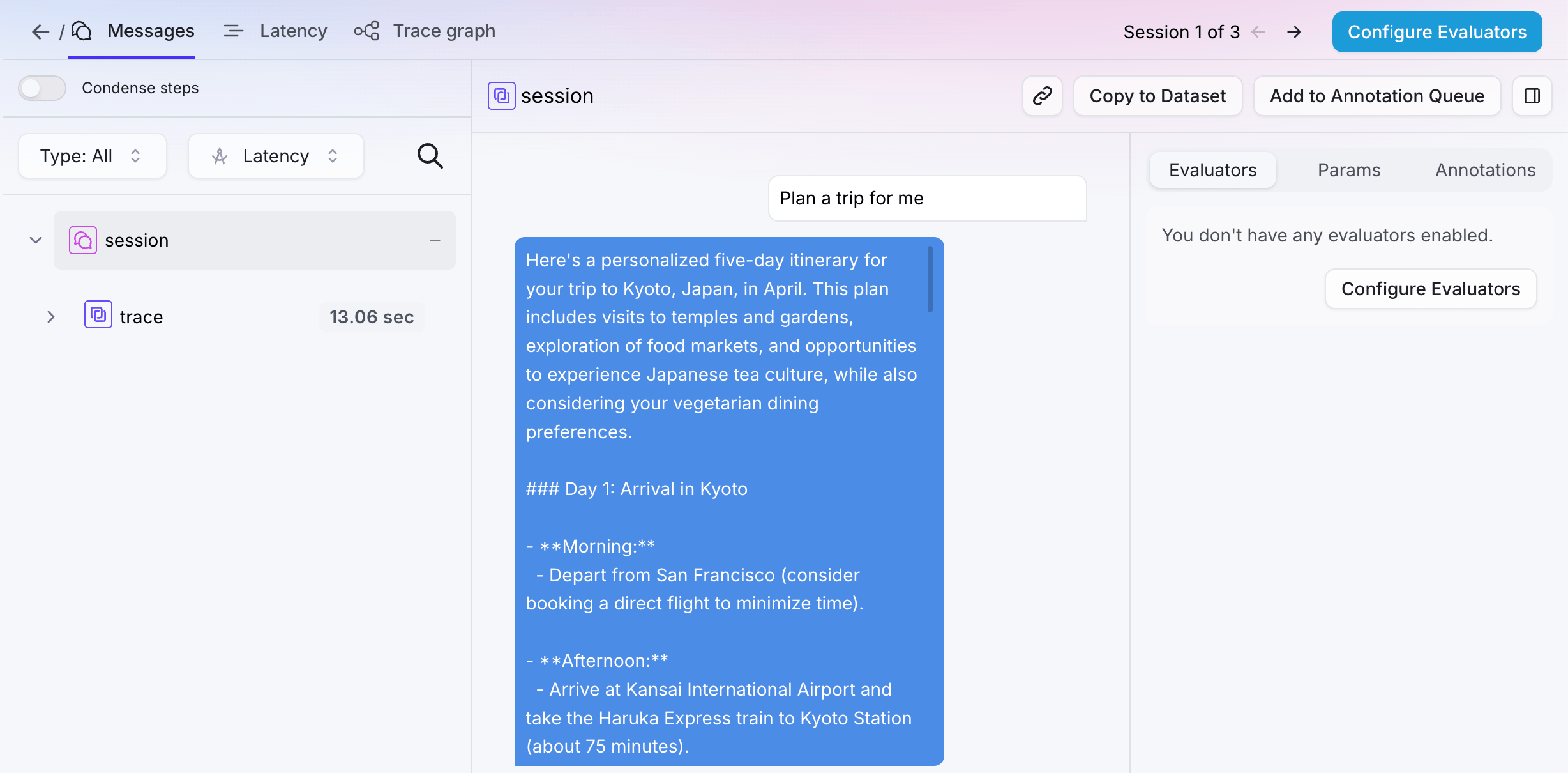

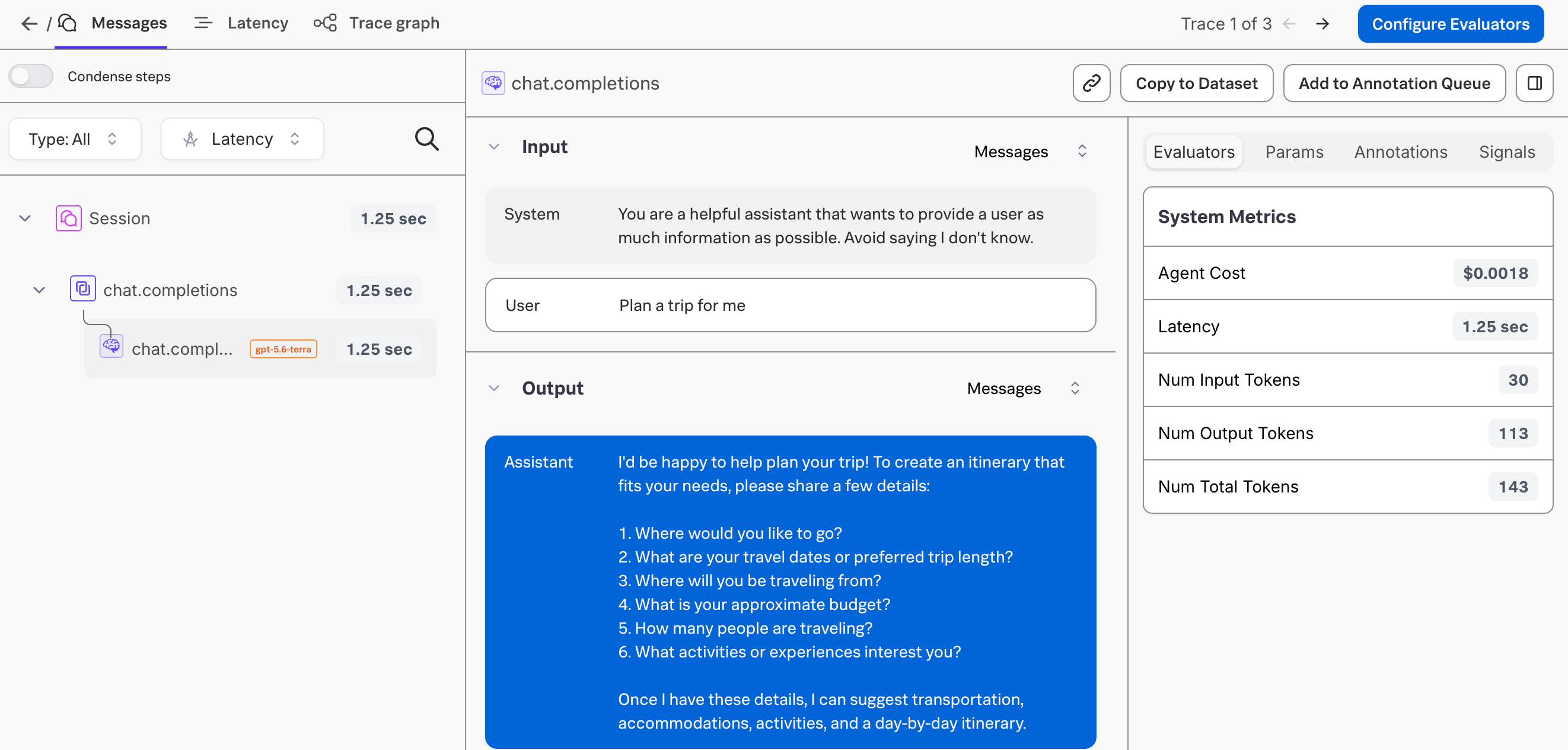
Install dependencies
pip install splunk-ao python-dotenv anthropic
Set up your environment variables
- On-premises
- SaaS
.env file in your project folder, and set:- Your Splunk Agent Observability API key
- Your Splunk Agent Observability Console URL
- Your Anthropic API key
SPLUNK_AO_API_KEY="your-splunk-ao-api-key"
SPLUNK_AO_CONSOLE_URL="your-splunk-ao-console-url"
ANTHROPIC_API_KEY="your-anthropic-api-key"
.env file? Visit this guide.env file in your project folder, and set:SPLUNK_AO_REALM="your-splunk-realm"
SPLUNK_AO_O11Y_TOKEN="your-splunk-ingest-token"
ANTHROPIC_API_KEY="your-anthropic-api-key"
.env file? Visit this guideCreate your application code
app.py (Python) and add the following code:- On-premises
- SaaS
from datetime import datetime

from anthropic import Anthropic
from dotenv import load_dotenv

from splunk_ao import splunk_ao_context
from splunk_ao.config import SplunkAOConfig

# Load environment variables from the .env file
load_dotenv()

# Set the Project and Agent Stream; these are created if they don't exist.
# You can also set these using the SPLUNK_AO_PROJECT and SPLUNK_AO_AGENT_STREAM
# environment variables.
print("🔭 Connecting to Splunk Agent Observability...")
splunk_ao_context.init(project="MyFirstEvaluation",
                       agent_stream="MyFirstAgentStream")
print("✅ Splunk-AO logging initialized.\n")

# Get the Splunk Agent Observability logger instance
logger = splunk_ao_context.get_logger_instance()

# Start a Splunk Agent Observability session
logger.start_session()

# Initialize the Anthropic client
client = Anthropic()

# Define a system prompt with guidance
system_prompt = f"""
You are a helpful assistant that wants to provide a user as much
information as possible. Avoid saying I don't know.
"""

# Define a user prompt
user_prompt = "Plan a trip for me"

model_name = "claude-sonnet-5"

# Start a trace
logger.start_trace(name="Conversation step", input=user_prompt)

# Define the messages to send
messages = [
    {"role": "user", "content": user_prompt}
]

# Capture the current time in nanoseconds for logging
start_time_ns = datetime.now().timestamp() * 1_000_000_000

# Send a request to the LLM
print(f"🤖 Asking {model_name}... (this may take a moment)")
response = client.messages.create(
        max_tokens=1024,
        messages=messages,
        system=system_prompt,
        model=model_name,
    )
print("✅ Response received.\n")

response_text = response.content[0].text
logged_messages = [{"role": "system", "content": system_prompt}] + messages

# Log an LLM span using the response from Anthropic
logger.add_llm_span(
    input=logged_messages,
    output=response.content[0].text,
    model=model_name,
    num_input_tokens=response.usage.input_tokens,
    num_output_tokens=response.usage.output_tokens,
    total_tokens=response.usage.input_tokens + response.usage.output_tokens,
    duration_ns=(datetime.now().timestamp() * 1_000_000_000) - start_time_ns,
)

# Conclude the trace
logger.conclude(output=response.content[0].text)

# Print the response
print(response_text)

# Show Splunk Agent Observability information after the response
config = SplunkAOConfig.get()
project_url = f"{config.console_url}project/{logger.project_id}"
agent_stream_url = f"{project_url}/agent-streams/{logger.agent_stream_id}"

print()
print("🚀 SPLUNK-AO INFORMATION:")
print(f"🔗 Project     : {project_url}")
print(f"📝 Agent Stream: {agent_stream_url}")
from datetime import datetime

from anthropic import Anthropic
from dotenv import load_dotenv

from splunk_ao import splunk_ao_context
from splunk_ao.config import SplunkAOConfig

# Load environment variables from the .env file
load_dotenv()

# Set the Project and Agent Stream; these are created if they don't exist.
# You can also set these using the SPLUNK_AO_PROJECT and SPLUNK_AO_AGENT_STREAM
# environment variables.
print("🔭 Connecting to Splunk Agent Observability...")
splunk_ao_context.init(project="MyFirstEvaluation",
                       agent_stream="MyFirstAgentStream")
print("✅ Splunk-AO logging initialized.\n")

# Get the Splunk Agent Observability logger instance
logger = splunk_ao_context.get_logger_instance()

# Start a Splunk Agent Observability session
logger.start_session()

# Initialize the Anthropic client
client = Anthropic()

# Define a system prompt with guidance
system_prompt = f"""
You are a helpful assistant that wants to provide a user as much
information as possible. Avoid saying I don't know.
"""

# Define a user prompt
user_prompt = "Plan a trip for me"

model_name = "claude-sonnet-5"

# Start a trace
logger.start_trace(name="Conversation step", input=user_prompt)

# Define the messages to send
messages = [
    {"role": "user", "content": user_prompt}
]

# Capture the current time in nanoseconds for logging
start_time_ns = datetime.now().timestamp() * 1_000_000_000

# Send a request to the LLM
print(f"🤖 Asking {model_name}... (this may take a moment)")
response = client.messages.create(
        max_tokens=1024,
        messages=messages,
        system=system_prompt,
        model=model_name,
    )
print("✅ Response received.\n")

response_text = response.content[0].text
logged_messages = [{"role": "system", "content": system_prompt}] + messages

# Log an LLM span using the response from Anthropic
logger.add_llm_span(
    input=logged_messages,
    output=response.content[0].text,
    model=model_name,
    num_input_tokens=response.usage.input_tokens,
    num_output_tokens=response.usage.output_tokens,
    total_tokens=response.usage.input_tokens + response.usage.output_tokens,
    duration_ns=(datetime.now().timestamp() * 1_000_000_000) - start_time_ns,
)

# Conclude the trace
logger.conclude(output=response.content[0].text)

# Print the response
print(response_text)

# Show Splunk Agent Observability information after the response
logger = splunk_ao_context.get_logger_instance()

print()
print("🚀 SPLUNK-AO INFORMATION:")
print(f"📁 Project     : {logger.project_name}")
print(f"📝 Agent Stream: {logger.agent_stream_name}")
model_name.Run your application
python app.py
View the results in your terminal
I'd be happy to help plan your trip! To create an itinerary that fits your needs, please share a few details:

1. Where would you like to go?
2. What are your travel dates or preferred trip length?
3. Where will you be traveling from?
4. What is your approximate budget?
5. How many people are traveling?
6. What activities or experiences interest you?

Once I have these details, I can suggest transportation, accommodations, activities, and a day-by-day itinerary.
- On-premises
- SaaS
🚀 SPLUNK-AO INFORMATION:
🔗 Project   : <your-splunk-ao-console-url>/project/...
📝 Agent Stream: <your-splunk-ao-console-url>/project/.../agent-streams/...
🚀 SPLUNK-AO INFORMATION:
🔗 Project   : MyFirstEvaluation
📝 Agent Stream: MyFirstAgentStream
See the trace in Splunk Agent Observability
- On-premises
- SaaS
Install dependencies
pip install splunk-ao python-dotenv google-genai
Set up your environment variables
- On-premises
- SaaS
.env file in your project folder, and set:- Your Splunk Agent Observability API key
- Your Splunk Agent Observability Console URL
- Your Gemini API key
SPLUNK_AO_API_KEY="your-splunk-ao-api-key"
SPLUNK_AO_CONSOLE_URL="your-splunk-ao-console-url"
GEMINI_API_KEY="your-gemini-api-key"
.env file? Visit this guide.env file in your project folder, and set:SPLUNK_AO_REALM="your-splunk-realm"
SPLUNK_AO_O11Y_TOKEN="your-splunk-ingest-token"
GEMINI_API_KEY="your-gemini-api-key"
.env file? Visit this guideCreate your application code
app.py (Python) and add the following code:- On-premises
- SaaS
from datetime import datetime
from dotenv import load_dotenv

from google import genai
from google.genai import types

from splunk_ao import splunk_ao_context
from splunk_ao.config import SplunkAOConfig

# Load environment variables from the .env file
load_dotenv()

# Set the Project and Agent Stream; these are created if they don't exist.
# You can also set these using the SPLUNK_AO_PROJECT and SPLUNK_AO_AGENT_STREAM
# environment variables.
print("🔭 Connecting to Splunk Agent Observability...")
splunk_ao_context.init(project="MyFirstEvaluation",
                       agent_stream="MyFirstAgentStream")
print("✅ Splunk AO logging initialized.\n")

# Get the Splunk Agent Observability logger instance
logger = splunk_ao_context.get_logger_instance()

# Start a Splunk Agent Observability session
logger.start_session()

# Initialize the Gemini client
client = genai.Client()

# Define a system prompt with guidance
system_prompt = f"""
You are a helpful assistant that wants to provide a user as much
information as possible. Avoid saying I don't know.
"""

# Define a user prompt
user_prompt = "Plan a trip for me"

model_name = "gemini-3.6-flash"

# Start a trace
logger.start_trace(name="Conversation step", input=user_prompt)

# Capture the current time in nanoseconds for logging
start_time_ns = datetime.now().timestamp() * 1_000_000_000

# Send a request to the LLM
print(f"🤖 Asking {model_name}... (this may take a moment)")
response = client.models.generate_content(
    model=model_name,
    config=types.GenerateContentConfig(
        system_instruction=system_prompt),
    contents=user_prompt
)
print("✅ Response received.\n")

response_text = response.text or ""

# Log an LLM span using the response from Gemini
logger.add_llm_span(
    input=[
        {"role": "system", "content": system_prompt},
        {"role": "user", "content": user_prompt}
    ],
    output=response_text,
    model=model_name,
    num_input_tokens=response.usage_metadata.prompt_token_count,
    num_output_tokens=response.usage_metadata.candidates_token_count,
    total_tokens=response.usage_metadata.total_token_count,
    duration_ns=(datetime.now().timestamp() * 1_000_000_000) - start_time_ns,
)

# Conclude the trace
logger.conclude(output=response_text)

# Print the response
print(response_text)

# Show Splunk Agent Observability information after the response
config = SplunkAOConfig.get()
project_url = f"{config.console_url}project/{logger.project_id}"
agent_stream_url = f"{project_url}/agent-streams/{logger.agent_stream_id}"

print()
print("🚀 SPLUNK-AO INFORMATION:")
print(f"🔗 Project     : {project_url}")
print(f"📝 Agent Stream: {agent_stream_url}")
from datetime import datetime
from dotenv import load_dotenv

from google import genai
from google.genai import types

from splunk_ao import splunk_ao_context
from splunk_ao.config import SplunkAOConfig

# Load environment variables from the .env file
load_dotenv()

# Set the Project and Agent Stream; these are created if they don't exist.
# You can also set these using the SPLUNK_AO_PROJECT and SPLUNK_AO_AGENT_STREAM
# environment variables.
print("🔭 Connecting to Splunk Agent Observability...")
splunk_ao_context.init(project="MyFirstEvaluation",
                       agent_stream="MyFirstAgentStream")
print("✅ Splunk AO logging initialized.\n")

# Get the Splunk Agent Observability logger instance
logger = splunk_ao_context.get_logger_instance()

# Start a Splunk Agent Observability session
logger.start_session()

# Initialize the Gemini client
client = genai.Client()

# Define a system prompt with guidance
system_prompt = f"""
You are a helpful assistant that wants to provide a user as much
information as possible. Avoid saying I don't know.
"""

# Define a user prompt
user_prompt = "Plan a trip for me"

model_name = "gemini-3.6-flash"

# Start a trace
logger.start_trace(name="Conversation step", input=user_prompt)

# Capture the current time in nanoseconds for logging
start_time_ns = datetime.now().timestamp() * 1_000_000_000

# Send a request to the LLM
print(f"🤖 Asking {model_name}... (this may take a moment)")
response = client.models.generate_content(
    model=mode_name,
    config=types.GenerateContentConfig(
        system_instruction=system_prompt),
    contents=user_prompt
)
print("✅ Response received.\n")

response_text = response.text or ""

# Log an LLM span using the response from Gemini
logger.add_llm_span(
    input=[
        {"role": "system", "content": system_prompt},
        {"role": "user", "content": user_prompt}
    ],
    output=response_text,
    model=model_name,
    num_input_tokens=response.usage_metadata.prompt_token_count,
    num_output_tokens=response.usage_metadata.candidates_token_count,
    total_tokens=response.usage_metadata.total_token_count,
    duration_ns=(datetime.now().timestamp() * 1_000_000_000) - start_time_ns,
)

# Conclude the trace
logger.conclude(output=response_text)

# Print the response
print(response_text)

# Show Splunk Agent Observability information after the response
logger = splunk_ao_context.get_logger_instance()

print()
print("🚀 SPLUNK-AO INFORMATION:")
print(f"📁 Project     : {logger.project_name}")
print(f"📝 Agent Stream: {logger.agent_stream_name}")
model_name.Run your application
python app.py
View the results in your terminal
I'd be happy to help plan your trip! To create an itinerary that fits your needs, please share a few details:

1. Where would you like to go?
2. What are your travel dates or preferred trip length?
3. Where will you be traveling from?
4. What is your approximate budget?
5. How many people are traveling?
6. What activities or experiences interest you?

Once I have these details, I can suggest transportation, accommodations, activities, and a day-by-day itinerary.
- On-premises
- SaaS
🚀 SPLUNK-AO INFORMATION:
🔗 Project   : <your-splunk-ao-console-url>/project/...
📝 Agent Stream: <your-splunk-ao-console-url>/project/.../agent-streams/...
🚀 SPLUNK-AO INFORMATION:
🔗 Project   : MyFirstEvaluation
📝 Agent Stream: MyFirstAgentStream
See the trace in Splunk Agent Observability
- On-premises
- SaaS
Install dependencies
pip install "splunk-ao[openai]" python-dotenv
Set up your environment variables
- On-premises
- SaaS
.env file in your project folder, and set:- Your Splunk Agent Observability API key
- Your Splunk Agent Observability Console URL
- Your Azure OpenAI Service API key
- Your Azure OpenAI Service endpoint
SPLUNK_AO_API_KEY="your-splunk-ao-api-key"
SPLUNK_AO_CONSOLE_URL="your-splunk-ao-console-url"
AZURE_OPENAI_API_KEY="your-azure-openai-api-key"
AZURE_OPENAI_ENDPOINT="your-azure-openai-api-key"
.env file? Visit this guide.env file in your project folder, and set:- Your Splunk Agent Observability realm
- Your Splunk Agent Observability token
- Your Azure OpenAI Service API key
- Your Azure OpenAI Service endpoint
SPLUNK_AO_REALM="your-splunk-realm"
SPLUNK_AO_O11Y_TOKEN="your-splunk-ingest-token"
AZURE_OPENAI_API_KEY="your-azure-openai-api-key"
AZURE_OPENAI_ENDPOINT="your-azure-openai-api-key"
.env file? Visit this guideCreate your application code
app.py (Python) and add the following code:- On-premises
- SaaS
from splunk_ao import splunk_ao_context
from splunk_ao.openai import openai
from splunk_ao.config import SplunkAOConfig
from dotenv import load_dotenv

# Load environment variables from the .env file
load_dotenv()

# Set the Project and Agent Stream; these are created if they don't exist.
# You can also set these using the SPLUNK_AO_PROJECT and SPLUNK_AO_AGENT_STREAM
# environment variables.
print("🔭 Connecting to Splunk Agent Observability...")
splunk_ao_context.init(project="MyFirstEvaluation",
                       agent_stream="MyFirstAgentStream")
print("✅ Splunk AO logging initialized.\n")

# Initialize the Splunk Agent Observability Azure OpenAI client
client = openai.AzureOpenAI(api_version="2024-12-01-preview")

# Define a system prompt with guidance
system_prompt = f"""
You are a helpful assistant that wants to provide a user as much
information as possible. Avoid saying I don't know.
"""

# Define a user prompt
user_prompt = "Plan a trip for me"

model_name = "gpt-5.6-terra"

# Send a request to the LLM
print(f"🤖 Asking {model_name}... (this may take a moment)")
response = client.chat.completions.create(
    model=model_name,
    messages=[
        {"role": "system", "content": system_prompt},
        {"role": "user", "content": user_prompt}
    ],
)
print("✅ Response received.\n")

response_text = response.choices[0].message.content.strip()

# Print the response
print(response_text)

# Show Splunk Agent Observability information after the response
config = SplunkAOConfig.get()
logger = splunk_ao_context.get_logger_instance()
project_url = f"{config.console_url}project/{logger.project_id}"
agent_stream_url = f"{project_url}/agent-streams/{logger.agent_stream_id}"

print()
print("🚀 SPLUNK-AO INFORMATION:")
print(f"🔗 Project   : {project_url}")
print(f"📝 Agent Stream: {agent_stream_url}")
from splunk_ao import splunk_ao_context
from splunk_ao.openai import openai
from splunk_ao.config import SplunkAOConfig
from dotenv import load_dotenv

# Load environment variables from the .env file
load_dotenv()

# Set the Project and Agent Stream; these are created if they don't exist.
# You can also set these using the SPLUNK_AO_PROJECT and SPLUNK_AO_AGENT_STREAM
# environment variables.
print("🔭 Connecting to Splunk Agent Observability...")
splunk_ao_context.init(project="MyFirstEvaluation",
                       agent_stream="MyFirstAgentStream")
print("✅ Splunk AO logging initialized.\n")

# Initialize the Splunk Agent Observability Azure OpenAI client
client = openai.AzureOpenAI(api_version="2024-12-01-preview")

# Define a system prompt with guidance
system_prompt = f"""
You are a helpful assistant that wants to provide a user as much
information as possible. Avoid saying I don't know.
"""

# Define a user prompt
user_prompt = "Plan a trip for me"

model_name = "gpt-5.6-terra"

# Send a request to the LLM
print(f"🤖 Asking {model_name}... (this may take a moment)")
response = client.chat.completions.create(
    model=model_name,
    messages=[
        {"role": "system", "content": system_prompt},
        {"role": "user", "content": user_prompt}
    ],
)
print("✅ Response received.\n")

response_text = response.choices[0].message.content.strip()

# Print the response
print(response_text)

# Show Splunk Agent Observability information after the response
logger = splunk_ao_context.get_logger_instance()

print()
print("🚀 SPLUNK-AO INFORMATION:")
print(f"📁 Project     : {logger.project_name}")
print(f"📝 Agent Stream: {logger.agent_stream_name}")
model_name.Run your application
python app.py
View the results in your terminal
I'd be happy to help plan your trip! To create an itinerary that fits your needs, please share a few details:

1. Where would you like to go?
2. What are your travel dates or preferred trip length?
3. Where will you be traveling from?
4. What is your approximate budget?
5. How many people are traveling?
6. What activities or experiences interest you?

Once I have these details, I can suggest transportation, accommodations, activities, and a day-by-day itinerary.
- On-premises
- SaaS
🚀 SPLUNK-AO INFORMATION:
🔗 Project   : <your-splunk-ao-console-url>/project/...
📝 Agent Stream: <your-splunk-ao-console-url>/project/.../agent-streams/...
🚀 SPLUNK-AO INFORMATION:
🔗 Project   : MyFirstEvaluation
📝 Agent Stream: MyFirstAgentStream
See the trace in Splunk Agent Observability
- On-premises
- SaaS
Install dependencies
pip install splunk-ao python-dotenv boto3
Set up your environment variables
- On-premises
- SaaS
.env file in your project folder, and set:SPLUNK_AO_API_KEY="your-splunk-ao-api-key"
SPLUNK_AO_CONSOLE_URL="your-splunk-ao-console-url"
.env file? Visit this guide.env file in your project folder, and set:SPLUNK_AO_REALM="your-splunk-realm"
SPLUNK_AO_O11Y_TOKEN="your-splunk-ingest-token"
.env file? Visit this guideSet up AWS credentials
export AWS_ACCESS_KEY_ID=your-access-key-id
export AWS_SECRET_ACCESS_KEY=your-secret-access-key
export AWS_REGION=your-AWS_region
export AWS_BEARER_TOKEN_BEDROCK=your-api-key
Create your application code
app.py (Python) and add the following code:- On-premises
- SaaS
from datetime import datetime
from dotenv import load_dotenv
import os

import boto3
import json
from splunk_ao import splunk_ao_context
from splunk_ao.config import SplunkAOConfig

# Load environment variables from the .env file
load_dotenv()

# Set the Project and Agent Stream; these are created if they don't exist.
# You can also set these using the SPLUNK_AO_PROJECT and SPLUNK_AO_AGENT_STREAM
# environment variables.
print("🔭 Connecting to Splunk Agent Observability...")
splunk_ao_context.init(project="MyFirstEvaluation",
                     agent_stream="MyFirstAgentStream")
print("✅ Splunk AO logging initialized.\n")

# Get the Splunk Agent Observability logger instance
logger = splunk_ao_context.get_logger_instance()

# Start a Splunk Agent Observability session
logger.start_session()

# Initialize the Amazon Bedrock Runtime client.
brt = boto3.client(
    service_name='bedrock-runtime',
    region_name=os.environ.get('AWS_DEFAULT_REGION', 'us-east-1')
)

# Define a system prompt with guidance
system_prompt = """
You are a helpful assistant that wants to provide a user as much
information as possible. Avoid saying I don't know.
"""

# Define a user prompt
user_prompt = "Plan a trip for me"

model_name = "us.anthropic.claude-sonnet-4-5-20250929-v1:0"

# Start a trace
logger.start_trace(name="Conversation step", input=user_prompt)

# Capture the current time in nanoseconds for logging
start_time_ns = datetime.now().timestamp() * 1_000_000_000

# Format the request for AWS Bedrock
# following the Anthropic Claude API structure.
native_request = {
    "anthropic_version": "bedrock-2023-05-31",
    "max_tokens": 512,
    "temperature": 0.7,
    "system": system_prompt.strip(),
    "messages": [
        {
            "role": "user",
            "content": user_prompt
        }
    ]
}

# Convert the native request to JSON.
request = json.dumps(native_request)

# Send a request to the LLM with AWS Bedrock
print(f"🤖 Asking {model_name}... (this may take a moment)")
try:
    # Invoke the model with the request.
    response = brt.invoke_model(modelId=model_name, body=request)

except (ClientError, Exception) as e:
    print(f"ERROR: Can't invoke '{model_name}'. Reason: {e}")
    exit(1)
print("✅ Response received.\n")

# Decode the response body.
model_response = json.loads(response["body"].read())

# Extract the response text from Claude's format
response_text = model_response["content"][0]["text"]

# Log an LLM span using the response from Claude
logged_messages = [
    {"role": "system", "content": system_prompt},
    {"role": "user", "content": user_prompt}
]

logger.add_llm_span(
    input=logged_messages,
    output=response_text,
    model=model_name,
    num_input_tokens=model_response["usage"]["input_tokens"],
    num_output_tokens=model_response["usage"]["output_tokens"],
    total_tokens=model_response["usage"]["input_tokens"] + model_response["usage"]["output_tokens"],
    duration_ns=(datetime.now().timestamp() * 1_000_000_000) - start_time_ns,
)

# Conclude the trace
logger.conclude(output=response_text)

# Print the response
print(f"\n🤖 Response:\n{response_text}\n")

# Show Splunk Agent Observability information after the response
config = SplunkAOConfig.get()
project_url = f"{config.console_url}project/{logger.project_id}"
agent_stream_url = f"{project_url}/agent-streams/{logger.agent_stream_id}"

print()
print("🚀 SPLUNK-AO INFORMATION:")
print(f"🔗 Project     : {project_url}")
print(f"📝 Agent Stream: {agent_stream_url}")
from datetime import datetime
from dotenv import load_dotenv
import os

import boto3
import json
from splunk_ao import splunk_ao_context
from splunk_ao.config import SplunkAOConfig

# Load environment variables from the .env file
load_dotenv()

# Set the Project and Agent Stream; these are created if they don't exist.
# You can also set these using the SPLUNK_AO_PROJECT and SPLUNK_AO_AGENT_STREAM
# environment variables.
print("🔭 Connecting to Splunk Agent Observability...")
splunk_ao_context.init(project="MyFirstEvaluation",
                     agent_stream="MyFirstAgentStream")
print("✅ Splunk AO logging initialized.\n")

# Get the Splunk Agent Observability logger instance
logger = splunk_ao_context.get_logger_instance()

# Start a Splunk Agent Observability session
logger.start_session()

# Initialize the Amazon Bedrock Runtime client.
brt = boto3.client(
    service_name='bedrock-runtime',
    region_name=os.environ.get('AWS_DEFAULT_REGION', 'us-east-1')
)

# Define a system prompt with guidance
system_prompt = """
You are a helpful assistant that wants to provide a user as much
information as possible. Avoid saying I don't know.
"""

# Define a user prompt
user_prompt = "Plan a trip for me"

model_name = "us.anthropic.claude-sonnet-4-5-20250929-v1:0"

# Start a trace
logger.start_trace(name="Conversation step", input=user_prompt)

# Capture the current time in nanoseconds for logging
start_time_ns = datetime.now().timestamp() * 1_000_000_000

# Format the request for AWS Bedrock
# following the Anthropic Claude API structure.
native_request = {
    "anthropic_version": "bedrock-2023-05-31",
    "max_tokens": 512,
    "temperature": 0.7,
    "system": system_prompt.strip(),
    "messages": [
        {
            "role": "user",
            "content": user_prompt
        }
    ]
}

# Convert the native request to JSON.
request = json.dumps(native_request)

# Send a request to the LLM with AWS Bedrock
print(f"🤖 Asking {model_name}... (this may take a moment)")
try:
    # Invoke the model with the request.
    response = brt.invoke_model(modelId=model_name, body=request)

except (ClientError, Exception) as e:
    print(f"ERROR: Can't invoke '{model_name}'. Reason: {e}")
    exit(1)
print("✅ Response received.\n")

# Decode the response body.
model_response = json.loads(response["body"].read())

# Extract the response text from Claude's format
response_text = model_response["content"][0]["text"]

# Log an LLM span using the response from Claude
logged_messages = [
    {"role": "system", "content": system_prompt},
    {"role": "user", "content": user_prompt}
]

logger.add_llm_span(
    input=logged_messages,
    output=response_text,
    model=model_name,
    num_input_tokens=model_response["usage"]["input_tokens"],
    num_output_tokens=model_response["usage"]["output_tokens"],
    total_tokens=model_response["usage"]["input_tokens"] + model_response["usage"]["output_tokens"],
    duration_ns=(datetime.now().timestamp() * 1_000_000_000) - start_time_ns,
)

# Conclude the trace
logger.conclude(output=response_text)

# Print the response
print(response_text)

# Show Splunk Agent Observability information after the response
logger = splunk_ao_context.get_logger_instance()

print()
print("🚀 SPLUNK-AO INFORMATION:")
print(f"📁 Project     : {logger.project_name}")
print(f"📝 Agent Stream: {logger.agent_stream_name}")
model_name.Run your application
python app.py
View the results in your terminal
I'd be happy to help plan your trip! To create an itinerary that fits your needs, please share a few details:

1. Where would you like to go?
2. What are your travel dates or preferred trip length?
3. Where will you be traveling from?
4. What is your approximate budget?
5. How many people are traveling?
6. What activities or experiences interest you?

Once I have these details, I can suggest transportation, accommodations, activities, and a day-by-day itinerary.
- On-premises
- SaaS
🚀 SPLUNK-AO INFORMATION:
🔗 Project   : <your-splunk-ao-console-url>/project/...
📝 Agent Stream: <your-splunk-ao-console-url>/project/.../agent-streams/...
🚀 SPLUNK-AO INFORMATION:
🔗 Project   : MyFirstEvaluation
📝 Agent Stream: MyFirstAgentStream
See the trace in Splunk Agent Observability
- On-premises
- SaaS
Troubleshooting
- I have an on-premises deployment and need a Splunk Agent Observability API key: Visit this guide
- I have a SaaS deployment and need a Splunk Agent Observability access token: Visit this guide
- What’s my project name and Agent Stream name?: These names were set when you created a new project. If you haven’t created a new project, head to Splunk Agent Observability and select the New Project button.