Splunk Agent Observability comes with a set of ready to use Out-of-the-Box evaluators that allow you to see how your AI is performing. With these evaluators, you can quickly spot problems, track improvements, and make your AI work better for your users. These evaluators apply to different node types (such as session, trace, or different span types), depending on the evaluator. You can then expand these evaluators with custom evaluators, using LLM-as-a-judge, or custom code-based evaluators. To calculate Out-of-the-Box evaluators, or LLM-as-a-judge evaluators, you first need to configure an integration with an LLM, or Luna-2. Connect Splunk Agent Observability to your language model by adding your API key on the LLM Integrations page from within the Splunk Agent Observability application. You can improve the evaluator calculation based on your requirements using Autotune. This allows you to continuously provide feedback in natural language that automatically improves the evaluators to align better with your domain, or expected inputs and outputs. Evaluators can be used with experiments, and Agent Streams.

Configure Splunk Agent Observability for Out-of-the-Box and LLM-as-a-judge evaluators

Most Out-of-the-Box evaluators and all LLM-as-a-judge evaluators are LLM-based evaluators. LLM-based evaluators use an LLM to evaluate inputs and outputs. To use these evaluators from Agent Streams or Experiments, you first need to configure an integration with an LLM platform.
1

Navigate to the LLM Integrations page

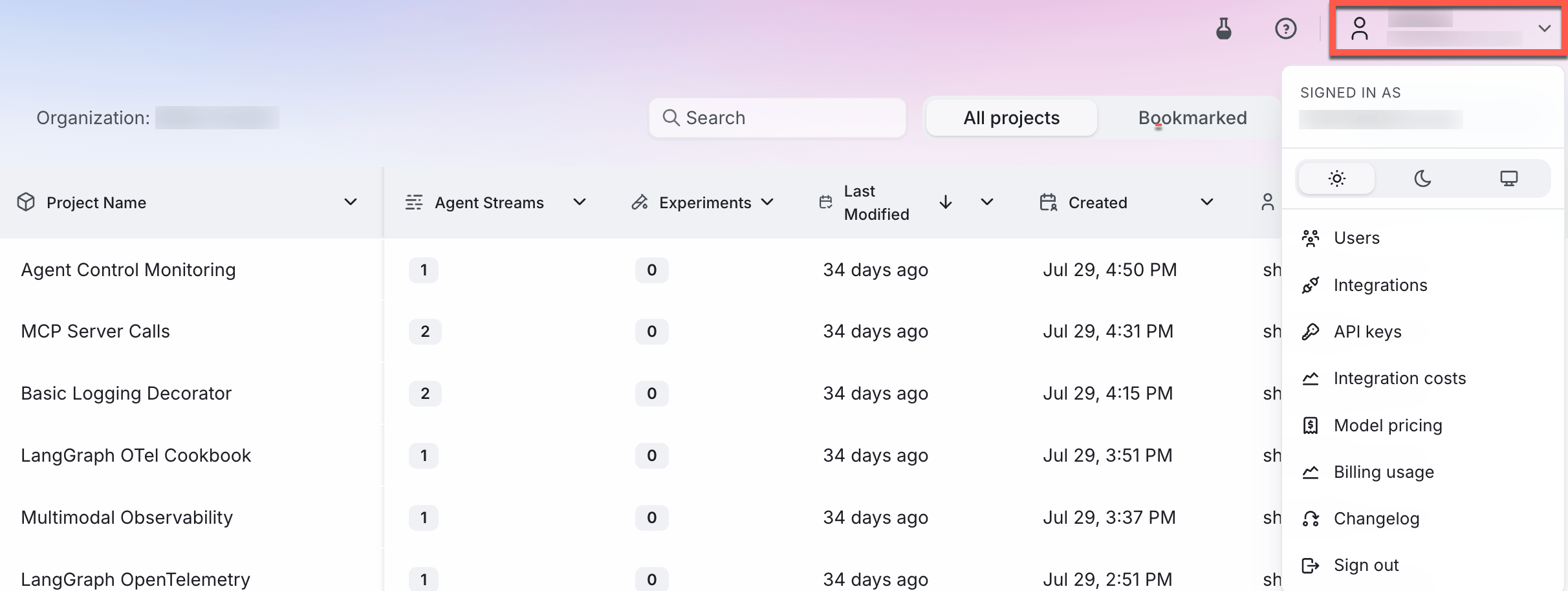
In the Splunk Agent Observability UI, navigate to the LLM Integrations page by selecting your user profile in the upper-right corner and then selecting Integrations.The user menu
2

Add an integration

Locate the LLM provider you are using (or specify a custom integration), then select the +Add Integration button.LLM provider options
3

Add settings

Specify settings for your integration (such as an API key), then select Save changes.

Using evaluators effectively

To get the most value from Splunk Agent Observability’s evaluators:
  1. Start with key evaluators - Focus on evaluators most relevant to your use case
  2. Establish baselines - Understand your current performance before making changes
  3. Track trends over time - Monitor how evaluators change as you iterate on your system
  4. Combine multiple evaluators - Look at related evaluators together for a more complete picture
  5. Set thresholds - Define acceptable ranges for critical evaluators
  6. Improve the evaluators - Use CLHF to continuously improve the evaluators

Out-of-the-Box evaluator categories

Our evaluators can be broken down into seven key categories, each addressing a specific aspect of AI system performance. You may benefit from using evaluators from more than one category. Splunk Agent Observability also supports custom evaluators that are able to be implemented alongside the Out-of-the-Box evaluator options. The Evaluators Comparison provides a full list of the Out-of-the-Box evaluators for each category.

1. Agentic performance evaluators

Agentic Performance Evaluators evaluate how effectively AI agents perform tasks, use tools, and progress toward goals.

2. Expression and readability evaluators

Expression And Readability Evaluators assess the style, tone, clarity, and overall presentation of AI-generated content.

3. Multimodal quality evaluators

Multimodal Quality Evaluators evaluate whether multimodal inputs and outputs (such as images and audio conversations) are usable and compliant for the task at hand.

4. Response quality evaluators

Response Quality Evaluators help you evaluate how correctly, consistently, and in line with ground truth your AI follows instructions and answers user queries in any setting — with or without RAG (correctness, instruction adherence, ground truth adherence).

5. RAG evaluators

RAG Evaluators help you evaluate retrieval and generation quality in RAG pipelines, including retrieval quality (chunk relevance, context relevance, context precision, Precision @ K) and generation quality (chunk attribution utilization, context adherence, completeness).

6. Safety and compliance evaluators

Safety And Compliance Evaluators identify potential risks, harmful content, bias, or privacy concerns in AI interactions.

7. Text-to-SQL evaluators

Text-to-SQL evaluators evaluate the accuracy and effectiveness of SQL queries generated by AI models from natural language inputs.

Next steps

Custom LLM-as-a-judge evaluators

Learn how to create evaluators using LLMs to judge the quality of responses

Custom code-based evaluators

Learn how to create, register, and use custom evaluators to evaluate your LLM applications

Improve LLM-as-a-Judge Evaluators with Autotune

Learn how to improve your LLM-as-a-judge evaluators using expert feedback with Autotune