Sign up, configure your first integration, and launch a Luna Studio training run.
This walkthrough takes you from a fresh sign-up through a custom evaluator training run. If the resulting evaluator passes registration preflight and your deployment has a Splunk Agent Observability connection, you can also publish it to the Splunk Agent Observability evaluators store.
This feature is only available in the Enterprise tier. Luna Studio is deployed by Splunk Agent Observability into your own cluster or cloud. See Availability and deployment, or contact us to get started.
You’ll need:
An instance of Luna Studio deployed for your organization (Luna Studio is part of the enterprise tier — see Availability and deployment).
A labelled CSV test dataset with the columns your evaluator requires, at least 300 rows total, and at least 100 examples per class. The source picker can ingest JSONL, but current run processing requires CSV.
Optional for training, required for import and registration: a Splunk Agent Observability API connection configured by your Luna Studio deployment operator.
Don’t have a labelled training dataset yet? Luna Studio can generate a training set from your test set — see the training-set step below. The test set still needs enough labelled rows for reliable
evaluation.
Open your organization’s Luna Studio URL and create an account.
Create a Luna Studio account
Enter an email and a password (8+ characters), accept the terms, and click Create account.
2
Connect your first LLM provider
On first launch, Luna Studio drops you into the onboarding wizard. Pick a supported LLM provider, such as OpenAI or Anthropic, and click Add integration on the card.A modal opens for the provider’s API key. Paste it and click Save changes.If you plan to import from Splunk Agent Observability or register the result, confirm that your deployment operator configured the Splunk Agent Observability connection. The current backend uses the deployment’s Splunk Agent Observability API URL and key for those operations.
3
Create your first project
Click Continue and enter a project name (e.g. support-tone-classifier). Click Continue again — Luna Studio creates the project and routes you to its Training runs page.
Onboarding, step 2 — name your first project
4
Start a new training run
On the project page, click New run in the top right. The run creation flow opens at Step 1 — Evaluator.
5
Pick an evaluator (Step 1)
Pick an evaluator from the dropdown. The list includes Splunk Agent Observability presets, custom Splunk Agent Observability evaluators, and saved custom prompts that are trainable in Luna Studio.Or click the dropdown’s Use custom prompt option to write your own LLM-as-judge prompt. See Step 1: Evaluator for the full reference.Click Next step.
6
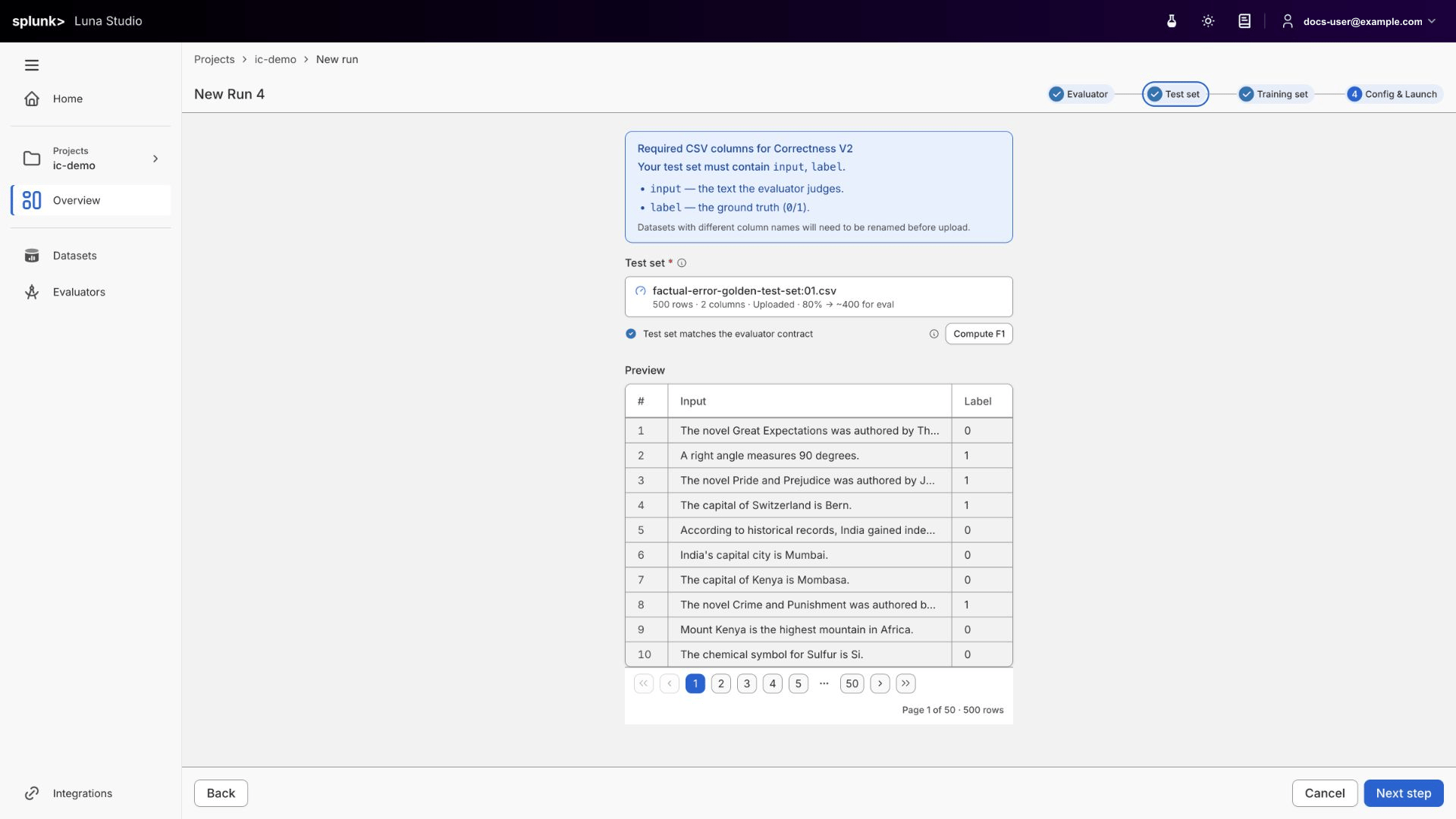
Add a test set (Step 2)
Pick an existing test set from the dropdown, or click Add new test set to upload one.
New run, Step 2 — pick or upload a test set to evaluate against
Test sets need the feature columns required by your evaluator shape, plus a label column. Because you are adding the dataset inside the run wizard, Luna Studio runs evaluator-aware validation before attaching it to the run. Resolve any highlighted errors before continuing.Click Next step.
7
Add a training set (Step 3)
Choose a training source:
Generate from test set (recommended for a first run) — Luna Studio uses 20% of your test set as seed examples and targets 2,000 synthetic labelled examples using your LLM-as-judge prompt from Step 1. Enhancement examples can be appended, so the final row count may be higher.
Add training logs — upload or import your own production logs.
Use existing training set — reuse a training dataset that already exists in your workspace.If you pick Generate, a drawer opens. Pick a model from your configured providers and click Generate sample dataset. Data generation moves through Queued → Generating data → Data ready inside Step 3. Review the sample rows, select any that should steer regeneration, and click Generate final dataset. Wait for the final dataset to be ready before continuing.Click Next step.
8
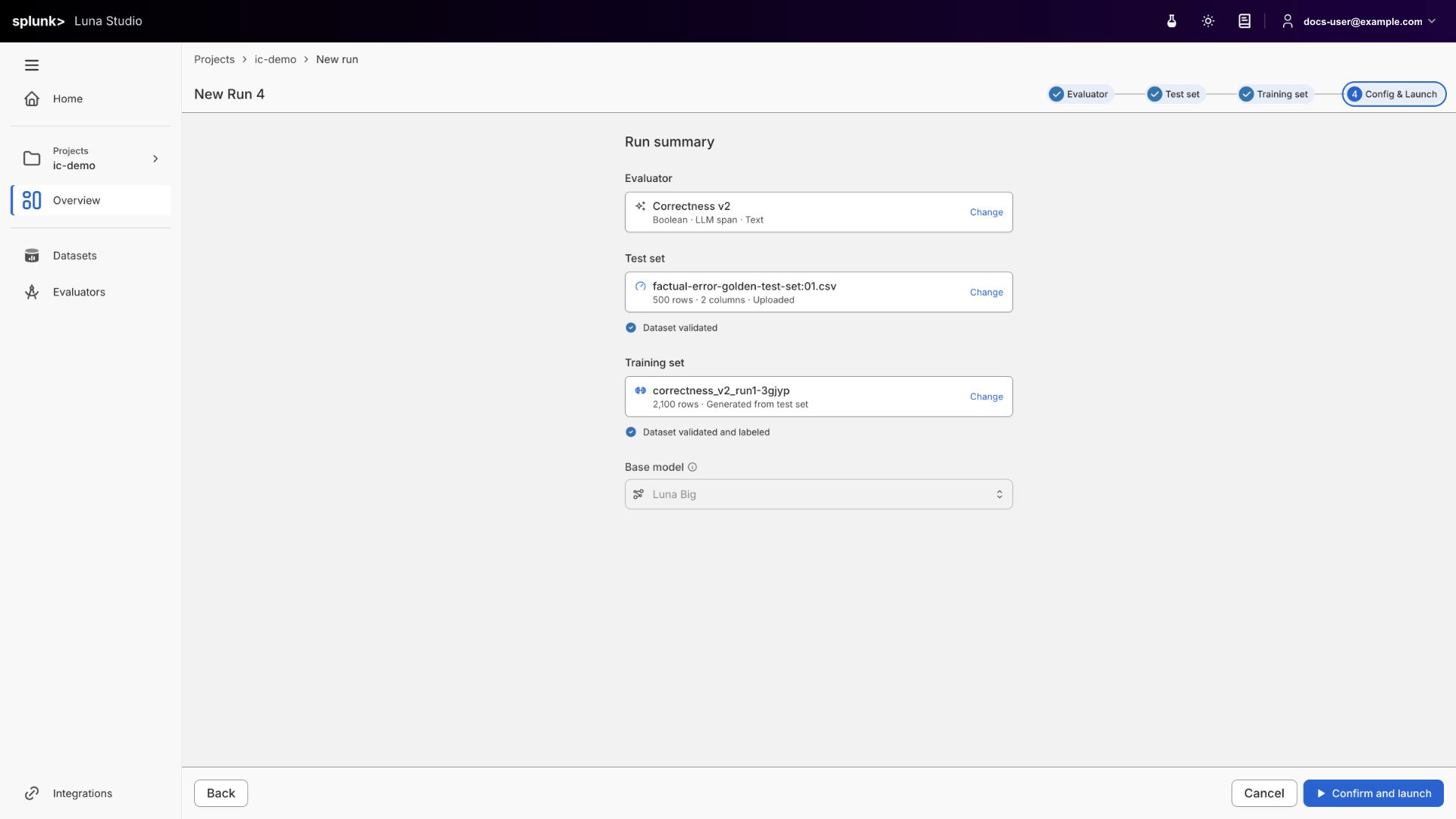
Confirm and launch (Step 4)
Review the run summary. The base model is selected from the models configured for your organization.
New run, Step 4 — pick a base model and launch fine-tuning
Click Confirm and launch. The run enters the Queued state and you’re routed back to the project page.
9
Wait for training to complete
Click the run row to open its details page and see live status. After Confirm and launch, the fine-tuning run follows Queued → Training → Fine-tuned. Any Generating data and Data ready states occurred inside Step 3 before launch.Once the run reaches Fine-tuned, the run details page shows a evaluators grid (F1 score, AUC-ROC, etc.) versus a baseline.
Run details for a fine-tuned run, ready to register
10
Register your evaluator
If the registration preflight passes, the Register evaluator button in the run details footer is enabled. Enter an evaluator name and click Register.After registration succeeds, the evaluator appears in the Splunk Agent Observability evaluators store and the run’s status flips to Registered. If the action is disabled, use its blocker tooltip and registration prerequisites to identify the unsupported contract or missing integration.
You’ve now created your first custom Luna evaluator. If you completed the optional registration step, it is also published to Splunk Agent Observability.
Understand the relationships between projects, runs, evaluators, and datasets.
Luna Studio deep dive
Deep dive on every step of the new run flow.
Datasets
Manage your test sets and training sets.
Integrations
Add provider credentials for the models and platform features your team uses.
{"docsConfig":{"theme":"mint","$schema":"https://mintlify.com/docs.json","name":"Splunk Agent Observability","description":"Documentation for Splunk Agent Observability, the leading observability, evaluation, and production guardrail platform for GenAI and agentic applications.","colors":{"primary":"#FF007F","light":"#02C8FF","dark":"#0A60FF"},"logo":{"light":"https://mintcdn.com/agent-observability-docs/LUm4pxMW6Tbpcv98/logo/logo_splunk-by-cisco_rgb_k.svg?fit=max\u0026auto=format\u0026n=LUm4pxMW6Tbpcv98\u0026q=85\u0026s=19c9c2c83e885f3126b82ae7c2d7c7df","dark":"https://mintcdn.com/agent-observability-docs/LUm4pxMW6Tbpcv98/logo/logo_splunk-by-cisco_rgb_w.svg?fit=max\u0026auto=format\u0026n=LUm4pxMW6Tbpcv98\u0026q=85\u0026s=6a4fb0deae94a52ef4fdc7f8fdf1bbf4"},"favicon":"https://mintcdn.com/agent-observability-docs/k9SS54Ao1ndXmVNI/logo/logo_splunk_favicon.png?fit=max\u0026auto=format\u0026n=k9SS54Ao1ndXmVNI\u0026q=85\u0026s=a5a1763e9e75c820c69ea7b6ddd9401d","background":{"decoration":"gradient"},"navbar":{"primary":{"type":"button","label":"Sign Up","href":"https://www.splunk.com/en_us/about-splunk/contact-us.html"}},"footer":{"socials":{"youtube":"https://www.youtube.com/user/splunkvideos","linkedin":"https://www.linkedin.com/company/splunk","github":"https://github.com/splunk/splunk-ao-python","x":"https://x.com/splunk"},"links":[{"items":[{"label":"Contact us","href":"https://www.splunk.com/en_us/about-splunk/contact-us.html"},{"label":"Legal","href":"https://www.splunk.com/en_us/legal.html"},{"label":"Privacy","href":"https://www.cisco.com/c/en/us/about/legal/privacy-full.html"},{"label":"Terms of Use","href":"https://www.splunk.com/en_us/legal/terms/terms-of-use.html"}]}]},"integrations":{"ga4":{"measurementId":"G-T19PJKCP07"},"gtm":{"tagId":"GTM-585ZMNLS"},"posthog":{"apiKey":"phc_ucgIH1Dwrsq0RY8zxzsrQYWg29RVgFz5bbcV23XQgRw"}},"contextual":{"options":["copy","view","chatgpt","claude"],"display":"header"},"styling":{"latex":false},"navigation":{"pages":[]}},"deployment":{"deploymentMetadataValue":{"subdomain":"agent-observability-docs","hasAudioNarration":false,"actualSubdomain":"agent-observability-docs","customDomains":["agent-observability-docs.splunk.com"],"gitSource":{"type":"github","owner":"splunk","repo":"agent-observability-docs","deployBranch":"main","contentDirectory":"","isPrivate":true,"mountPath":"","label":""},"chroma":{"collectionId":"7169909b-5ecc-493d-b27b-44ecf5e60f39","liveDeploymentHistoryId":"6ae4d8d1a3796f569fccdbd5","schemaVersion":"v3","latestBuiltDeploymentHistoryId":"6ae4d8d1a3796f569fccdbd5"},"entitlements":{"AI_CHAT":{"status":"ENABLED"},"WEB_MCP":{"status":"ENABLED"},"NARRATION":{"status":"ENABLED"}},"buildId":"6aecd7139f70837773b1c45f","clientVersion":"0.0.4071","searchFilterCounts":[{"language":"default","tag":"SDK/API","count":347},{"language":"default","tag":"API","count":265},{"language":"default","tag":"v2","count":263},{"language":"default","tag":"Documentation","count":199},{"language":"default","tag":"Python SDK","count":81},{"language":"default","tag":"splunk_ao","count":80},{"language":"default","tag":"Evaluators","count":58},{"language":"default","tag":"Luna Studio","count":55},{"language":"default","tag":"integrations","count":40},{"language":"default","tag":"Out-of-the-Box Evaluators","count":39}]},"assistantConfig":{"enableAskAiButton":false,"enableStarterQuestions":false,"enableContextualStarterQuestions":false,"enableAskAiSearchBar":true},"basePath":"","hasChatPermissions":true,"hasWebMcpPermissions":true,"toggles":[{"name":"kill-isr","enabled":true,"variant":{"name":"disabled","enabled":false,"feature_enabled":true},"impressionData":false},{"name":"agent-mintlify-slack","enabled":true,"variant":{"name":"disabled","enabled":false,"feature_enabled":true},"impressionData":false},{"name":"agent-integrations-settings","enabled":true,"variant":{"name":"disabled","enabled":false,"feature_enabled":true},"impressionData":false},{"name":"rbac-expansion","enabled":true,"variant":{"name":"disabled","enabled":false,"feature_enabled":true},"impressionData":false},{"name":"automations-pr-grouping","enabled":true,"variant":{"name":"disabled","enabled":false,"feature_enabled":true},"impressionData":false},{"name":"custom-prefix","enabled":true,"variant":{"name":"disabled","enabled":false,"feature_enabled":true},"impressionData":false},{"name":"analytics-v7","enabled":true,"variant":{"name":"disabled","enabled":false,"feature_enabled":true},"impressionData":false},{"name":"user-flows-analytics","enabled":true,"variant":{"name":"disabled","enabled":false,"feature_enabled":true},"impressionData":false},{"name":"no-publish-flow","enabled":true,"variant":{"name":"disabled","enabled":false,"feature_enabled":true},"impressionData":false},{"name":"workos-onboarding","enabled":true,"variant":{"name":"disabled","enabled":false,"feature_enabled":true},"impressionData":false},{"name":"llms-txt-v2","enabled":true,"variant":{"name":"disabled","enabled":false,"feature_enabled":true},"impressionData":false},{"name":"snapshot-serving-live","enabled":true,"variant":{"name":"disabled","enabled":false,"feature_enabled":true},"impressionData":false},{"name":"stripTemperatureMiddleware","enabled":true,"variant":{"name":"disabled","enabled":false,"feature_enabled":true},"impressionData":false},{"name":"support-platform-pylon-zendesk","enabled":true,"variant":{"name":"disabled","enabled":false,"feature_enabled":true},"impressionData":false},{"name":"snapshot-serving","enabled":true,"variant":{"name":"disabled","enabled":false,"feature_enabled":true},"impressionData":false},{"name":"instant-rollback","enabled":true,"variant":{"name":"disabled","enabled":false,"feature_enabled":true},"impressionData":false},{"name":"granular-notifications-server","enabled":true,"variant":{"name":"disabled","enabled":false,"feature_enabled":true},"impressionData":false},{"name":"granular-notifications","enabled":true,"variant":{"name":"disabled","enabled":false,"feature_enabled":true},"impressionData":false},{"name":"automations-fable","enabled":true,"variant":{"name":"disabled","enabled":false,"feature_enabled":true},"impressionData":false},{"name":"fixed-ai-action-pricing","enabled":true,"variant":{"name":"disabled","enabled":false,"feature_enabled":true},"impressionData":false},{"name":"automation-resolve-merge-conflict","enabled":true,"variant":{"name":"disabled","enabled":false,"feature_enabled":true},"impressionData":false},{"name":"scoped-publishing","enabled":true,"variant":{"name":"disabled","enabled":false,"feature_enabled":true},"impressionData":false},{"name":"mintql","enabled":true,"variant":{"name":"disabled","enabled":false,"feature_enabled":true},"impressionData":false},{"name":"page-level-analytics","enabled":true,"variant":{"name":"disabled","enabled":false,"feature_enabled":true},"impressionData":false},{"name":"editor-version-history-v2","enabled":true,"variant":{"name":"disabled","enabled":false,"feature_enabled":true},"impressionData":false},{"name":"billing-page-v2","enabled":true,"variant":{"name":"disabled","enabled":false,"feature_enabled":true},"impressionData":false},{"name":"full-page-search","enabled":true,"variant":{"name":"disabled","enabled":false,"feature_enabled":true},"impressionData":false},{"name":"workspace-projects","enabled":true,"variant":{"name":"disabled","enabled":false,"feature_enabled":true},"impressionData":false},{"name":"assistant-v5","enabled":true,"variant":{"name":"disabled","enabled":false,"feature_enabled":true},"impressionData":false},{"name":"fork-pr-previews","enabled":true,"variant":{"name":"disabled","enabled":false,"feature_enabled":true},"impressionData":false},{"name":"revalidation-jwt","enabled":true,"variant":{"name":"disabled","enabled":false,"feature_enabled":true},"impressionData":false},{"name":"vite-origin","enabled":true,"variant":{"name":"disabled","enabled":false,"feature_enabled":true},"impressionData":false},{"name":"workos-sso-scim","enabled":true,"variant":{"name":"disabled","enabled":false,"feature_enabled":true},"impressionData":false},{"name":"hobby-abuse-scan","enabled":true,"variant":{"name":"disabled","enabled":false,"feature_enabled":true},"impressionData":false},{"name":"dashboard-inbox","enabled":true,"variant":{"name":"disabled","enabled":false,"feature_enabled":true},"impressionData":false},{"name":"workos-signup","enabled":true,"variant":{"name":"disabled","enabled":false,"feature_enabled":true},"impressionData":false},{"name":"turbopuffer-dual-write","enabled":true,"variant":{"name":"disabled","enabled":false,"feature_enabled":true},"impressionData":false},{"name":"workos-enabled","enabled":true,"variant":{"name":"disabled","enabled":false,"feature_enabled":true},"impressionData":false},{"name":"approve-review-flow","enabled":true,"variant":{"name":"disabled","enabled":false,"feature_enabled":true},"impressionData":false},{"name":"sso-setup-deadline-banner","enabled":true,"variant":{"name":"disabled","enabled":false,"feature_enabled":true},"impressionData":false},{"name":"turbopuffer-serve","enabled":true,"variant":{"name":"disabled","enabled":false,"feature_enabled":true},"impressionData":false},{"name":"live-agents","enabled":true,"variant":{"name":"disabled","enabled":false,"feature_enabled":true},"impressionData":false}],"googleFontsInlined":false},"customCss":[{"filePath":"style.css","content":"/* cyrillic-ext */\n@font-face {\n font-family: 'Geist Mono';\n font-style: normal;\n font-weight: 100 900;\n font-display: swap;\n src: url(/_mintlify/assets/fonts/google/s/geistmono/v6/or3nQ6H-1_WfwkMZI_qYFrodmgPn.woff2) format('woff2');\n unicode-range: U+0460-052F, U+1C80-1C8A, U+20B4, U+2DE0-2DFF, U+A640-A69F, U+FE2E-FE2F;\n}\n/* cyrillic */\n@font-face {\n font-family: 'Geist Mono';\n font-style: normal;\n font-weight: 100 900;\n font-display: swap;\n src: url(/_mintlify/assets/fonts/google/s/geistmono/v6/or3nQ6H-1_WfwkMZI_qYFrMdmgPn.woff2) format('woff2');\n unicode-range: U+0301, U+0400-045F, U+0490-0491, U+04B0-04B1, U+2116;\n}\n/* symbols2 */\n@font-face {\n font-family: 'Geist Mono';\n font-style: normal;\n font-weight: 100 900;\n font-display: swap;\n src: url(/_mintlify/assets/fonts/google/s/geistmono/v6/or3nQ6H-1_WfwkMZI_qYFg08vz7ehw.woff2) format('woff2');\n unicode-range: U+2000-2001, U+2004-2008, U+200A, U+23B8-23BD, U+2500-259F;\n}\n/* vietnamese */\n@font-face {\n font-family: 'Geist Mono';\n font-style: normal;\n font-weight: 100 900;\n font-display: swap;\n src: url(/_mintlify/assets/fonts/google/s/geistmono/v6/or3nQ6H-1_WfwkMZI_qYFrgdmgPn.woff2) format('woff2');\n unicode-range: U+0102-0103, U+0110-0111, U+0128-0129, U+0168-0169, U+01A0-01A1, U+01AF-01B0, U+0300-0301, U+0303-0304, U+0308-0309, U+0323, U+0329, U+1EA0-1EF9, U+20AB;\n}\n/* latin-ext */\n@font-face {\n font-family: 'Geist Mono';\n font-style: normal;\n font-weight: 100 900;\n font-display: swap;\n src: url(/_mintlify/assets/fonts/google/s/geistmono/v6/or3nQ6H-1_WfwkMZI_qYFrkdmgPn.woff2) format('woff2');\n unicode-range: U+0100-02BA, U+02BD-02C5, U+02C7-02CC, U+02CE-02D7, U+02DD-02FF, U+0304, U+0308, U+0329, U+1D00-1DBF, U+1E00-1E9F, U+1EF2-1EFF, U+2020, U+20A0-20AB, U+20AD-20C4, U+2113, U+2C60-2C7F, U+A720-A7FF;\n}\n/* latin */\n@font-face {\n font-family: 'Geist Mono';\n font-style: normal;\n font-weight: 100 900;\n font-display: swap;\n src: url(/_mintlify/assets/fonts/google/s/geistmono/v6/or3nQ6H-1_WfwkMZI_qYFrcdmg.woff2) format('woff2');\n unicode-range: U+0000-00FF, U+0131, U+0152-0153, U+02BB-02BC, U+02C6, U+02DA, U+02DC, U+0304, U+0308, U+0329, U+2000-206F, U+20AC, U+2122, U+2191, U+2193, U+2212, U+2215, U+FEFF, U+FFFD;\n}\ndiv.font-mono{font-family:'Geist Mono', 'JetBrains Mono', 'JetBrains Mono Fallback', ui-monospace, SFMono-Regular, Menlo, Monaco, Consolas, 'Liberation Mono', 'Courier New', monospace}div.font-mono pre,div.font-mono code,div.font-mono span{font-family:'Geist Mono', 'JetBrains Mono', 'JetBrains Mono Fallback', ui-monospace, SFMono-Regular, Menlo, Monaco, Consolas, 'Liberation Mono', 'Courier New', monospace}.sidebar>.section{margin-bottom:0px}.sidebar .page{margin-bottom:0px}.sidebar .page a{padding:0px 0px}:target,h2[id]:target,h3[id]:target,h4[id]:target,h5[id]:target,div[id]:target{position:relative;background:linear-gradient(to right, rgba(74, 47, 249, 0.1), rgba(2, 255, 187, 0.1));animation:highlight-section 3s ease-in-out;scroll-margin-top:80px;padding:0.3rem;border-radius:8px;border-left:4px solid #4a2ff9}@keyframes highlight-section{0%{background:linear-gradient(to right, rgba(74, 47, 249, 0.2), rgba(2, 255, 187, 0.2))}50%{background:linear-gradient(to right, rgba(74, 47, 249, 0.2), rgba(2, 255, 187, 0.2))}100%{background:linear-gradient(to right, rgba(74, 47, 249, 0.1), rgba(2, 255, 187, 0.1))}}:root{--api-icon-color: #3D3A3A}[data-theme=\"dark\"],.dark,[data-theme=\"dark\"] img[src*=\"api-reference.svg\"],.dark img[src*=\"api-reference.svg\"],.dark-mode img[src*=\"api-reference.svg\"],html[data-theme=\"dark\"] img[src*=\"api-reference.svg\"],body.dark img[src*=\"api-reference.svg\"]{--api-icon-color: #7C7979}img[src*=\"api-reference.svg\"]{--icon-color: var(--api-icon-color)}.dark img[src*=\"api-reference.svg\"]{color:#7C7979!important}[data-theme=\"dark\"] img[src*=\"api-reference.svg\"],.dark img[src*=\"api-reference.svg\"]{filter:brightness(0) saturate(100%) invert(48%) sepia(0%) saturate(0%) hue-rotate(0deg) brightness(100%) contrast(100%)!important}.page-content img,.docs-main img,.content img{max-width:100%;height:auto;display:block}.page-content table,.docs-main table,.content table{display:block;width:100%;max-width:100%;overflow-x:auto;-webkit-overflow-scrolling:touch}.sidebar{z-index:1}main,.main,.page-content,.docs-main,.content{position:relative;z-index:2;overflow-x:auto}.steps,.columns,.Step,.Columns{overflow:visible}@media (min-width: 1280px){html[data-current-path=\"/references/faqs/errors-catalog\"] div:has(>main#content-container),html[data-current-path=\"/references/faqs/errors-catalog\"] main#content-container{max-width:100rem!important}}.nav-logo{height:2.5rem}"}],"page":{"pagePath":"luna-studio/ui/quickstart","slug":"/luna-studio/ui/quickstart","pageMetadata":{"title":"Quickstart","description":"Sign up, configure your first integration, and launch a Luna Studio training run.","href":"/luna-studio/ui/quickstart"},"description":{"compiledSource":"\"use strict\";\nconst {jsx: _jsx} = arguments[0];\nconst {useMDXComponents: _provideComponents} = arguments[0];\nfunction _createMdxContent(props) {\n const _components = {\n p: \"p\",\n ..._provideComponents(),\n ...props.components\n };\n return _jsx(_components.p, {\n children: \"Sign up, configure your first integration, and launch a Luna Studio training run.\"\n });\n}\nfunction MDXContent(props = {}) {\n const {wrapper: MDXLayout} = {\n ..._provideComponents(),\n ...props.components\n };\n return MDXLayout ? _jsx(MDXLayout, {\n ...props,\n children: _jsx(_createMdxContent, {\n ...props\n })\n }) : _createMdxContent(props);\n}\nreturn {\n default: MDXContent\n};\n","frontmatter":{},"scope":{}},"pageType":"default","mdx":{"mdxSource":{"compiledSource":"\"use strict\";const{Fragment:_Fragment,jsx:_jsx,jsxs:_jsxs}=arguments[0];const{useMDXComponents:_provideComponents}=arguments[0];function _createMdxContent(props){const _components={a:`a`,code:`code`,em:`em`,li:`li`,p:`p`,strong:`strong`,ul:`ul`,..._provideComponents(),...props.components},{Card,CardGroup,Frame,Heading,Note,OptimizedImage,Step,Steps,Tip}=_components;if(!Card)_missingMdxReference(`Card`,true);if(!CardGroup)_missingMdxReference(`CardGroup`,true);if(!Frame)_missingMdxReference(`Frame`,true);if(!Heading)_missingMdxReference(`Heading`,true);if(!Note)_missingMdxReference(`Note`,true);if(!OptimizedImage)_missingMdxReference(`OptimizedImage`,true);if(!Step)_missingMdxReference(`Step`,true);if(!Steps)_missingMdxReference(`Steps`,true);if(!Tip)_missingMdxReference(`Tip`,true);return _jsxs(_Fragment,{children:[_jsx(_components.p,{children:`This walkthrough takes you from a fresh sign-up through a custom evaluator training run. If the resulting evaluator passes registration preflight and your deployment has a Splunk Agent Observability connection, you can also publish it to the Splunk Agent Observability evaluators store.`}),`\n`,_jsx(Heading,{level:`2`,id:`before-you-start`,children:`Before you start`}),`\n`,_jsx(Note,{children:_jsxs(_components.p,{children:[_jsx(_components.strong,{children:`This feature is only available in the Enterprise tier.`}),` Luna Studio is deployed by Splunk Agent Observability into your own cluster or cloud. See `,_jsx(_components.a,{href:`/luna-studio/ui/availability`,children:`Availability and deployment`}),`, or `,_jsx(_components.a,{href:`https://www.splunk.com/en_us/about-splunk/contact-us.html`,children:`contact us`}),` to get started.`]})}),`\n`,_jsx(_components.p,{children:`You’ll need:`}),`\n`,_jsxs(_components.ul,{children:[`\n`,_jsxs(_components.li,{children:[`An instance of Luna Studio deployed for your organization (Luna Studio is part of the enterprise tier — see `,_jsx(_components.a,{href:`/luna-studio/ui/availability`,children:`Availability and deployment`}),`).`]}),`\n`,_jsx(_components.li,{children:`An email address for the Luna Studio account.`}),`\n`,_jsxs(_components.li,{children:[`An API key for at least one supported LLM provider: `,_jsx(_components.a,{href:`https://platform.openai.com/api-keys`,children:`OpenAI`}),`, `,_jsx(_components.a,{href:`https://platform.claude.com/settings/keys`,children:`Anthropic`}),`, `,_jsx(_components.a,{href:`https://aistudio.google.com/apikey`,children:`Google AI Studio`}),`, or `,_jsx(_components.a,{href:`https://console.groq.com/keys`,children:`Groq`}),`.`]}),`\n`,_jsx(_components.li,{children:`A labelled CSV test dataset with the columns your evaluator requires, at least 300 rows total, and at least 100 examples per class. The source picker can ingest JSONL, but current run processing requires CSV.`}),`\n`,_jsxs(_components.li,{children:[_jsx(_components.em,{children:`Optional for training, required for import and registration:`}),` a Splunk Agent Observability API connection configured by your Luna Studio deployment operator.`]}),`\n`]}),`\n`,_jsx(Tip,{children:_jsxs(_components.p,{children:[`Don’t have a labelled training dataset yet? Luna Studio can `,_jsx(_components.strong,{children:`generate a training set`}),` from your test set — see the `,_jsx(_components.a,{href:`#step-6-add-a-training-set`,children:`training-set step below`}),`. The test set still needs enough labelled rows for reliable\nevaluation.`]})}),`\n`,_jsx(Heading,{level:`2`,id:`walkthrough`,children:`Walkthrough`}),`\n`,_jsxs(Steps,{children:[_jsxs(Step,{title:`Sign up`,children:[_jsx(_components.p,{children:`Open your organization’s Luna Studio URL and create an account.`}),` `,_jsx(Frame,{caption:`Create a Luna Studio account`,children:_jsx(OptimizedImage,{src:`https://mintcdn.com/agent-observability-docs/s87N8XuXiH5pBNTj/images/luna-studio/auth/sign-up.png?fit=max\u0026auto=format\u0026n=s87N8XuXiH5pBNTj\u0026q=85\u0026s=5c14be710f85443241acbf61890e3b4e`,alt:`Sign up screen`,\"data-og-width\":`1920`,width:`1920`,\"data-og-height\":`1080`,height:`1080`,\"data-path\":`images/luna-studio/auth/sign-up.png`,\"data-optimize\":`true`,\"data-opv\":`3`,srcset:`https://mintcdn.com/agent-observability-docs/s87N8XuXiH5pBNTj/images/luna-studio/auth/sign-up.png?w=280\u0026fit=max\u0026auto=format\u0026n=s87N8XuXiH5pBNTj\u0026q=85\u0026s=146d544d8983472bff112bd2acb47555 280w, https://mintcdn.com/agent-observability-docs/s87N8XuXiH5pBNTj/images/luna-studio/auth/sign-up.png?w=560\u0026fit=max\u0026auto=format\u0026n=s87N8XuXiH5pBNTj\u0026q=85\u0026s=b2a5e0e5380012baab57b25808231ce9 560w, https://mintcdn.com/agent-observability-docs/s87N8XuXiH5pBNTj/images/luna-studio/auth/sign-up.png?w=840\u0026fit=max\u0026auto=format\u0026n=s87N8XuXiH5pBNTj\u0026q=85\u0026s=0bc5e6d4e5f744952f3069b1d9c766b4 840w, https://mintcdn.com/agent-observability-docs/s87N8XuXiH5pBNTj/images/luna-studio/auth/sign-up.png?w=1100\u0026fit=max\u0026auto=format\u0026n=s87N8XuXiH5pBNTj\u0026q=85\u0026s=197f457191f3d498c47e64f7e8d0f079 1100w, https://mintcdn.com/agent-observability-docs/s87N8XuXiH5pBNTj/images/luna-studio/auth/sign-up.png?w=1650\u0026fit=max\u0026auto=format\u0026n=s87N8XuXiH5pBNTj\u0026q=85\u0026s=315ff64c2c6713c134593ebee1f827da 1650w, https://mintcdn.com/agent-observability-docs/s87N8XuXiH5pBNTj/images/luna-studio/auth/sign-up.png?w=2500\u0026fit=max\u0026auto=format\u0026n=s87N8XuXiH5pBNTj\u0026q=85\u0026s=e4829f1204604ed0e7e1ee84bd4abe20 2500w`})}),_jsxs(_components.p,{children:[`Enter an email and a password (8+ characters), accept the terms, and click `,_jsx(_components.strong,{children:`Create account`}),`.`]})]}),_jsxs(Step,{title:`Connect your first LLM provider`,children:[_jsxs(_components.p,{children:[`On first launch, Luna Studio drops you into the onboarding wizard. Pick a supported LLM provider, such as OpenAI or Anthropic, and click `,_jsx(_components.strong,{children:`Add integration`}),` on the card.`]}),_jsxs(_components.p,{children:[`A modal opens for the provider’s API key. Paste it and click `,_jsx(_components.strong,{children:`Save changes`}),`.`]}),_jsx(_components.p,{children:`If you plan to import from Splunk Agent Observability or register the result, confirm that your deployment operator configured the Splunk Agent Observability connection. The current backend uses the deployment’s Splunk Agent Observability API URL and key for those operations.`})]}),_jsxs(Step,{title:`Create your first project`,children:[_jsxs(_components.p,{children:[`Click `,_jsx(_components.strong,{children:`Continue`}),` and enter a project name (e.g. `,_jsx(_components.code,{children:`support-tone-classifier`}),`). Click `,_jsx(_components.strong,{children:`Continue`}),` again — Luna Studio creates the project and routes you to its `,_jsx(_components.strong,{children:`Training runs`}),` page.`]}),` `,_jsx(Frame,{caption:`Onboarding, step 2 — name your first project`,children:_jsx(OptimizedImage,{src:`https://mintcdn.com/agent-observability-docs/s87N8XuXiH5pBNTj/images/luna-studio/onboarding/step-2-create-project.png?fit=max\u0026auto=format\u0026n=s87N8XuXiH5pBNTj\u0026q=85\u0026s=a21f8d0ae6a024059fa030c02610353e`,alt:`Onboarding step 2`,\"data-og-width\":`1920`,width:`1920`,\"data-og-height\":`1080`,height:`1080`,\"data-path\":`images/luna-studio/onboarding/step-2-create-project.png`,\"data-optimize\":`true`,\"data-opv\":`3`,srcset:`https://mintcdn.com/agent-observability-docs/s87N8XuXiH5pBNTj/images/luna-studio/onboarding/step-2-create-project.png?w=280\u0026fit=max\u0026auto=format\u0026n=s87N8XuXiH5pBNTj\u0026q=85\u0026s=74878ca9f01d8a8a2895d69c9cb8bedd 280w, https://mintcdn.com/agent-observability-docs/s87N8XuXiH5pBNTj/images/luna-studio/onboarding/step-2-create-project.png?w=560\u0026fit=max\u0026auto=format\u0026n=s87N8XuXiH5pBNTj\u0026q=85\u0026s=f1e93124388601f33e78efcd40609016 560w, https://mintcdn.com/agent-observability-docs/s87N8XuXiH5pBNTj/images/luna-studio/onboarding/step-2-create-project.png?w=840\u0026fit=max\u0026auto=format\u0026n=s87N8XuXiH5pBNTj\u0026q=85\u0026s=c46b376388da34865c43fccb5936a8ad 840w, https://mintcdn.com/agent-observability-docs/s87N8XuXiH5pBNTj/images/luna-studio/onboarding/step-2-create-project.png?w=1100\u0026fit=max\u0026auto=format\u0026n=s87N8XuXiH5pBNTj\u0026q=85\u0026s=0a8a583472b6a6bddfc0b048de2387dc 1100w, https://mintcdn.com/agent-observability-docs/s87N8XuXiH5pBNTj/images/luna-studio/onboarding/step-2-create-project.png?w=1650\u0026fit=max\u0026auto=format\u0026n=s87N8XuXiH5pBNTj\u0026q=85\u0026s=c16f6c99fb82e5ccf3211cad4514dfee 1650w, https://mintcdn.com/agent-observability-docs/s87N8XuXiH5pBNTj/images/luna-studio/onboarding/step-2-create-project.png?w=2500\u0026fit=max\u0026auto=format\u0026n=s87N8XuXiH5pBNTj\u0026q=85\u0026s=f7ff4bd5b1d56ac63d2c4896cbeeebb0 2500w`})})]}),_jsxs(Step,{title:`Start a new training run`,children:[`On the project page, click `,_jsx(_components.strong,{children:`New run`}),` in the top right. The run creation flow opens at `,_jsx(_components.strong,{children:`Step 1 — Evaluator`}),`.`]}),_jsxs(Step,{title:`Pick an evaluator (Step 1)`,children:[_jsx(_components.p,{children:`Pick an evaluator from the dropdown. The list includes Splunk Agent Observability presets, custom Splunk Agent Observability evaluators, and saved custom prompts that are trainable in Luna Studio.`}),_jsxs(_components.p,{children:[`Or click the dropdown’s `,_jsx(_components.strong,{children:`Use custom prompt`}),` option to write your own LLM-as-judge prompt. See `,_jsx(_components.a,{href:`/luna-studio/ui/runs/new-run/step-1-evaluator`,children:`Step 1: Evaluator`}),` for the full reference.`]}),_jsxs(_components.p,{children:[`Click `,_jsx(_components.strong,{children:`Next step`}),`.`]})]}),_jsxs(Step,{title:`Add a test set (Step 2)`,children:[_jsxs(_components.p,{children:[`Pick an existing test set from the dropdown, or click `,_jsx(_components.strong,{children:`Add new test set`}),` to upload one.`]}),` `,_jsx(Frame,{caption:`New run, Step 2 — pick or upload a test set to evaluate against`,children:_jsx(OptimizedImage,{src:`https://mintcdn.com/agent-observability-docs/s87N8XuXiH5pBNTj/images/luna-studio/runs/new-run-test-set.png?fit=max\u0026auto=format\u0026n=s87N8XuXiH5pBNTj\u0026q=85\u0026s=4a3a00e08d8d65a5790d28435bed66bf`,alt:`Test set step`,\"data-og-width\":`1920`,width:`1920`,\"data-og-height\":`1080`,height:`1080`,\"data-path\":`images/luna-studio/runs/new-run-test-set.png`,\"data-optimize\":`true`,\"data-opv\":`3`,srcset:`https://mintcdn.com/agent-observability-docs/s87N8XuXiH5pBNTj/images/luna-studio/runs/new-run-test-set.png?w=280\u0026fit=max\u0026auto=format\u0026n=s87N8XuXiH5pBNTj\u0026q=85\u0026s=f5d86daae7c9ddffe86a30c18766258c 280w, https://mintcdn.com/agent-observability-docs/s87N8XuXiH5pBNTj/images/luna-studio/runs/new-run-test-set.png?w=560\u0026fit=max\u0026auto=format\u0026n=s87N8XuXiH5pBNTj\u0026q=85\u0026s=e0f0b76798668645beea18f0ba5e0dc4 560w, https://mintcdn.com/agent-observability-docs/s87N8XuXiH5pBNTj/images/luna-studio/runs/new-run-test-set.png?w=840\u0026fit=max\u0026auto=format\u0026n=s87N8XuXiH5pBNTj\u0026q=85\u0026s=314b82edc5bbe4259a6fe764aa3dd4e1 840w, https://mintcdn.com/agent-observability-docs/s87N8XuXiH5pBNTj/images/luna-studio/runs/new-run-test-set.png?w=1100\u0026fit=max\u0026auto=format\u0026n=s87N8XuXiH5pBNTj\u0026q=85\u0026s=2d264c3c9b8743cbb37fb2ef89e799b0 1100w, https://mintcdn.com/agent-observability-docs/s87N8XuXiH5pBNTj/images/luna-studio/runs/new-run-test-set.png?w=1650\u0026fit=max\u0026auto=format\u0026n=s87N8XuXiH5pBNTj\u0026q=85\u0026s=2b29cee9905ffe279d0cd8a1c81c1ab8 1650w, https://mintcdn.com/agent-observability-docs/s87N8XuXiH5pBNTj/images/luna-studio/runs/new-run-test-set.png?w=2500\u0026fit=max\u0026auto=format\u0026n=s87N8XuXiH5pBNTj\u0026q=85\u0026s=9b889e94b707b97d356fbc5992d06439 2500w`})}),_jsxs(_components.p,{children:[`Test sets need the feature columns required by your evaluator shape, plus a `,_jsx(_components.code,{children:`label`}),` column. Because you are adding the dataset inside the run wizard, Luna Studio runs evaluator-aware validation before attaching it to the run. Resolve any highlighted errors before continuing.`]}),_jsxs(_components.p,{children:[`Click `,_jsx(_components.strong,{children:`Next step`}),`.`]})]}),_jsxs(Step,{title:`Add a training set (Step 3)`,id:`step-6-add-a-training-set`,children:[_jsx(_components.p,{children:`Choose a training source:`}),_jsxs(_components.ul,{children:[`\n`,_jsxs(_components.li,{children:[`\n`,_jsxs(_components.p,{children:[_jsx(_components.strong,{children:`Generate from test set`}),` (recommended for a first run) — Luna Studio uses 20% of your test set as seed examples and targets 2,000 synthetic labelled examples using your LLM-as-judge prompt from Step 1. Enhancement examples can be appended, so the final row count may be higher.`]}),`\n`]}),`\n`,_jsxs(_components.li,{children:[`\n`,_jsxs(_components.p,{children:[_jsx(_components.strong,{children:`Add training logs`}),` — upload or import your own production logs.`]}),`\n`]}),`\n`,_jsxs(_components.li,{children:[`\n`,_jsxs(_components.p,{children:[_jsx(_components.strong,{children:`Use existing training set`}),` — reuse a training dataset that already exists in your workspace.`]}),`\n`,_jsxs(_components.p,{children:[`If you pick Generate, a drawer opens. Pick a model from your configured providers and click `,_jsx(_components.strong,{children:`Generate sample dataset`}),`. Data generation moves through `,_jsx(_components.strong,{children:`Queued → Generating data → Data ready`}),` inside Step 3. Review the sample rows, select any that should steer regeneration, and click `,_jsx(_components.strong,{children:`Generate final dataset`}),`. Wait for the final dataset to be ready before continuing.`]}),`\n`,_jsxs(_components.p,{children:[`Click `,_jsx(_components.strong,{children:`Next step`}),`.`]}),`\n`]}),`\n`]})]}),_jsxs(Step,{title:`Confirm and launch (Step 4)`,children:[_jsx(_components.p,{children:`Review the run summary. The base model is selected from the models configured for your organization.`}),` `,_jsx(Frame,{caption:`New run, Step 4 — pick a base model and launch fine-tuning`,children:_jsx(OptimizedImage,{src:`https://mintcdn.com/agent-observability-docs/s87N8XuXiH5pBNTj/images/luna-studio/runs/new-run-config-launch.png?fit=max\u0026auto=format\u0026n=s87N8XuXiH5pBNTj\u0026q=85\u0026s=798ae8397caaef182edead43dcaac328`,alt:`Config and launch step`,\"data-og-width\":`1920`,width:`1920`,\"data-og-height\":`1080`,height:`1080`,\"data-path\":`images/luna-studio/runs/new-run-config-launch.png`,\"data-optimize\":`true`,\"data-opv\":`3`,srcset:`https://mintcdn.com/agent-observability-docs/s87N8XuXiH5pBNTj/images/luna-studio/runs/new-run-config-launch.png?w=280\u0026fit=max\u0026auto=format\u0026n=s87N8XuXiH5pBNTj\u0026q=85\u0026s=0929fbace98be284e675435498e76ad2 280w, https://mintcdn.com/agent-observability-docs/s87N8XuXiH5pBNTj/images/luna-studio/runs/new-run-config-launch.png?w=560\u0026fit=max\u0026auto=format\u0026n=s87N8XuXiH5pBNTj\u0026q=85\u0026s=a3e09b720842f1c73ce341cde959e450 560w, https://mintcdn.com/agent-observability-docs/s87N8XuXiH5pBNTj/images/luna-studio/runs/new-run-config-launch.png?w=840\u0026fit=max\u0026auto=format\u0026n=s87N8XuXiH5pBNTj\u0026q=85\u0026s=3ec9be098a62adac4c8fa6ee4fd70ea3 840w, https://mintcdn.com/agent-observability-docs/s87N8XuXiH5pBNTj/images/luna-studio/runs/new-run-config-launch.png?w=1100\u0026fit=max\u0026auto=format\u0026n=s87N8XuXiH5pBNTj\u0026q=85\u0026s=29c4397ccd22abc41c221245097a600b 1100w, https://mintcdn.com/agent-observability-docs/s87N8XuXiH5pBNTj/images/luna-studio/runs/new-run-config-launch.png?w=1650\u0026fit=max\u0026auto=format\u0026n=s87N8XuXiH5pBNTj\u0026q=85\u0026s=4589f06d270194482a3a670b9da3888b 1650w, https://mintcdn.com/agent-observability-docs/s87N8XuXiH5pBNTj/images/luna-studio/runs/new-run-config-launch.png?w=2500\u0026fit=max\u0026auto=format\u0026n=s87N8XuXiH5pBNTj\u0026q=85\u0026s=159f20044dfe348338dc104859743f6f 2500w`})}),_jsxs(_components.p,{children:[`Click `,_jsx(_components.strong,{children:`Confirm and launch`}),`. The run enters the `,_jsx(_components.strong,{children:`Queued`}),` state and you’re routed back to the project page.`]})]}),_jsxs(Step,{title:`Wait for training to complete`,children:[_jsxs(_components.p,{children:[`Click the run row to open its details page and see live status. After `,_jsx(_components.strong,{children:`Confirm and launch`}),`, the fine-tuning run follows `,_jsx(_components.strong,{children:`Queued → Training → Fine-tuned`}),`. Any `,_jsx(_components.strong,{children:`Generating data`}),` and `,_jsx(_components.strong,{children:`Data ready`}),` states occurred inside Step 3 before launch.`]}),_jsxs(_components.p,{children:[`Once the run reaches `,_jsx(_components.strong,{children:`Fine-tuned`}),`, the run details page shows a evaluators grid (F1 score, AUC-ROC, etc.) versus a baseline.`]}),` `,_jsx(Frame,{caption:`Run details for a fine-tuned run, ready to register`,children:_jsx(OptimizedImage,{src:`https://mintcdn.com/agent-observability-docs/s87N8XuXiH5pBNTj/images/luna-studio/runs/run-details.png?fit=max\u0026auto=format\u0026n=s87N8XuXiH5pBNTj\u0026q=85\u0026s=95e2b775f24dccd3ac1dd0dd54b0e99d`,alt:`Run details`,\"data-og-width\":`1920`,width:`1920`,\"data-og-height\":`1080`,height:`1080`,\"data-path\":`images/luna-studio/runs/run-details.png`,\"data-optimize\":`true`,\"data-opv\":`3`,srcset:`https://mintcdn.com/agent-observability-docs/s87N8XuXiH5pBNTj/images/luna-studio/runs/run-details.png?w=280\u0026fit=max\u0026auto=format\u0026n=s87N8XuXiH5pBNTj\u0026q=85\u0026s=2628bc32d96f60b84edb862c6344a076 280w, https://mintcdn.com/agent-observability-docs/s87N8XuXiH5pBNTj/images/luna-studio/runs/run-details.png?w=560\u0026fit=max\u0026auto=format\u0026n=s87N8XuXiH5pBNTj\u0026q=85\u0026s=1c159e1ce3a5ae7a7995aace2cd969b8 560w, https://mintcdn.com/agent-observability-docs/s87N8XuXiH5pBNTj/images/luna-studio/runs/run-details.png?w=840\u0026fit=max\u0026auto=format\u0026n=s87N8XuXiH5pBNTj\u0026q=85\u0026s=d0bd35e2510d33e2d8208b47e122daf3 840w, https://mintcdn.com/agent-observability-docs/s87N8XuXiH5pBNTj/images/luna-studio/runs/run-details.png?w=1100\u0026fit=max\u0026auto=format\u0026n=s87N8XuXiH5pBNTj\u0026q=85\u0026s=641d984a1f7c5255ffbb63b16fec7236 1100w, https://mintcdn.com/agent-observability-docs/s87N8XuXiH5pBNTj/images/luna-studio/runs/run-details.png?w=1650\u0026fit=max\u0026auto=format\u0026n=s87N8XuXiH5pBNTj\u0026q=85\u0026s=ad5ee25add672de70eae0e980f962fdb 1650w, https://mintcdn.com/agent-observability-docs/s87N8XuXiH5pBNTj/images/luna-studio/runs/run-details.png?w=2500\u0026fit=max\u0026auto=format\u0026n=s87N8XuXiH5pBNTj\u0026q=85\u0026s=5fe4f124e3060110ff8be534859a1226 2500w`})})]}),_jsxs(Step,{title:`Register your evaluator`,children:[_jsxs(_components.p,{children:[`If the registration preflight passes, the `,_jsx(_components.strong,{children:`Register evaluator`}),` button in the run details footer is enabled. Enter an evaluator name and click `,_jsx(_components.strong,{children:`Register`}),`.`]}),_jsxs(_components.p,{children:[`After registration succeeds, the evaluator appears in the `,_jsx(_components.a,{href:`/concepts/evaluators/overview`,children:`Splunk Agent Observability evaluators store`}),` and the run’s status flips to `,_jsx(_components.strong,{children:`Registered`}),`. If the action is disabled, use its blocker tooltip and `,_jsx(_components.a,{href:`/luna-studio/ui/runs/register-evaluator#prerequisites`,children:`registration prerequisites`}),` to identify the unsupported contract or missing integration.`]})]})]}),`\n`,_jsx(_components.p,{children:`You’ve now created your first custom Luna evaluator. If you completed the optional registration step, it is also published to Splunk Agent Observability.`}),`\n`,_jsx(Heading,{level:`2`,id:`what’s-next`,children:`What’s next`}),`\n`,_jsxs(CardGroup,{cols:2,children:[_jsx(Card,{title:`Core concepts`,icon:`book-open`,href:`/luna-studio/ui/core-concepts`,children:_jsx(_components.p,{children:`Understand the relationships between projects, runs, evaluators, and datasets.`})}),_jsx(Card,{title:`Luna Studio deep dive`,icon:`wand-magic-sparkles`,href:`/luna-studio/ui/runs/new-run/overview`,children:_jsx(_components.p,{children:`Deep dive on every step of the new run flow.`})}),_jsx(Card,{title:`Datasets`,icon:`database`,href:`/luna-studio/ui/datasets/overview`,children:_jsx(_components.p,{children:`Manage your test sets and training sets.`})}),_jsx(Card,{title:`Integrations`,icon:`plug`,href:`/luna-studio/ui/integrations/overview`,children:_jsx(_components.p,{children:`Add provider credentials for the models and platform features your team uses.`})})]})]})}function MDXContent(props={}){const{wrapper:MDXLayout}={..._provideComponents(),...props.components};return MDXLayout?_jsx(MDXLayout,{...props,children:_jsx(_createMdxContent,{...props})}):_createMdxContent(props)}return{default:MDXContent};function _missingMdxReference(id,component){throw new Error(`Expected `+(component?`component`:`object`)+\" `\"+id+\"` to be defined: you likely forgot to import, pass, or provide it.\")}","frontmatter":{},"scope":{"config":{},"pageMetadata":{"title":"Quickstart","description":"Sign up, configure your first integration, and launch a Luna Studio training run.","href":"/luna-studio/ui/quickstart"}}},"mdxSourceWithNoJs":null},"mdxExtracts":{"tableOfContents":[{"title":"Before you start","slug":"before-you-start","depth":2,"children":[]},{"title":"Walkthrough","slug":"walkthrough","depth":2,"children":[]},{"title":"What’s next","slug":"what’s-next","depth":2,"children":[]}],"codeExamples":{}},"jsLinks":["/_mintlify/custom/agent-observability-docs/ea7d5bd1caa6468a/script.js","/_mintlify/custom/agent-observability-docs/6398132c924e67d9/snippets/components/errors-data.js"],"subdomain":"agent-observability-docs","siteName":"Splunk Agent Observability","title":"Quickstart - Splunk Agent Observability","navMaps":{"firstHrefInVersion":{},"firstHrefInLanguage":{}},"lastModified":"2026-09-04T16:05:24.109Z","originalFileLocation":"luna-studio/ui/quickstart.mdx"},"headHtml":"\u003cscript data-mint-head>(function(){var d=document.documentElement,p=null;if(!p){try{p=localStorage.getItem(\"isDarkMode\")}catch(e){}if(p==='true')p='dark';else if(p==='false')p='light';if(p!=='light'\u0026\u0026p!=='dark'\u0026\u0026p!=='system')p=\"system\"}var r=p==='system'?(matchMedia(\"(prefers-color-scheme: dark)\").matches?'dark':'light'):p;d.classList.remove(r==='dark'?'light':'dark');d.classList.add(r);d.setAttribute(\"data-theme-preference\",p)})();\u003c/script>\u003cmeta data-mint-head name=\"description\" content=\"Sign up, configure your first integration, and launch a Luna Studio training run.\">\u003cmeta data-mint-head name=\"application-name\" content=\"Splunk Agent Observability\">\u003cmeta data-mint-head name=\"generator\" content=\"Mintlify\">\u003clink data-mint-head rel=\"icon\" type=\"image/png\" sizes=\"192x192\" href=\"/mintlify-assets/_mintlify/favicons/agent-observability-docs/MHJJWE05UFpRUHCL/_generated/favicon/android-chrome-192x192.png\" media=\"(prefers-color-scheme: light)\">\u003clink data-mint-head rel=\"apple-touch-icon\" type=\"image/png\" sizes=\"180x180\" href=\"/mintlify-assets/_mintlify/favicons/agent-observability-docs/MHJJWE05UFpRUHCL/_generated/favicon/apple-touch-icon.png\">\u003clink data-mint-head rel=\"icon\" type=\"image/png\" sizes=\"16x16\" href=\"/mintlify-assets/_mintlify/favicons/agent-observability-docs/MHJJWE05UFpRUHCL/_generated/favicon/favicon-16x16.png\" media=\"(prefers-color-scheme: light)\">\u003clink data-mint-head rel=\"icon\" type=\"image/png\" sizes=\"32x32\" href=\"/mintlify-assets/_mintlify/favicons/agent-observability-docs/MHJJWE05UFpRUHCL/_generated/favicon/favicon-32x32.png\" media=\"(prefers-color-scheme: light)\">\u003clink data-mint-head rel=\"shortcut icon\" type=\"image/x-icon\" href=\"/mintlify-assets/_mintlify/favicons/agent-observability-docs/MHJJWE05UFpRUHCL/_generated/favicon/favicon.ico\" media=\"(prefers-color-scheme: light)\">\u003clink data-mint-head rel=\"icon\" type=\"image/png\" sizes=\"192x192\" href=\"/mintlify-assets/_mintlify/favicons/agent-observability-docs/MHJJWE05UFpRUHCL/_generated/favicon-dark/android-chrome-192x192.png\" media=\"(prefers-color-scheme: dark)\">\u003clink data-mint-head rel=\"icon\" type=\"image/png\" sizes=\"16x16\" href=\"/mintlify-assets/_mintlify/favicons/agent-observability-docs/MHJJWE05UFpRUHCL/_generated/favicon-dark/favicon-16x16.png\" media=\"(prefers-color-scheme: dark)\">\u003clink data-mint-head rel=\"icon\" type=\"image/png\" sizes=\"32x32\" href=\"/mintlify-assets/_mintlify/favicons/agent-observability-docs/MHJJWE05UFpRUHCL/_generated/favicon-dark/favicon-32x32.png\" media=\"(prefers-color-scheme: dark)\">\u003clink data-mint-head rel=\"shortcut icon\" type=\"image/x-icon\" href=\"/mintlify-assets/_mintlify/favicons/agent-observability-docs/MHJJWE05UFpRUHCL/_generated/favicon-dark/favicon.ico\" media=\"(prefers-color-scheme: dark)\">\u003cmeta data-mint-head property=\"og:title\" content=\"Quickstart - Splunk Agent Observability\">\u003cmeta data-mint-head property=\"og:description\" content=\"Sign up, configure your first integration, and launch a Luna Studio training run.\">\u003cmeta data-mint-head property=\"og:site_name\" content=\"Splunk Agent Observability\">\u003cmeta data-mint-head property=\"og:url\" content=\"https://agent-observability-docs.splunk.com/luna-studio/ui/quickstart\">\u003cmeta data-mint-head property=\"og:type\" content=\"website\">\u003cmeta data-mint-head property=\"og:image\" content=\"https://agent-observability-docs.mintlify.app/_mintlify/api/og/v2?division=UI\u0026amp;title=Quickstart\u0026amp;description=Sign+up%2C+configure+your+first+integration%2C+and+launch+a+Luna+Studio+training+run.\u0026amp;theme=31325f23d2fae21964c82aea\u0026amp;signature=9f663d02a26246dbd43b61d2586c27b57970fb172ffff1c9bb92db366564acdb\">\u003cmeta data-mint-head property=\"og:image:width\" content=\"1200\">\u003cmeta data-mint-head property=\"og:image:height\" content=\"630\">\u003cmeta data-mint-head name=\"twitter:card\" content=\"summary_large_image\">\u003cmeta data-mint-head name=\"twitter:title\" content=\"Quickstart - Splunk Agent Observability\">\u003cmeta data-mint-head name=\"twitter:description\" content=\"Sign up, configure your first integration, and launch a Luna Studio training run.\">\u003cmeta data-mint-head name=\"twitter:image\" content=\"https://agent-observability-docs.mintlify.app/_mintlify/api/og/v2?division=UI\u0026amp;title=Quickstart\u0026amp;description=Sign+up%2C+configure+your+first+integration%2C+and+launch+a+Luna+Studio+training+run.\u0026amp;theme=31325f23d2fae21964c82aea\u0026amp;signature=9f663d02a26246dbd43b61d2586c27b57970fb172ffff1c9bb92db366564acdb\">\u003cmeta data-mint-head name=\"twitter:image:width\" content=\"1200\">\u003cmeta data-mint-head name=\"twitter:image:height\" content=\"630\">\u003cmeta data-mint-head name=\"msapplication-config\" content=\"/mintlify-assets/_mintlify/favicons/agent-observability-docs/MHJJWE05UFpRUHCL/_generated/favicon/browserconfig.xml\">\u003cmeta data-mint-head name=\"apple-mobile-web-app-title\" content=\"Splunk Agent Observability\">\u003cmeta data-mint-head name=\"msapplication-TileColor\" content=\"#FF007F\">\u003clink data-mint-head rel=\"canonical\" href=\"https://agent-observability-docs.splunk.com/luna-studio/ui/quickstart\">\u003clink data-mint-head rel=\"alternate\" type=\"application/xml\" href=\"/sitemap.xml\">\u003clink data-mint-head rel=\"alternate\" type=\"text/markdown\" href=\"/luna-studio/ui/quickstart.md\">\u003cscript data-mint-head type=\"application/ld+json\">{\"@context\":\"https://schema.org\",\"@graph\":[{\"@type\":\"Organization\",\"@id\":\"https://agent-observability-docs.splunk.com/#organization\",\"name\":\"Splunk Agent Observability\",\"url\":\"https://agent-observability-docs.splunk.com\",\"logo\":{\"@type\":\"ImageObject\",\"url\":\"https://mintcdn.com/agent-observability-docs/LUm4pxMW6Tbpcv98/logo/logo_splunk-by-cisco_rgb_k.svg?fit=max\u0026auto=format\u0026n=LUm4pxMW6Tbpcv98\u0026q=85\u0026s=19c9c2c83e885f3126b82ae7c2d7c7df\"}},{\"@type\":\"WebSite\",\"@id\":\"https://agent-observability-docs.splunk.com#website\",\"name\":\"Splunk Agent Observability\",\"url\":\"https://agent-observability-docs.splunk.com\",\"publisher\":{\"@id\":\"https://agent-observability-docs.splunk.com/#organization\"}},{\"@type\":\"WebPage\",\"@id\":\"https://agent-observability-docs.splunk.com/luna-studio/ui/quickstart#webpage\",\"url\":\"https://agent-observability-docs.splunk.com/luna-studio/ui/quickstart\",\"name\":\"Quickstart\",\"description\":\"Sign up, configure your first integration, and launch a Luna Studio training run.\",\"dateModified\":\"2026-09-04T16:05:24.109Z\",\"isPartOf\":{\"@id\":\"https://agent-observability-docs.splunk.com#website\"},\"breadcrumb\":{\"@id\":\"https://agent-observability-docs.splunk.com/luna-studio/ui/quickstart#breadcrumb\"}},{\"@type\":\"BreadcrumbList\",\"@id\":\"https://agent-observability-docs.splunk.com/luna-studio/ui/quickstart#breadcrumb\",\"itemListElement\":[{\"@type\":\"ListItem\",\"position\":1,\"name\":\"Luna Studio\",\"item\":\"https://agent-observability-docs.splunk.com/luna-studio/index\"},{\"@type\":\"ListItem\",\"position\":2,\"name\":\"UI\",\"item\":\"https://agent-observability-docs.splunk.com/luna-studio/ui/index\"},{\"@type\":\"ListItem\",\"position\":3,\"name\":\"Quickstart\",\"item\":\"https://agent-observability-docs.splunk.com/luna-studio/ui/quickstart\"}]},{\"@type\":[\"Article\",\"TechArticle\"],\"@id\":\"https://agent-observability-docs.splunk.com/luna-studio/ui/quickstart#article\",\"headline\":\"Quickstart\",\"name\":\"Quickstart\",\"description\":\"Sign up, configure your first integration, and launch a Luna Studio training run.\",\"url\":\"https://agent-observability-docs.splunk.com/luna-studio/ui/quickstart\",\"mainEntityOfPage\":{\"@id\":\"https://agent-observability-docs.splunk.com/luna-studio/ui/quickstart#webpage\"},\"dateModified\":\"2026-09-04T16:05:24.109Z\",\"publisher\":{\"@id\":\"https://agent-observability-docs.splunk.com/#organization\"},\"isPartOf\":{\"@id\":\"https://agent-observability-docs.splunk.com#website\"}}]}\u003c/script>\u003cscript data-mint-head type=\"application/ld+json\">{\"@context\":\"https://schema.org\",\"@type\":\"WebSite\",\"name\":\"Splunk Agent Observability\",\"creator\":{\"@type\":\"Organization\",\"name\":\"Mintlify\",\"url\":\"https://mintlify.com\"}}\u003c/script>","siteName":"Splunk Agent Observability","nav":{"global":null,"tabs":[{"tab":"Documentation","icon":"book-open","groups":[{"group":"Overview","pages":[{"title":"What Is Splunk Agent Observability?","icon":"house","href":"/what-is-splunk-agent-observability"}]},{"group":"SaaS deployments","pages":[{"title":"Splunk Agent Observability (SaaS)","href":"/saas/overview"},{"title":"Billing and Usage","href":"/saas/billing-and-usage"},{"title":"Capabilities","href":"/saas/capabilities"},{"title":"Agent Observability in Cisco Cloud Control","href":"/concepts/cisco-cloud-control"}]},{"group":"Get Started","pages":[{"title":"Log Your First Trace","href":"/getting-started/quickstart"},{"title":"Evaluate Your Traces","href":"/getting-started/evaluate-and-improve/evaluate-and-improve"},{"title":"Run an Experiment","href":"/getting-started/experiments"},{"title":"Splunk Agent Observability MCP Server","href":"/getting-started/mcp/setup-splunk-ao-mcp"},{"title":"Add Users and Assign Roles","href":"/getting-started/add-users-and-assign-roles"},{"group":"Sample Projects","pages":[{"title":"Overview","href":"/getting-started/sample-projects/sample-projects"},{"title":"Preset Evaluator Examples","href":"/getting-started/sample-projects/preset-evaluator-examples"},{"title":"Simple Chatbot","href":"/getting-started/sample-projects/simple-chatbot"},{"title":"Multi-agent banking chatbot sample","href":"/getting-started/sample-projects/multi-agent"}]}]},{"group":"Observability","pages":[{"title":"Overview","href":"/concepts/logging/overview"},{"title":"Instrumentation","href":"/sdk-api/logging/logging-basics"},{"title":"Sessions Overview","href":"/concepts/logging/sessions/sessions-overview"},{"title":"Splunk Agent Observability Logger","href":"/sdk-api/logging/splunk-ao-logger"},{"title":"Log Decorator","href":"/sdk-api/logging/log-decorator/log-decorator"},{"title":"Splunk Agent Observability Context","href":"/sdk-api/logging/splunk-ao-context"},{"title":"Multimodal Observability","href":"/concepts/logging/multimodal-observability"},{"title":"Distributed Tracing","href":"/sdk-api/logging/distributed-tracing"},{"title":"Distributed Tracing with OpenTelemetry","href":"/sdk-api/logging/distributed-tracing-otel"},{"title":"Tags and Metadata","href":"/sdk-api/logging/tags-and-metadata"},{"group":"How-to guides","pages":[{"title":"Log Using the OpenAI Wrapper","href":"/how-to-guides/basics/basic-example"},{"title":"Log Using the Log Decorator","href":"/how-to-guides/basics/basic-logging-with-decorator/basic-logging-with-decorator"},{"title":"Create Traces and Spans","href":"/how-to-guides/basics/manual-span-creation/manual-span-creation"},{"title":"Create and Use Sessions","href":"/concepts/logging/sessions/using-sessions"},{"title":"Set Up Alerts on Logs","href":"/how-to-guides/basics/set-up-alerts-on-logs"},{"title":"Log MCP Server Tool Calls","href":"/how-to-guides/basics/log-mcp-server-calls/log-mcp-server-calls"},{"title":"Create and Manage Views","href":"/how-to-guides/basics/create-views"}]}]},{"group":"Evaluators","pages":[{"title":"Evaluators Overview","href":"/concepts/evaluators/overview"},{"title":"Agent Stream Evaluators","href":"/concepts/logging/configure-evaluators/configure-evaluators"},{"title":"Experiment Evaluators","href":"/sdk-api/evaluators/evaluators"},{"group":"Out-of-the-Box Evaluators","pages":[{"title":"Out-of-the-box Evaluator Categories","href":"/concepts/evaluators/ootb-evaluator-categories"},{"title":"Evaluators Comparison","href":"/concepts/evaluators/evaluator-comparison"},{"group":"Agentic AI","pages":[{"title":"Agentic Evaluators","href":"/concepts/evaluators/agentic/agentic-overview"},{"title":"Action Advancement","href":"/concepts/evaluators/agentic/action-advancement"},{"title":"Action Completion","href":"/concepts/evaluators/agentic/action-completion"},{"title":"Agent Efficiency","href":"/concepts/evaluators/agentic/agent-efficiency"},{"title":"Agent Flow","href":"/concepts/evaluators/agentic/agent-flow"},{"title":"Conversation Quality","href":"/concepts/evaluators/agentic/conversation-quality"},{"title":"Reasoning Coherence","href":"/concepts/evaluators/agentic/reasoning-coherence"},{"title":"Tool Selection Quality","href":"/concepts/evaluators/agentic/tool-selection-quality"},{"title":"Tool Error","href":"/concepts/evaluators/agentic/tool-error"},{"title":"User Intent Change","href":"/concepts/evaluators/agentic/intent-change"}]},{"group":"Expression and Readability","pages":[{"title":"Expression and Readability Evaluators","href":"/concepts/evaluators/expression-and-readability/expression-and-readability-overview"},{"title":"Tone","href":"/concepts/evaluators/expression-and-readability/tone"}]},{"group":"Multimodal Quality","pages":[{"title":"Multimodal Quality Evaluators","href":"/concepts/evaluators/multimodal-quality/multimodal-quality-overview"},{"title":"Visual Quality","href":"/concepts/evaluators/multimodal-quality/visual-quality"},{"title":"Visual Fidelity","href":"/concepts/evaluators/multimodal-quality/visual-fidelity"},{"title":"Interruption Detection","href":"/concepts/evaluators/multimodal-quality/interruption-detection"}]},{"group":"Response Quality","pages":[{"title":"Response Quality Evaluators","href":"/concepts/evaluators/response-quality/response-quality-overview"},{"title":"Ground Truth Adherence","href":"/concepts/evaluators/response-quality/ground-truth-adherence"},{"title":"Correctness","href":"/concepts/evaluators/response-quality/correctness"},{"title":"Instruction Adherence","href":"/concepts/evaluators/response-quality/instruction-adherence"}]},{"group":"RAG","pages":[{"title":"RAG Evaluators","href":"/concepts/evaluators/rag/rag-overview"},{"group":"Retrieval Quality","pages":[{"title":"Chunk Relevance","href":"/concepts/evaluators/rag/retrieval-quality/chunk-relevance"},{"title":"Context Relevance (Query Adherence)","href":"/concepts/evaluators/rag/retrieval-quality/context-relevance"},{"title":"Context Precision","href":"/concepts/evaluators/rag/retrieval-quality/context-precision"},{"title":"Precision @ K","href":"/concepts/evaluators/rag/retrieval-quality/precision-at-k"}]},{"group":"Generation Quality","pages":[{"title":"Context Adherence","href":"/concepts/evaluators/rag/generation-quality/context-adherence"},{"title":"Completeness","href":"/concepts/evaluators/rag/generation-quality/completeness"}]}]},{"group":"Safety and Compliance","pages":[{"title":"Safety and Compliance Evaluators","href":"/concepts/evaluators/safety-and-compliance/safety-and-compliance-overview"},{"title":"Prompt Injection","href":"/concepts/evaluators/safety-and-compliance/prompt-injection"},{"title":"PII","href":"/concepts/evaluators/safety-and-compliance/pii"},{"title":"Sexism","href":"/concepts/evaluators/safety-and-compliance/sexism"},{"title":"Toxicity","href":"/concepts/evaluators/safety-and-compliance/toxicity"}]},{"group":"Text-to-SQL","pages":[{"title":"Text-to-SQL Evaluators","href":"/concepts/evaluators/text2sql/text2sql-overview"},{"title":"SQL Correctness","href":"/concepts/evaluators/text2sql/sql-correctness"},{"title":"SQL Adherence","href":"/concepts/evaluators/text2sql/sql-adherence"},{"title":"SQL Injection","href":"/concepts/evaluators/text2sql/sql-injection"},{"title":"SQL Efficiency","href":"/concepts/evaluators/text2sql/sql-efficiency"}]}]},{"group":"Custom Evaluators","pages":[{"title":"Custom Decision Model Evaluators","href":"/concepts/evaluators/custom-evaluators/custom-decision-model-evaluators"},{"title":"Custom LLM-as-a-Judge Evaluators","href":"/concepts/evaluators/custom-evaluators/custom-evaluators-ui-llm"},{"title":"LLM-as-a-Judge Prompt Engineering Guide","href":"/concepts/evaluators/custom-evaluators/prompt-engineering"},{"title":"Custom Code-Based Evaluators","href":"/concepts/evaluators/custom-evaluators/custom-evaluators-ui-code"},{"title":"Composite Evaluators","href":"/concepts/evaluators/custom-evaluators/composite-evaluators"},{"title":"Test Custom Evaluators","href":"/concepts/evaluators/custom-evaluators/test-evaluators"}]},{"title":"How LLM-as-a-judge is Calculated","href":"/concepts/evaluators/how-llm-as-judge-evaluators-are-calculated"},{"title":"Improve LLM-as-a-Judge Evaluators with Autotune","href":"/concepts/evaluators/autotune-llm-as-a-judge-evaluators"},{"group":"Luna-3","pages":[{"title":"Luna-3 Overview","href":"/concepts/luna/luna"},{"title":"Luna Evaluators Comparison","href":"/concepts/luna/luna-evaluator-comparison"},{"title":"Fine-Tuning Luna Models","href":"/concepts/luna/fine-tuning"}]},{"group":"How-to guides","pages":[{"title":"Create a Local Evaluator","href":"/how-to-guides/evaluators/create-local-evaluator/create-local-evaluator"},{"title":"Create Evaluators with the Luna-3 Model","href":"/how-to-guides/luna/evaluate-with-luna/evaluate-with-luna"},{"title":"Use Luna-3 in Your Experiments","href":"/how-to-guides/luna/experiments-with-luna/experiments-with-luna"}]}]},{"group":"Tokenomics","pages":[{"title":"Tokenomics","href":"/concepts/tokenomics/tokenomics"},{"title":"Tokenomics concepts and metrics","href":"/concepts/tokenomics/tokenomics-concepts"}]},{"group":"Signals","pages":[{"title":"Signals","href":"/concepts/signals/signals"},{"title":"Signals Labels","href":"/concepts/signals/signals-labels"}]},{"group":"AI Assistant","pages":[{"title":"AI Assistant","href":"/concepts/ai-assistant"}]},{"group":"Luna Studio","pages":[{"title":"Luna Studio","href":"/luna-studio/index"},{"group":"UI","pages":[{"title":"Luna Studio UI","href":"/luna-studio/ui/index"},{"title":"Availability and deployment","description":"Luna Studio is part of the enterprise tier of Splunk Agent Observability and is deployed by Splunk Agent Observability into your own cluster or cloud.","href":"/luna-studio/ui/availability"},{"title":"Quickstart","href":"/luna-studio/ui/quickstart"},{"title":"Core concepts","description":"How projects, runs, evaluators, datasets, and base models fit together in Luna Studio.","href":"/luna-studio/ui/core-concepts"},{"title":"Prerequisites","href":"/luna-studio/ui/prerequisites"},{"group":"Integrations","pages":[{"title":"Integrations overview","href":"/luna-studio/ui/integrations/overview"},{"title":"LLM providers","href":"/luna-studio/ui/integrations/llm-providers"},{"title":"Splunk Agent Observability integration","href":"/luna-studio/ui/integrations/splunk-ao"}]},{"group":"Projects","pages":[{"title":"Projects overview","href":"/luna-studio/ui/projects/overview"},{"title":"Training runs home","href":"/luna-studio/ui/projects/training-runs-home"}]},{"group":"Training Runs","pages":[{"group":"Creating a run","pages":[{"title":"Creating a new run","href":"/luna-studio/ui/runs/new-run/overview"},{"title":"Step 1 — Evaluator","href":"/luna-studio/ui/runs/new-run/step-1-evaluator"},{"title":"Step 2 — Test set","href":"/luna-studio/ui/runs/new-run/step-2-test-set"},{"title":"Step 3 — Training set","href":"/luna-studio/ui/runs/new-run/step-3-training-set"},{"title":"Step 4 — Config and launch","href":"/luna-studio/ui/runs/new-run/step-4-config-and-launch"}]},{"title":"Run lifecycle","href":"/luna-studio/ui/runs/lifecycle"},{"title":"Register an evaluator","href":"/luna-studio/ui/runs/register-evaluator"}]},{"group":"Datasets","pages":[{"title":"Datasets overview","href":"/luna-studio/ui/datasets/overview"},{"title":"Test sets","href":"/luna-studio/ui/datasets/test-sets"},{"title":"Training sets","href":"/luna-studio/ui/datasets/training-sets"},{"title":"Add a dataset","href":"/luna-studio/ui/datasets/add-a-dataset"},{"title":"Dataset validation","href":"/luna-studio/ui/datasets/validation"}]},{"group":"Evaluators","pages":[{"title":"Evaluators overview","href":"/luna-studio/ui/evaluators/overview"},{"title":"Custom evaluators","href":"/luna-studio/ui/evaluators/custom-evaluators"}]},{"group":"References","pages":[{"title":"FAQ","href":"/luna-studio/ui/reference/faq"},{"title":"Troubleshooting","href":"/luna-studio/ui/reference/troubleshooting"}]}]},{"group":"SDK","pages":[{"title":"Luna Studio SDK","href":"/luna-studio/sdk/overview"},{"title":"Installation","href":"/luna-studio/sdk/installation"},{"group":"How to Train your Luna Evaluator","pages":[{"title":"Overview","href":"/luna-studio/sdk/how-to-train-your-luna-evaluator/overview"},{"title":"Prerequisites","href":"/luna-studio/sdk/how-to-train-your-luna-evaluator/prerequisites"},{"title":"Understanding Config","href":"/luna-studio/sdk/how-to-train-your-luna-evaluator/understanding-config"},{"group":"Data generation","pages":[{"title":"Overview","href":"/luna-studio/sdk/how-to-train-your-luna-evaluator/data-generation/overview"},{"group":"Config","expanded":true,"pages":[{"title":"Config file","href":"/luna-studio/sdk/how-to-train-your-luna-evaluator/data-generation/config/config"},{"title":"Evaluator Input Types","href":"/luna-studio/sdk/how-to-train-your-luna-evaluator/data-generation/config/evaluator-input-types"},{"title":"Evaluator Output Types","href":"/luna-studio/sdk/how-to-train-your-luna-evaluator/data-generation/config/evaluator-output-types"}]},{"title":"Run Labelling only","href":"/luna-studio/sdk/how-to-train-your-luna-evaluator/data-generation/run-labelling-only"}]},{"group":"Training","pages":[{"title":"Overview","href":"/luna-studio/sdk/how-to-train-your-luna-evaluator/training/overview"},{"group":"Config","expanded":true,"pages":[{"title":"Config file","href":"/luna-studio/sdk/how-to-train-your-luna-evaluator/training/config/config"},{"title":"Evaluator Input Types","href":"/luna-studio/sdk/how-to-train-your-luna-evaluator/training/config/evaluator-input-types"},{"title":"Evaluator Output Types","href":"/luna-studio/sdk/how-to-train-your-luna-evaluator/training/config/evaluator-output-types"}]},{"title":"Post Training artifacts","href":"/luna-studio/sdk/how-to-train-your-luna-evaluator/training/output-artifacts"},{"title":"Evaluate","href":"/luna-studio/sdk/how-to-train-your-luna-evaluator/training/evaluate"}]}]},{"group":"Deployment","pages":[{"title":"Overview","href":"/luna-studio/sdk/deployment/overview"},{"title":"Register evaluator in Splunk Agent Observability","href":"/luna-studio/sdk/deployment/register-evaluator-in-splunk-ao"}]},{"group":"Tutorials","pages":[{"title":"Overview","href":"/luna-studio/sdk/tutorials/overview"},{"title":"LLM spans without RAG","href":"/luna-studio/sdk/tutorials/llm-spans-without-rag"},{"title":"LLM spans with RAG","href":"/luna-studio/sdk/tutorials/llm-spans-with-rag"},{"title":"LLM spans with tools (Agentic)","href":"/luna-studio/sdk/tutorials/llm-spans-with-tools-agentic"},{"title":"Retriever spans","href":"/luna-studio/sdk/tutorials/retriever-spans"},{"title":"Trace input / output only","href":"/luna-studio/sdk/tutorials/trace-input-output-only"},{"title":"Using a preset evaluator","href":"/luna-studio/sdk/tutorials/preset-evaluator"},{"title":"Full traces","href":"/luna-studio/sdk/tutorials/full-traces"},{"title":"List of Trace inputs / outputs only","href":"/luna-studio/sdk/tutorials/list-of-trace-inputs-outputs-only"},{"title":"Full Sessions","href":"/luna-studio/sdk/tutorials/full-sessions"}]}]}]},{"group":"Experiments","pages":[{"title":"Experiments Basics","href":"/sdk-api/experiments/experiments"},{"title":"Datasets","href":"/sdk-api/experiments/datasets"},{"title":"Prompts","href":"/sdk-api/experiments/prompts"},{"title":"Run Experiments in Code","href":"/sdk-api/experiments/running-experiments"},{"title":"Run Experiments in Playgrounds","href":"/concepts/experiments/running-experiments-in-console"},{"title":"Run Experiments in Unit Tests","href":"/sdk-api/experiments/running-experiments-in-unit-tests"},{"title":"Experiment Groups","href":"/sdk-api/experiments/experiment-groups"},{"title":"Compare Experiments","href":"/concepts/experiments/compare"},{"group":"How-to guides","pages":[{"title":"Run an experiment against a RAG app","href":"/how-to-guides/experiments/rag-and-tools/rag-and-tools"},{"title":"Run experiments with OpenTelemetry","href":"/how-to-guides/experiments/otel-experiment/otel-experiment"},{"title":"Create and Manage Views","href":"/how-to-guides/basics/create-views"}]}]},{"group":"Agent Control","pages":[{"title":"Agent Control","href":"/concepts/agent-control/overview"},{"group":"How-to-guides","pages":[{"title":"Create a control","href":"/how-to-guides/agent-control/create-a-control"},{"title":"Initialize and configure Agent Control","href":"/how-to-guides/agent-control/initialize-and-configure-agent-control"},{"title":"Monitor a control","href":"/how-to-guides/agent-control/monitor-a-control"}]}]},{"group":"Annotations","pages":[{"title":"Annotations Overview","href":"/concepts/annotations/overview"}]},{"group":"Integrations","pages":[{"title":"Integrations Overview","href":"/sdk-api/third-party-integrations/overview"},{"title":"A2A","href":"/sdk-api/third-party-integrations/a2a"},{"title":"Claude","href":"/sdk-api/third-party-integrations/claude"},{"group":"CrewAI","pages":[{"title":"Logging","href":"/sdk-api/third-party-integrations/crewai/crewai"},{"title":"Experiments","href":"/sdk-api/third-party-integrations/crewai/experiments"}]},{"group":"Google ADK","pages":[{"title":"Google ADK (Native)","href":"/sdk-api/third-party-integrations/google-adk/google-adk-native"},{"title":"Google ADK (OpenTelemetry)","href":"/sdk-api/third-party-integrations/opentelemetry-and-openinference/google-adk"}]},{"group":"LangChain and LangGraph","pages":[{"title":"Logging","href":"/sdk-api/third-party-integrations/langchain/langchain"},{"title":"Command and Send","href":"/sdk-api/third-party-integrations/langchain/command-and-send"},{"title":"Experiments","href":"/sdk-api/third-party-integrations/langchain/experiments"},{"title":"Middleware","href":"/sdk-api/third-party-integrations/langchain/middleware"}]},{"group":"Model Integrations","pages":[{"title":"AWS Bedrock Inference Profiles","href":"/sdk-api/third-party-integrations/model-integrations/aws-bedrock/awsbedrock"},{"title":"Custom Model Integrations","href":"/sdk-api/third-party-integrations/model-integrations/custom-model-integrations/custom-model-integrations"},{"title":"Decision Models","href":"/sdk-api/third-party-integrations/decision-models/decision-models"},{"title":"Set up Gemini Enterprise credentials","href":"/sdk-api/third-party-integrations/model-integrations/gemini-enterprise/gemini-enterprise-credentials"}]},{"group":"Model Costs","pages":[{"title":"Model Pricing Settings","href":"/concepts/costs/model-pricing-settings"},{"title":"Integration Costs","href":"/concepts/costs/integration-costs"}]},{"title":"Microsoft Agent Framework","href":"/sdk-api/third-party-integrations/opentelemetry-and-openinference/microsoft-agent-framework"},{"title":"OpenAI SDK","href":"/sdk-api/third-party-integrations/openai/openai"},{"title":"OpenAI Agents SDK","href":"/sdk-api/third-party-integrations/openai-agents/openai-agents"},{"group":"OpenTelemetry","pages":[{"title":"Overview","href":"/sdk-api/third-party-integrations/opentelemetry-and-openinference"},{"title":"OpenTelemetry Integration Recommendations","href":"/sdk-api/third-party-integrations/opentelemetry-and-openinference/integration-recommendations"},{"title":"Custom Spans","href":"/sdk-api/third-party-integrations/opentelemetry-and-openinference/start-splunk-ao-span"}]},{"title":"Pydantic AI","href":"/sdk-api/third-party-integrations/opentelemetry-and-openinference/pydantic-ai"},{"title":"Strands Agents","href":"/sdk-api/third-party-integrations/opentelemetry-and-openinference/strands-agents"},{"group":"How-to guides","pages":[{"title":"Add Splunk Agent Observability to a CrewAI Application","href":"/how-to-guides/third-party-integrations/add-splunk-ao-to-crewai/add-splunk-ao-to-crewai"},{"title":"Integrate NVIDIA NIM with Splunk Agent Observability","href":"/how-to-guides/third-party-integrations/nvidia-nim-models"},{"title":"OpenAI Agent Integration","href":"/how-to-guides/third-party-integrations/openai-agent-integration"},{"title":"Log with OpenTelemetry, LangGraph, and OpenAI","href":"/how-to-guides/third-party-integrations/otel"}]}]},{"group":"Security","pages":[{"title":"Projects","href":"/concepts/projects"},{"title":"Access Control","href":"/concepts/access-control"},{"title":"SSO Integration","href":"/security/sso"}]},{"group":"References","pages":[{"title":"FAQ","href":"/references/faqs/faqs"},{"title":"Find Your Organization Keys","href":"/references/faqs/find-keys"},{"title":"Troubleshooting","href":"/references/faqs/troubleshooting"},{"title":"Common Errors Guide","href":"/references/faqs/errors"},{"title":"Error Catalog","mode":"wide","href":"/references/faqs/errors-catalog"}]}]},{"tab":"SDK/API","icon":"code","pages":[{"title":"SDK/API","href":"/sdk-api/overview"}]},{"tab":"Cookbooks","icon":"book","pages":[{"title":"Cookbooks","href":"/cookbooks/overview"}]},{"tab":"Release Notes","icon":"newspaper","pages":[{"title":"Release Notes","href":"/release-notes"}]}]},"basePath":"","title":"Quickstart - Splunk Agent Observability","buildId":"dpl_GZsjphRpnhWkstV12jxWNcMHFyox","deploymentId":"dpl_GZsjphRpnhWkstV12jxWNcMHFyox","dynamics":["07c022d89b","a74be98ba7"],"chunks":["Frame-BJc2v2A3.js","DynamicMarkdown-CWvhfcZc.js","zoom-image-lightbox-CAita2ok.js","lightbox-handle-r17bVUz3.js"]}