

This feature is only supported for on-premises, standalone, and custom deployments.
- Registered custom evaluators: Evaluators that can be shared across your organization
- Local evaluators: Evaluators that run in your local notebook environment
Registered custom evaluators
Registered custom evaluators are stored and run in Splunk Agent Observability’s environment and can be used across your organization.Create a registered custom evaluator
You can create a registered custom evaluator either through the Python SDK or directly in the Splunk Agent Observability UI. Let’s walk through the UI approach:1
Navigate to the Evaluators section
Use the Splunk Agent Observability main menu to select Evaluators. Select the Create evaluator button.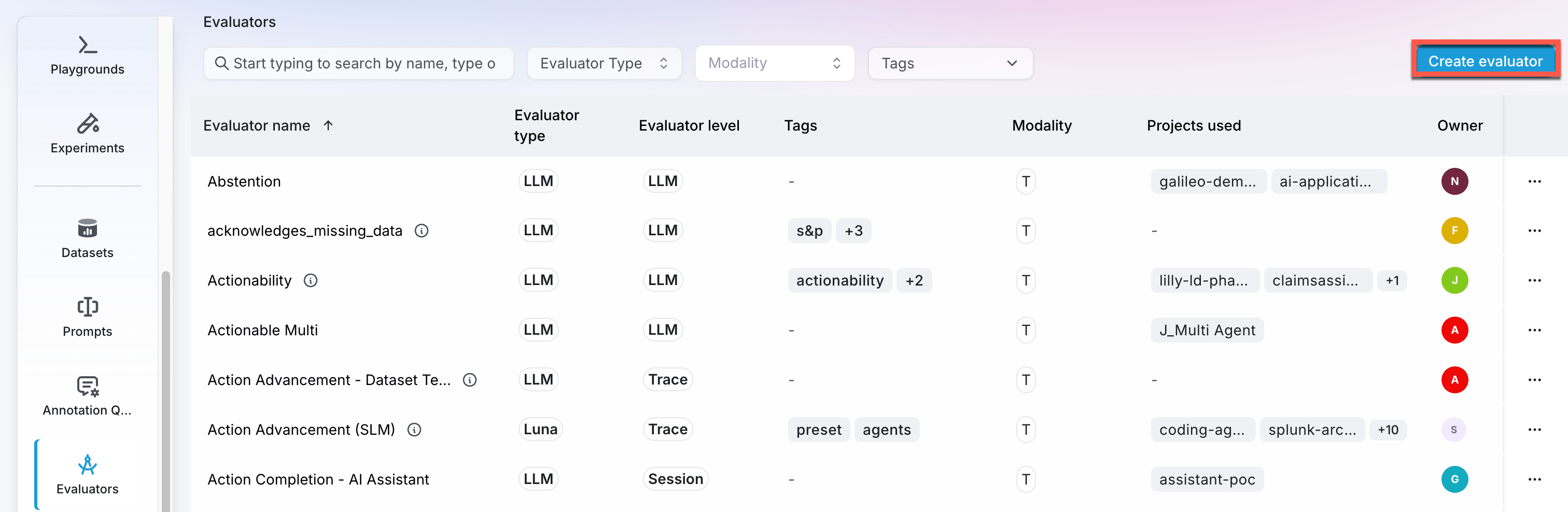
2
Select the Code evaluator type
From the dialog that appears, choose the Code-powered evaluator type. This option allows you to write custom Python code to evaluate your LLM outputs.
3
Write your custom evaluator
Select the step level you’d like to apply this evaluator to (ie: Sessions, Traces, LlmSpan, etc…). Then, use the code editor to write your custom evaluator. The editor provides a template with the required functions and helpful comments to guide you.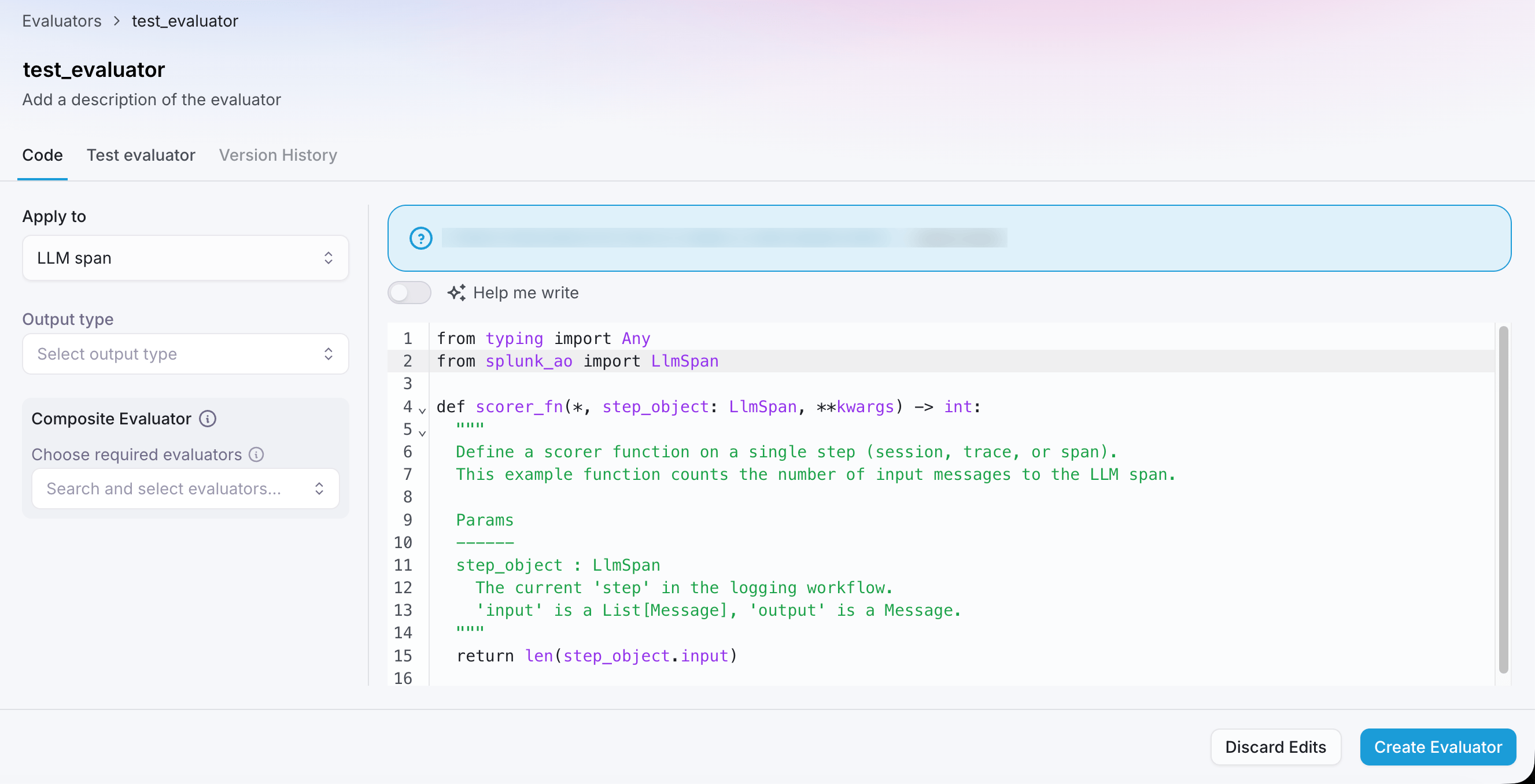
scorer_fn function as described below.You can optionally enable the Help me write toggle to use AI-assisted code generation. See AI-assisted code generation for a full walkthrough of this feature.4
Test your evaluator
Before saving, test the evaluator against real inputs and iterate on the code.
From the Test Evaluator tab you can test three ways: with manual input,
against your current logs, or against a labeled dataset
to measure how closely it matches your ground truth with a macro F1 score or RMSE.
See Test your evaluators for the
full walkthrough of each method and how the scores are calculated.
5
Save your evaluator
After writing your custom evaluator code, select the Save button in the bottom right corner of the code editor. Your evaluator will be validated. If there are no errors, the evaluator will be saved and become available for use across your organization.You can now select this evaluator when running evaluations.
AI-assisted code generation
Writing a scorer from scratch can be tricky, especially when you’re just getting started or when you’re migrating from another evaluation framework. The Help me write feature generates a working scorer function from a plain-English description — so you can go from idea to runnable evaluator in seconds.How to use it
1
Create a custom code-based evaluator
Follow steps 1-3 of Create a registered custom evaluator to start creating a custom code-based evaluator.
2
Enable Help me write
In the code editor, toggle on Help me write above the editor panel.
3
Describe your evaluator
In the prompt field, describe what you want the evaluator to do in natural language. Be as specific as you like — the more detail you provide, the better the generated code will match your intent. Optionally include examples of expected inputs and outputs for edge-case guidance.You can also paste in code from another evaluation framework (LangSmith, RAGAS, etc.) and the generator will convert it to a Splunk Agent Observability scorer automatically.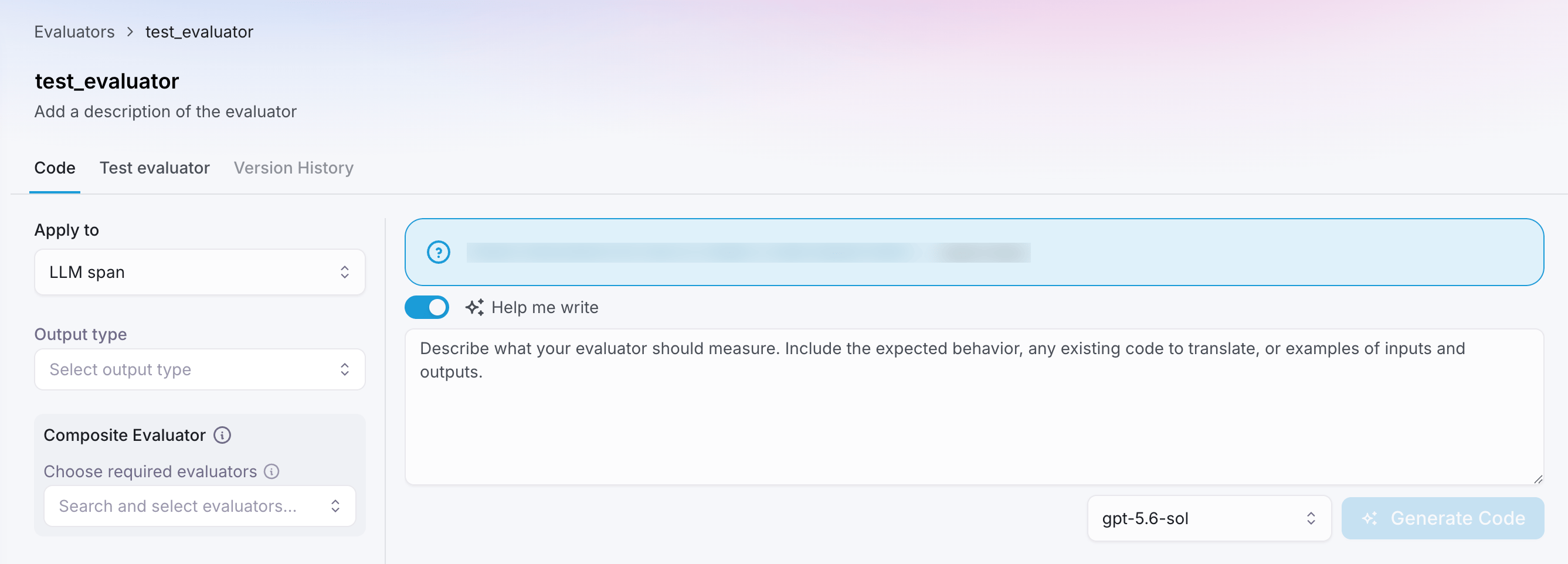
4
Choose a model
Select the model you want to use for code generation from the dropdown menu. Models recommended for code generation are highlighted.
5
Click Generate Code
Click Generate Code. The scorer function is written directly into the editor. Review it, adjust if needed, and proceed to test and save as normal.
AI-assisted generation is a one-shot tool — it creates a starting point rather than engaging in an iterative conversation. After generating, you can edit the code freely in the editor before saving.
Example prompts
Simple boolean check on an LLM span:The scorer function
This function evaluates individual responses and returns a score:**kwargs to ensure forward/backward compatibility. Here’s a complete example that measures the difference in length between the output and ground truth:
step_object: The step object represents the unit of your LLM application being evaluated. It can be one of several types from thesplunk-aolibrary:Session- A complete user session containing multiple tracesTrace- A single execution trace containing multiple spansWorkflowSpan- A workflow-level span containing child spansAgentSpan- An agent execution spanLlmSpan- A single LLM call spanRetrieverSpan- A retriever/search operation spanToolSpan- A tool execution span
- Input/Output data: Access the input prompt and generated output (e.g.,
step_object.output.contentfor LLM responses) - Metadata: Additional context like timestamps, model information, and custom metadata
- Dataset references: Ground truth or reference data when available (e.g.,
step_object.dataset_output) - Hierarchical data: For Session/Trace/Workflow objects, access child spans and nested execution data
Complete example: trace counter
Let’s create a custom evaluator that counts the number of traces in a Session:Creating composite evaluators
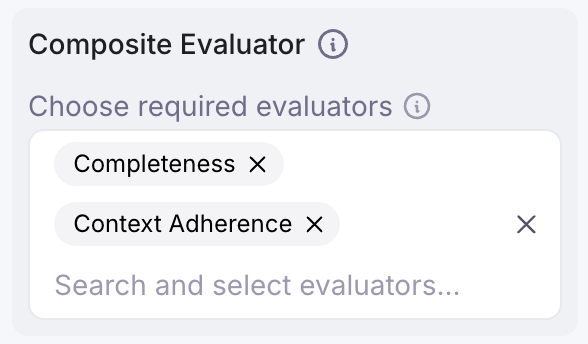
Composite evaluators are advanced custom evaluators that can access and leverage the results of other evaluators to perform sophisticated evaluations. This allows you to create conditional logic, aggregate multiple evaluators, or build hierarchical evaluations. To create a composite evaluator in the UI:-
When creating a code-based custom evaluator, use the Composite Evaluators
section to select which evaluators must be computed before your composite
evaluator runs
-
Access the required evaluator values in your scorer function via
step_object.metrics
Example: Conditional evaluation based on other evaluators
Referencing evaluators
- Splunk Agent Observability preset evaluators: Use the
SplunkAOEvaluatorsenum (e.g.,SplunkAOEvaluators.context_adherence) - Custom evaluators: Use the evaluator name as a string (e.g.,
step_object.metrics["My Custom Evaluator"])
Composite evaluators are only supported for code-based custom evaluators.
For a comprehensive guide including use cases and best practices, see the
Composite Evaluators
documentation.
Execution environment
Registered custom evaluators run in a sandbox Python 3.10 environment with only the Python standard library and the Splunk Agent Observability SDK installed. To install your own PyPI package, you can define dependencies at the top of the file using the script dependency format fromuv:
Local evaluators
A Local evaluator (or Local scorer) is a custom evaluator that you can attach to an experiment — just like a Splunk Agent Observability preset evaluator. The key difference is that a Local Evaluator lives in code on your machine, so you share it by sharing your code. Local Evaluators are ideal for running isolated tests and refining outcomes when you need more control than built-in evaluators offer. You can also use any library or custom Python code with your local evaluators, including calling out to LLMs or other APIs.Splunk Agent Observability currently only supports Local scorers in Python
Local scorer components
A Local scorer consists of three main parts:-
Scorer Function
Receives a single
SpanorTracecontaining the LLM input and output, and computes a score. The exact measurement is up to you — for example, you might measure the length of the output or rate it based on the presence/absence of specific words. -
LocalMetricConfig[type]A typed callable provided by Splunk Agent Observability’s Python SDK that combines your Scorer into a custom evaluator.- Example: If your Scorer returns
boolvalues, you would useLocalMetricConfig[bool](…).
- Example: If your Scorer returns
LocalMetricConfig, running the experiment is as simple as calling run_experiment. The results appear alongside Splunk Agent Observability’s built-in evaluators, so you can compare, visualize, and analyze everything in one place.
With local evaluators, you have full control over how you measure LLM behavior—unlocking deeper insights and more targeted evaluations for your AI applications.
Create a local evaluator
Learn how to create a local evaluator in Python to use in your experiments
Comparison: registered custom evaluators vs. local evaluators
Common use cases
Custom evaluators are ideal for:- Heuristic evaluation: Checking for specific patterns, keywords, or structural elements
- Model-guided evaluation: Using pre-trained models to detect entities or LLMs to grade outputs
- Business-specific evaluators: Measuring domain-specific quality indicators
- Comparative analysis: Comparing outputs against ground truth or reference data
Simple example: sentiment scorer
Here’s a simple custom evaluator that measures the sentiment of responses:- Counts positive and negative words in responses
- Calculates a sentiment score between -1 (negative) and 1 (positive)
- Aggregates results to show the distribution of positive, neutral, and negative responses
Next steps
Create custom LLM-as-a-judge evaluators
Learn how to create custom LLM-as-a-judge evaluators in the Splunk Agent Observability UI or in code.
LLM-as-a-Judge Prompt Engineering Guide
Learn best practices for prompt engineering with custom LLM-as-a-judge evaluators.
Evaluators overview
Explore Splunk Agent Observability’s comprehensive evaluators framework for evaluating and improving AI system performance across multiple dimensions.
Create a local evaluator
Learn how to create a local evaluator in Python to use in your experiments
Run experiments
Learn how to run experiments in Splunk Agent Observability using the Splunk Agent Observability SDKs and custom evaluators.